
A cut that lands in silence is easy to miss while you edit and easy to feel when you watch. A title card slides in, a screen recording jumps ahead, and nothing on the soundtrack marks the moment. Finding every one of those by ear means playing your edit back again and again.
Earshot, a free open-source tool by Leon Lin, hands that listening job to Claude Code. When we ran it on a 50-second vertical video of ours, it counted 45 visual moments (cuts and big changes on screen) and flagged 3 that had no sound at all, each with its exact time. It suggested a whoosh, a hit or a UI click for each, and it can render those sounds itself from a bank of 252 effects stored as code.
Below is the full setup from scratch, the prompt for each stage, how to read the answers and where the tool falls short.
Short answer: Install Claude Code, then paste one prompt that installs Earshot as an MCP server. Restart, give Claude your exported video and ask it to listen and add sound effects. Earshot reports which cuts have no sound and renders whooshes, hits and clicks to fill them, and Claude mixes them into a new copy of your file.
- Earshot is free under the MIT license. Claude Code needs a paid Claude plan, starting with Pro at $20 a month billed monthly or $17 a month billed annually.
- It runs on your computer's CPU, with no graphics card. The first listen downloads about 1.1 GB of models.
- You need Python 3.10 or newer, ffmpeg and Git. Claude Code can install them for you.
- It hears sounds, not words. It will not transcribe speech or judge what someone says.
How an AI can listen to your video
Claude Code can read every file in a project and write the code that edits a video, but on its own it cannot hear the result. Leon Lin wrote Earshot for that gap. His README gives two examples of what an agent misses: it cannot tell a cheap key press from a good one, and it cannot notice that a hit lands 80 milliseconds after the cut.
Earshot turns sound into text and numbers that Claude can read. It listens through two open models plus plain measurements:
- CLAP, from LAION, scores a sound against a few hundred written descriptions such as "rain on a window" and reports which ones stand out. It is Apache-2.0 licensed.
- AST, from MIT, tags sounds with AudioSet's list of sound labels. It is BSD-3-Clause licensed.
- The measurements need no model at all: loudness in LUFS, true peak, loudness range, tempo and key.
Earshot also looks at the video frames, so it can line sound events up against the cuts and tell Claude which cuts have nothing under them. It plugs into Claude Code as an MCP server. MCP, the Model Context Protocol, is the open standard Claude Code uses to connect outside tools, and in that mode Earshot keeps its models loaded between calls, so Claude can ask question after question without waiting for a reload.
It does not understand speech. It will not write captions, check what someone said or clean up a noisy voice. It is built for sound effects, music, ambience and the overall mix.
Before you start
| What you need | Why | Where to get it |
|---|---|---|
| A paid Claude plan | Claude Code comes with Pro, Max, Team and Enterprise plans, not with Free. | Claude pricing |
| Claude Code | The agent that runs Earshot and edits your file. | Claude Code quickstart |
| Python 3.10 or newer | Earshot is a Python package. | python.org, or ask Claude |
| ffmpeg and ffprobe | Earshot requires both on your PATH. ffmpeg is also the usual tool for mixing sounds into a video. | ffmpeg.org, or ask Claude |
| Git | The install copies Earshot's code from GitHub. | git-scm.com, or ask Claude |
| About 1.1 GB of disk | For the two models, downloaded once and cached. | |
| Two test files | One short sound, and one video exported with its final audio. | Your own, or Wikimedia Commons |
Most of the first setup is downloads. After that, Earshot's own tests put a 60 to 90 second video at about 1.5 minutes of listening on a laptop CPU.
Step 1: Install Claude Code
Already use Claude Code? Skip to step 2.
- Open a terminal: the Terminal app on a Mac, or PowerShell from the Start menu on Windows.
- Run the installer. On macOS or Linux:
curl -fsSL https://claude.ai/install.sh | bash. In Windows PowerShell:irm https://claude.ai/install.ps1 | iex. It shows no progress while it downloads, so let it finish. - Open a new terminal window and run
claude --version. You should see a version number followed by "(Claude Code)". Ifclaudeis not found, the install folder is not on your PATH yet, and Anthropic's install troubleshooting page has the fix. - Make a folder such as
sound-test, copy your test files into it, move into it withcd sound-testand typeclaude. - Log in through the browser prompt with your Claude account. You only do this once.
On Windows, Anthropic recommends Git for Windows, which Earshot needs anyway.
Step 2: Install Earshot with one prompt
Inside Claude Code, paste this prompt and press Enter:
Install this and add it to Claude Code as an MCP server. Install Python and ffmpeg too if I don't have them.
https://github.com/Leonxlnx/earshotPrefer a one-click copy? The same prompt is on our free prompt page.
What Claude does next, so you know what you are approving:
- It works out the install steps from Earshot's README and asks your permission before each command. Read each one, then approve it.
- If Python or ffmpeg is missing, it installs them first.
- It copies Earshot from GitHub into a private Python environment (a venv), so Earshot cannot clash with other Python tools on your computer, then installs the CPU version of PyTorch and Earshot with its MCP extra.
- It runs
earshot doctor --load, which checks the install, models, data files and CPU settings. - It registers Earshot with
claude mcp add earshot --scope user. The--scope userpart makes Earshot available in every project on your computer instead of only the current one.
If the install stops with an error, paste the error back to Claude and ask it to fix it. Check two things first: a Python older than 3.10, and ffmpeg installed but not on your PATH.
The same install by hand
The commands from Earshot's README, for when you want to see where it broke. On Windows, use .venv/Scripts/python in place of .venv/bin/python, and put your real folder in place of /path/to/earshot.
git clone https://github.com/Leonxlnx/earshot && cd earshot
python -m venv .venv
.venv/bin/python -m pip install torch --index-url https://download.pytorch.org/whl/cpu
.venv/bin/python -m pip install -e ".[mcp]"
.venv/bin/python -m earshot doctor --load
claude mcp add earshot --scope user -e EARSHOT_THREADS=3 -- /path/to/earshot/.venv/bin/python -m earshot mcpEARSHOT_THREADS=3 caps how many CPU threads Earshot uses. Without it, Earshot uses the smaller of 4 threads or half your cores.
Step 3: Restart Claude Code and check the connection
- Type
/exitto close Claude Code. It loads MCP servers when it starts, so Earshot will not work in the session that installed it. - Start it again in the same folder with
claude, then type/mcp. You should seeearshotlisted as connected, with the number of tools it offers. - If it is missing, exit and run
claude mcp listin the terminal. Not listed means the registration never ran, so ask Claude to run it again. Listed but failing means the path is wrong: runclaude mcp get earshotand check that the Python path it shows exists. - On a slow computer, Earshot can take longer to start than Claude Code waits. Start Claude Code with
MCP_TIMEOUT=60000 claudeon a Mac or Linux, or$env:MCP_TIMEOUT=60000; claudein Windows PowerShell. That is 60 seconds.
Optional: ask Claude to run earshot doctor --fetch now. It downloads both models up front, so your first listen does not sit waiting on 1.1 GB.
Step 4: Test it on one sound
Try one short sound first, so you see what the answers look like and the model download is done before the real job.
- Put a short audio file in your folder. Wikimedia Commons has public domain and CC0 recordings. We tested with a rain clip, a round of applause and a man breathing from there.
- Type this in Claude Code. The
@points Claude at a file in your folder.@rain.wav what do you hear? - Give the first call a few minutes, since it loads the models (and downloads them if you skipped the doctor step). Later calls in the same session come back fast.
- Claude answers in plain words. On our 6-second rain clip, the top reading was "rain on a window" at z +4.1, then "rain on a roof" at z +3.3, plus the clip's peak level, loudness and brightness.
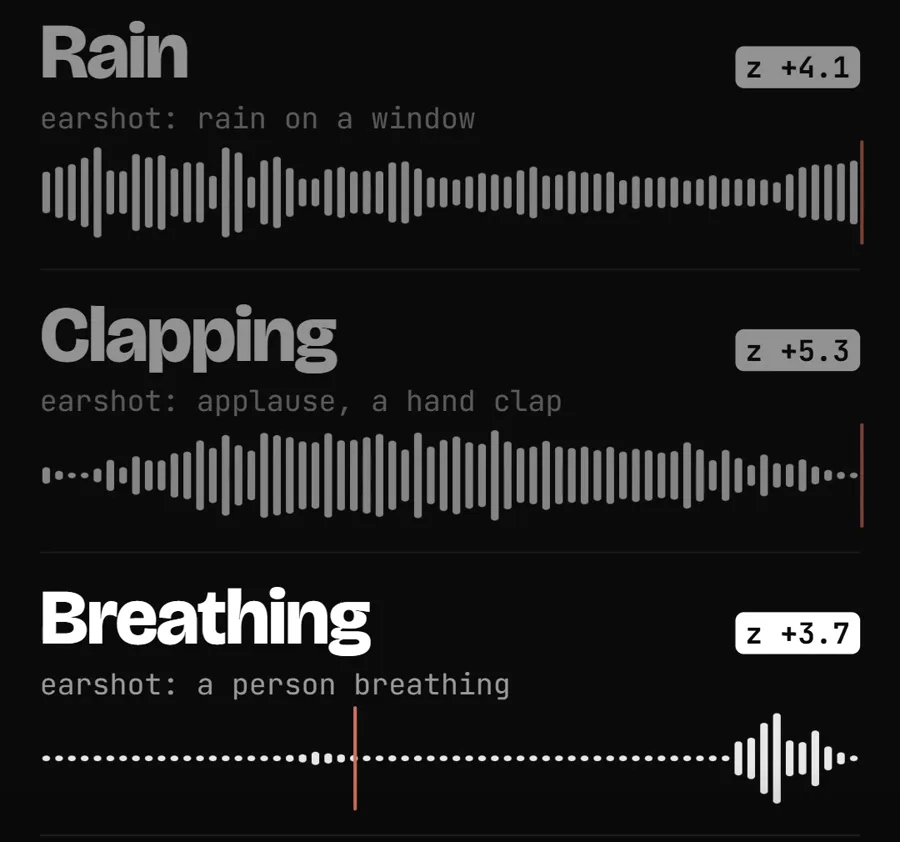
Watch the z number. It says how far a description stands out from the few hundred others Earshot scored on the same sound. Earshot's guide reads it like this: 3 or more is a strong match, 2.5 to 3 plausible, 2 to 2.5 weak, under 2 no match.
Our applause clip scored z +5.3 for "applause". The breathing clip scored z +3.7 for "a person breathing", which Earshot marked as an unvalidated hint because voice sounds sit outside its calibration. The hint was right. For a borderline reading, Earshot's guide says to try two or three wordings and trust only the answer that holds up.
Step 5: Find the silent cuts in your video
- Export your edit with its final audio: voice, music and any effects you already have. Earshot judges what is in the file, so an export with no music gets scored as having no music.
- Ask Claude to listen. This prompt does the whole job in one go:
To get the report before anything changes, ask the narrower question:@reel.mp4 edit my reel. Listen to it and add sound effects.@reel.mp4 listen to my video and tell me which cuts have no sound. - Read the report: every cut with nothing under it, with its time. A cut counts as silent when no sound starts within 100 milliseconds of it, no whoosh or riser peaks within 300 milliseconds and the level does not jump within 150 milliseconds.
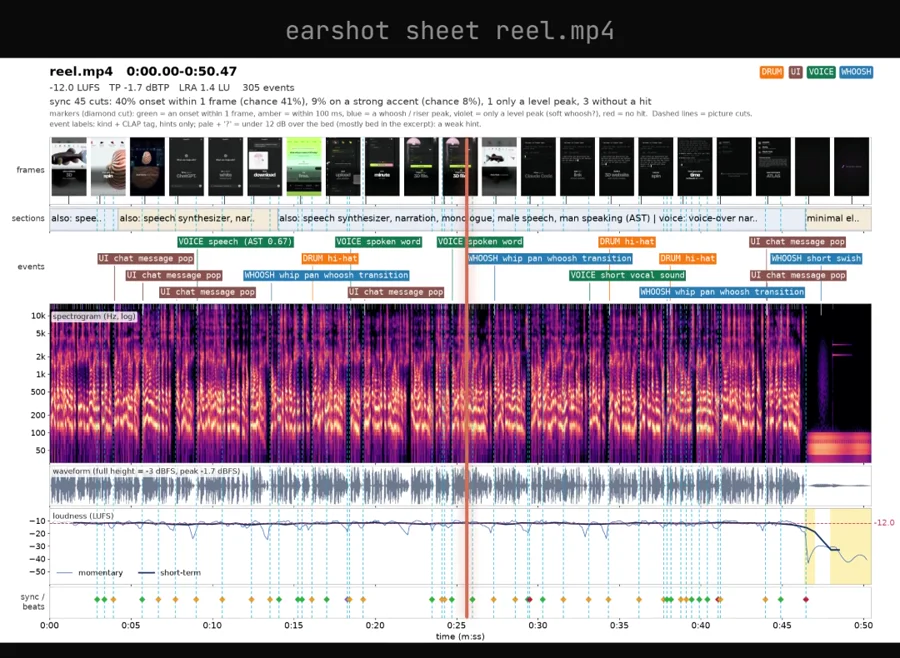
- To see it yourself, say "Make an Earshot sheet of my video and look at it." The sheet is one image with video frames, labelled sound events, a spectrogram, loudness and sync markers.
On our 50-second test video, Earshot flagged 3 of 45 visual events with no sound, all in the second half. It advised a whoosh into the cut, a hit or a UI click for the ones that matter, or keeping one silent on purpose as a stop-down.
The scorecard, and how to read it
Ask for a critique and Earshot scores the whole mix against a profile of 7 professional launch films, with fixes in order of importance. Our test video got "needs work", with 18 of 23 metrics in range. The critical flag was no music at all, which we expected, because we add music inside the Instagram app and the exported file had none. The rest was useful:
- The final moment sat 17.7 LU below the rest of the video, after a 4-second fade. Earshot suggested ending on a logo sting or a hit at the last visual event instead.
- The mix was nearly mono. It advised stereo music and ambience, with effects panned to follow the motion on screen.
- A voice ran through 90% of the video, so it advised ducking music 3 to 6 dB under the voice and keeping effects out of the 1 to 4 kHz range while someone speaks.
Read the verdict as advice for one style. All 7 reference films have music in at least two thirds of their 5-second windows, so a talking-head clip, or a video that gets its music later, loses points there no matter what. Earshot rates itself most reliable on loudness, timing and sync, so weigh those findings highest.
Step 6: Make the sound effects and mix them in
Earshot's bank holds 252 sound effects stored as code: whooshes, swishes, hits, sub drops, clicks, taps, pops, dings, risers, glitches, camera shutters and short musical notes. None is a recording, so each renders on your computer with no models and no internet. On the author's laptop, a whoosh aimed at an exact moment takes about 1.9 seconds. The first render after an install is slower, 25 to 45 seconds, while parts of it compile.
- Ask for one sound to hear it:
Claude picks a sound from the bank and renders a WAV file into your folder. Ours came from the bank's fast, crisp whoosh family.make me a whoosh sound - Aim it at the cut.
dursets the exact length,apexputs a whoosh's loudest point within 5 milliseconds of the time you choose, andpitchtunes a note. Plain words work: "make a 0.8 second whoosh that peaks 0.3 seconds in." - Ask Claude to place the sounds. Earshot finds the gaps and makes the sounds, and Claude mixes them in as a separate step. Ask for a new file so your original stays safe.
- Ask Claude to listen to the new file and confirm the silent cuts are covered and the voice still sits on top.
This prompt runs steps 2 to 4 in one go:
Use Earshot to find every cut in @reel.mp4 that has no sound. For each one, render a short whoosh or hit from the Earshot bank and place it so its loudest point lands just after the cut. Keep every effect quieter than my voice. Save the result as reel-sfx.mp4, keep the original untouched, then listen to the new file and tell me if any cut is still silent.Why "just after the cut": Earshot's launch preset, built from measurements of professional sound effects, puts a whoosh's peak a median of 37 milliseconds after the cut, while taps and clicks land slightly before it. In our test we mixed the whoosh so it peaked in the brief gap between two spoken words, under the voice.
Making a series? Ask Claude for an Earshot kit: one sound per role (tick, hit, short whoosh, key, bell), rendered with measured start, peak and end points, so every episode sounds alike. Presets: calm (the default, for text-led films), crisp, minimal and launch (for films cut to music).
More things to ask once it is installed
You do not need the command names. Claude picks the right one.
| What you want | What to say | Earshot command |
|---|---|---|
| Check the loudness | "Measure the loudness of final.mp4." | measure: LUFS, true peak, loudness range |
| Pick the best download | "Rank these five files by how well they match a fast crisp air whoosh." | rank |
| Trim the best moment | "Find the cleanest single key press in typing.wav and trim it." | find: start and end times |
| Compare two mixes | "Compare mix-a.wav and mix-b.wav and tell me what changed." | ab |
What it costs
| Item | Cost | Notes |
|---|---|---|
| Earshot | Free | MIT license. Code only, no audio stored in the repo. |
| Claude Code | From $20 a month | In every paid Claude plan, not in Free. Pro is $17 a month on annual billing. Max starts at $100 a month. |
| Python, ffmpeg, Git | Free | Claude can install all three. |
| Disk and hardware | About 1.1 GB | CPU only, no graphics card used. |
Limits, privacy and fixes
- It cannot judge taste, emotion, speech content or licenses, and its models hear nothing above 14 kHz.
- Trust it most on loudness, timing, sync and picking between candidate files. Its tags for events buried in a busy mix, music genre and mood are hints only.
- The realness check is evidence, not proof. In Earshot's held-out test, its firm verdicts called 6.7% of real clips synthesized, and the README warns the realness model is easy to fool.
- It is new and marked alpha, with three releases between October 15 and October 22, 2026, so commands may change.
- Everything runs on your computer. After the first download it loads the models from its local cache and does not contact the model hub again. One optional command uploads your audio to an outside cloud service. Nothing here needs it, so skip it.
| Problem | Fix |
|---|---|
| The install fails on Python | Earshot needs 3.10 or newer. Ask Claude to install a newer Python and rebuild the venv with it. |
| ffmpeg is "not found" | It has to be on your PATH. Open a new terminal after installing it, then start Claude Code again. |
| Command-line calls are slow | Each one loads the models first, about 20 to 40 seconds. Through Claude Code's MCP connection they stay loaded. |
| A tag looks wrong | Ask about a single exposed sound instead of a busy mix, or rephrase the description two or three ways. |
Other ways to get sound effects
Earshot's bank covers motion-graphics sounds. For a real door slam or a crowd, you need recordings or a generator, and Earshot can still rank your downloads and trim the best moment.
| Option | What it is | Pick it when |
|---|---|---|
| ElevenLabs Sound Effects | Makes a sound effect from a text description, up to 30 seconds per clip. The free plan is for personal use only, and paid plans allow royalty-free commercial use. | You need one specific sound that no library has. |
| Freesound | A community library of over 737,000 sounds, run from Universitat Pompeu Fabra. Each uploader picks CC0, CC BY or CC BY-NC. Downloads need a free account. | You want real recordings. CC BY needs credit, and CC BY-NC rules out ads and client work. |
| Wikimedia Commons | A free media library with many public domain and CC0 audio files. | You want clips with no strings attached. Our three test clips came from here. |
Who this is not for
If you have never opened a terminal, learn Claude Code on its own first, because Earshot stays a bit technical even when Claude does the install. If your problem is speech, Earshot is the wrong tool: it will not clean up or transcribe a voice track. And a talking head with a song added in the app may have no gaps for it to find.
It fits best on videos with motion: screen recordings, product demos, animated explainers and short-form edits with lots of cuts, where a silent cut slips through easily. If you want help building that kind of AI editing workflow for your team, that is the work we do in AI-enhanced automations.
Frequently asked questions
Can Claude Code hear audio files?
Not by itself. Leon Lin built Earshot because coding agents could write the code for a video but could not hear the result. With Earshot added as an MCP server, Claude gets each sound described in words and numbers: what it is, how loud it is and when it happens.
Is Earshot free?
Yes. Earshot is open source under the MIT license. Claude Code itself comes with every paid Claude plan, starting with Pro at $20 a month billed monthly, or $17 a month billed annually.
Does Earshot transcribe speech?
No. Its README says it cannot judge speech content. For captions you still need a transcription tool. Earshot is for sound effects, music, ambience and the overall mix.
Do I need a graphics card to run Earshot?
No. It runs on the CPU only and uses up to 4 threads by default. The first run downloads about 1.1 GB of models, and later runs load them from your disk.
Can Earshot put the sound effects into my video by itself?
Earshot listens, tells Claude which cuts have no sound and renders sound effects from its bank of 252 with measured sync points. Mixing those sounds into your video file is a step you ask Claude Code to do in the same edit, ideally into a new copy of the file.
Is my audio uploaded anywhere?
Earshot runs on your computer. After the first model download it loads the models from its local cache and does not contact the model hub again. One optional command uploads audio to an outside cloud service. You do not need it, so skip it.
Sources
- Earshot on GitHub (README, install, limits, license)
- Earshot agent skill: how to read its numbers
- Earshot sound bank, knobs, kits and render times
- Earshot limits
- Claude Code quickstart
- Claude Code docs: connect Claude Code to tools via MCP
- Claude pricing
- CLAP model by LAION on Hugging Face
- AST AudioSet model by MIT on Hugging Face
- ElevenLabs Sound Effects
- Freesound FAQ (licenses and downloads)