

When we pointed a Playwright browser at a small demo bakery website, it took a screenshot of each section and clicked every button. Two buttons worked. The third, "Order for pickup", did nothing, and the page logged the reason: openOrderForm is not defined.
That is the kind of bug you only find by clicking. When Claude Code builds you a website, it writes the code and tells you it is done. Whether the order button works is something you may only learn when a customer tries it.
Four free plugins close that gap. One makes Claude ask what you want and plan before it builds. One pushes the design away from the generic AI look. One gives Claude a real browser to test the result. The last one scans the code for security holes. This guide covers what you need, how to install all four with one prompt, and how to use each one step by step, with no coding.
Short answer: install four plugins from Anthropic's official Claude Code marketplace: Superpowers (plans and reviews its own work), Frontend Design (better design), Playwright (tests your site in a real browser) and Claude Security (finds security holes). Then ask Claude to build, say "test my website", and finish with "run a security scan".
- All four plugins are free. Claude Code itself needs a paid Claude plan, from $20 a month.
- Playwright needs Node.js 18 or newer. Claude Security needs Python 3.9 or newer. Claude can install both for you.
- Two plugins are made by Anthropic, one by Microsoft and one by Jesse Vincent and his company Prime Radiant.
- Plugins load in Claude Code on your own computer, in the desktop app or the terminal. Cloud sessions in the browser do not load them.
Why AI-built websites break in ways you do not see
A chat model is good at producing code that looks finished. The trouble sits in four places a non-developer rarely checks:
- It starts building before it knows what you need, so you get a polished version of the wrong thing.
- The design falls back on the same safe choices, which is why so many AI-made sites look alike.
- Nobody clicks every button on every screen size before you share the link.
- Secrets such as API keys can end up written into files that anyone can read.
Each plugin below covers one of these. None of them asks you to read code. You talk to Claude in plain English, as you do now.
What a Claude Code plugin is
A plugin is a package that adds skills, agents, hooks or MCP servers to Claude Code. A skill is a set of instructions Claude follows for a type of task. An MCP server connects Claude to an outside tool, such as a browser. You do not have to call any of these by name: once a plugin is installed, Claude picks the right skill from what you ask.
Plugins install from a marketplace, which is a catalog. Claude Code adds Anthropic's official marketplace for you the first time you start it in a terminal. On October 27, 2026 that catalog listed 315 plugins, and all four in this guide are in it. Plugins from the official marketplace update themselves by default.
The four plugins at a glance
| Plugin | Made by | What it does | What you say |
|---|---|---|---|
| Superpowers | Jesse Vincent and Prime Radiant | Asks questions, writes a plan, builds in small tested steps, reviews its own work | "build me a landing page for my bakery" |
| Frontend Design | Anthropic | Makes bolder choices in type, color and motion so the site does not look generic | "redesign my homepage" |
| Playwright | Microsoft | Opens your site in a real browser, clicks, fills forms and takes screenshots | "test my website" |
| Claude Security | Anthropic | Scans your code with a team of agents and writes a report of verified findings | "run a security scan" |
Before you start
- A paid Claude plan. Claude Code is in every paid plan but not the Free plan. Pro is $20 a month, or $17 a month billed annually. See Claude pricing.
- Claude Code on your computer. The easiest route is the Claude desktop app: sign in and click the Code tab. If you prefer a terminal, the quickstart has a one-line installer for Mac, Linux and Windows.
- A project folder. Make an empty folder for the new site, or use the folder your current site lives in. Claude works inside the folder you choose.
- Node.js 18 or newer for Playwright, and Python 3.9 or newer for Claude Security. The install prompt below tells Claude to add them if they are missing, so you can skip this unless you want to do it yourself from nodejs.org and python.org.
- Git, which Superpowers uses to keep its work on a separate branch. Most Macs have it. On Windows, Anthropic recommends installing Git for Windows.
Stage 1: install all four with one prompt
- Open Claude Code. In the desktop app, click the Code tab, use the folder control next to the environment selector to pick your project folder, and keep the environment on Local. In a terminal, go to your project folder and type
claude. - Paste the prompt below and press Enter.
- Approve what Claude asks to run. Depending on your permission settings, Claude asks before it runs install commands, such as the ones for Node or Python. Read each request and say yes to the ones that match the prompt. Expect it to take longer if Node or Python has to be downloaded first.
- Restart Claude Code. Close it and open it again so the new plugins load. In a terminal you can also type
/reload-plugins. - Check that they are there. Type
/pluginand open the Installed tab, or type/and look for skills listed under each plugin's name. In a terminal,claude plugin listprints the same list.
Install these four Claude Code plugins for me, one by one. If Node or Python is missing, install that too. When you are done, tell me to restart Claude Code.
1. https://github.com/obra/superpowers
2. https://github.com/anthropics/claude-plugins-official/tree/main/plugins/frontend-design
3. https://github.com/microsoft/playwright-mcp
4. https://github.com/anthropics/claude-plugins-official/tree/main/plugins/claude-securityPrefer a one-click copy? The same prompt is on our free prompt page.
The manual way, if you prefer
All four are in Anthropic's official marketplace, so you can install each one yourself. In a terminal session, run these one at a time:
/plugin install superpowers@claude-plugins-official
/plugin install frontend-design@claude-plugins-official
/plugin install playwright@claude-plugins-official
/plugin install claude-security@claude-plugins-officialEach command opens the plugin's details first. The pane lists what the plugin will install and, for official plugins, two context estimates: "Every turn" is what it adds to each message you send, and "When invoked" is what its skills add once Claude loads them. Then you pick a scope:
- Install for you: the plugin works in every project on this computer. This is the one most people want.
- Install for all collaborators on this repository: it is turned on for everyone who works in this project.
- Install for you, in this repo only: it works for you in this one project.
The summary at the end tells you whether the plugin is active or whether to run /reload-plugins. In the desktop app, the same thing is a few clicks: press the + button next to the prompt box, choose Add plugins (or Plugins, then Browse plugins), find the plugin and pick a scope.
Stage 2: plan the job with Superpowers
Superpowers is by Jesse Vincent (obra on GitHub) and the team at Prime Radiant. It is MIT licensed, had more than 305,000 GitHub stars on October 27, 2026, and its latest release is version 7.0.1 from October 21, 2026. Its job is to stop Claude from jumping straight into code.
- Ask for what you want in one sentence, such as
build me a landing page for my bakery. You do not need to name the plugin. - Answer the questions. Its brainstorming skill steps back and asks what you are really trying to do, then plays its understanding back to you so you can correct it. Answer in plain words: who the page is for, what they should do on it, what you already have (logo, photos, menu, prices).
- Approve the design. Small changes get agreed in chat. Bigger projects get a short written design document, shown in pieces you can read. Ask for changes until it matches what you want, then say yes.
- Let it set up a separate workspace. After you approve, it creates a new git branch for the work, so your main copy stays untouched until you choose to keep the result.
- Read the plan. It splits the job into small tasks of roughly 2 to 5 minutes each. It may ask whether to run them with subagents, which its README calls the most thorough option, or inline in the same session, which it calls the cheapest. If your plan has usage limits you are close to, pick inline.
- Watch it build. During the work it writes tests first and reviews each task against the plan before moving on, reporting any issues by severity.
- Choose how to finish. When the tasks are done, it checks the tests and offers to merge the branch, open a pull request, keep it as it is, or discard it. If you are not sure, ask it to merge into your main copy.
If it skips the questions, say "brainstorm this with me before you build anything". If the process feels heavy for a tiny edit, say so; a one-line text change does not need a design document.
Stage 3: make it look designed with Frontend Design
Frontend Design is made by Anthropic. Its README lists two Anthropic authors, Prithvi Rajasekaran and Alexander Bricken, and says it builds interfaces that avoid generic AI aesthetics, with bold choices in typography, color palettes and animation. Claude uses it on its own whenever the task is frontend work.
- Give it real material. Before you ask for a page, tell Claude your brand colors, any fonts you use, and two or three sites whose feel you like. The plugin makes choices; your details point those choices at your brand.
- Ask as normal:
redesign my homepageorbuild the menu page. - Open the result in your browser. If Claude does not say which file or local address to open, ask it.
- React in plain words: "warmer", "less busy", "the headline is too small on my phone". Specific feedback gets better second drafts than "make it nicer".
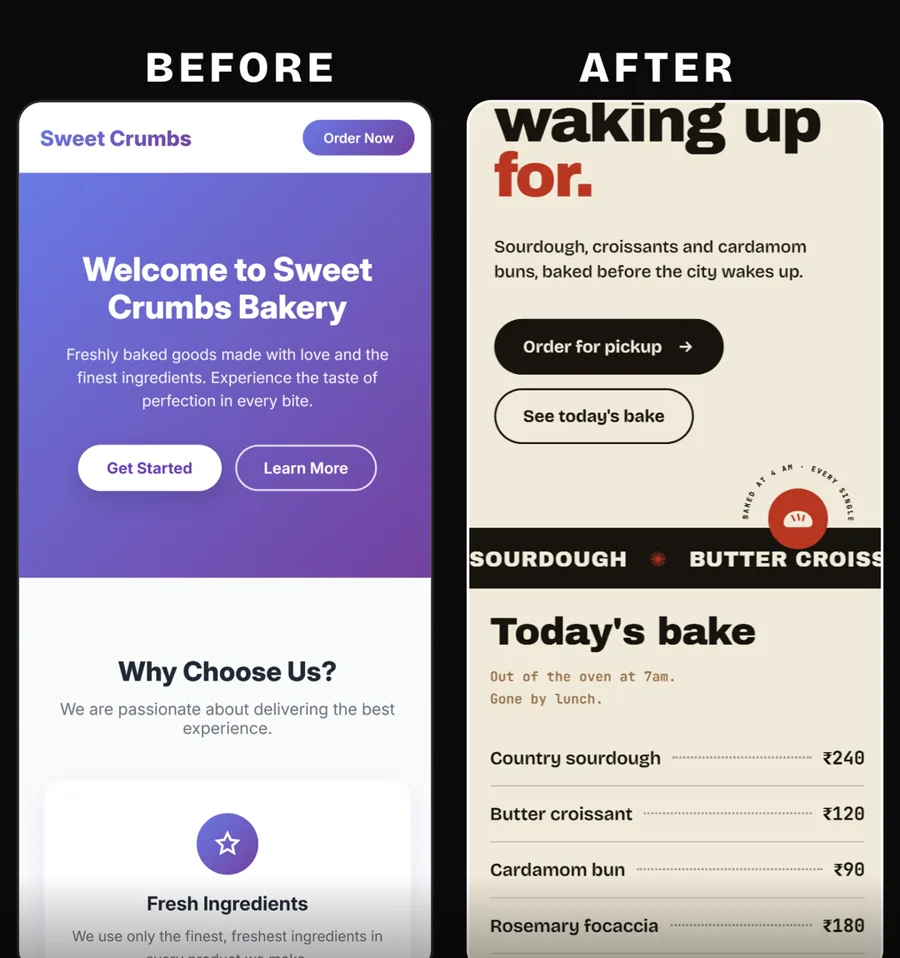
If you want the ideas behind it, Anthropic's frontend aesthetics cookbook explains the prompting approach.
Stage 4: test it in a real browser with Playwright
Playwright MCP is made by Microsoft and licensed Apache-2.0. Its latest version on October 27, 2026 was 0.0.83. It gives Claude a browser it can drive: open a page, click, fill in forms, take screenshots and read the page's error messages. It reads the page's structure, its accessibility tree, instead of guessing from pixels.
- Make sure your site is open somewhere Claude can reach: a live address, or the local preview Claude gave you in stage 3.
- Say
test my website. By default Playwright opens a visible browser window, so you can watch. Leave it alone while Claude works. - Read the report. Claude lists what it opened, what it clicked and what failed, often with the error text from the page.
- Ask it to fix what failed and test again. Repeat until the report is clean.
- Test the phone view. Ask
test my website at phone size too. Playwright can resize the browser window, and it can also emulate a device such as an iPhone 15 when set up that way.
Our own run shows what a report looks like. In a fresh headless browser, Playwright opened the demo bakery page, took screenshots of the hero, the menu and the visit section, then clicked the three buttons. "See today's bake" and the directions button worked. "Order for pickup" did nothing and logged openOrderForm is not defined.
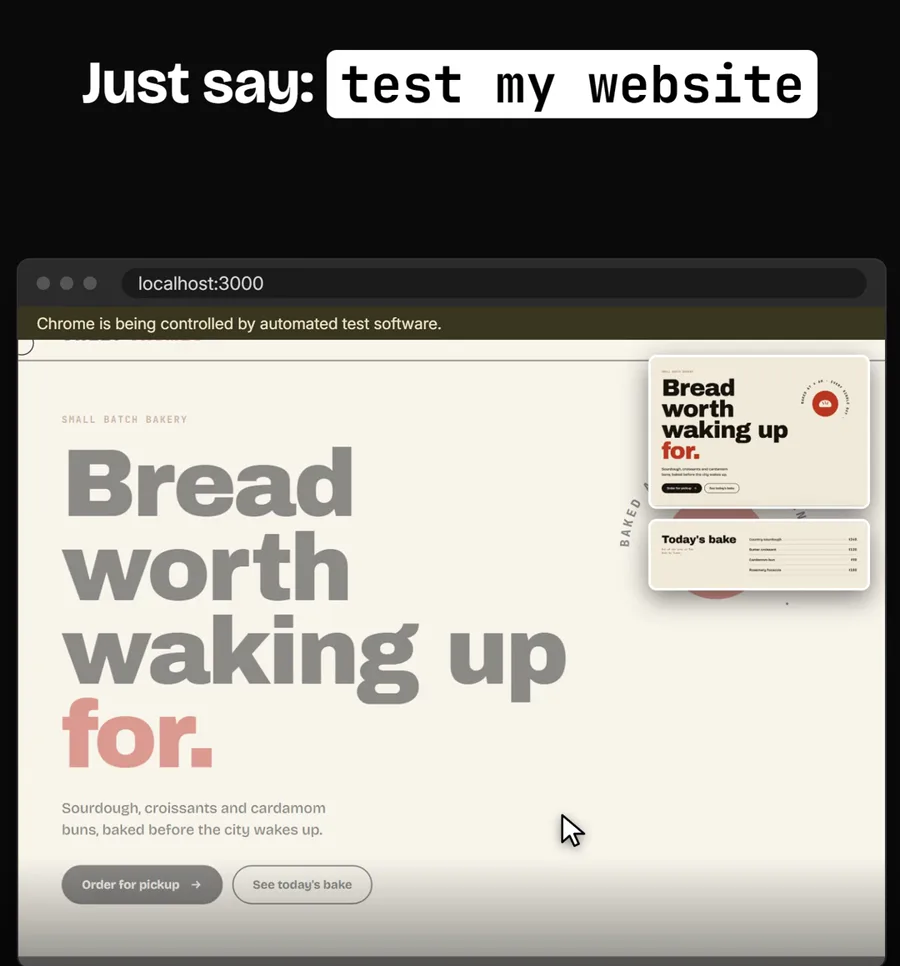
One thing to know: Playwright keeps its own browser profile between sessions, so if you log in to a site in that window, it stays logged in next time. Use a test account, not your admin login, when Claude tests pages behind a sign-in.
Stage 5: scan for security holes with Claude Security
Claude Security is made by Anthropic and is in beta for all Claude Code users. It is the in-session version of Claude Security, Anthropic's hosted product for Enterprise customers.
- Say
run a security scan, or type/claude-securityfor its menu. The menu offers three jobs: scan the whole codebase (or part of it), scan only your recent changes, or suggest patches for an existing report. - Pick the scope and effort. A typed request can include both, such as "run a Claude Security scan on the whole repo at medium". Effort levels include medium and high.
- Confirm the cost. The scan asks you once to confirm its time and token cost before it starts.
- Wait while it works. A team of agents maps how the app fits together, builds a threat model, hunts for problems and then tries to disprove each finding. Only findings that survive reach the report. It skips installed third-party code such as
node_modulesunless you point it there. - Open the report. It lands in a new folder named
CLAUDE-SECURITY-plus a timestamp, inside your project. OpenCLAUDE-SECURITY-RESULTS.md. Each finding is rated CRITICAL, HIGH, MEDIUM or LOW, with a recommended fix. Read CRITICAL and HIGH first. - Ask for fixes. Say "suggest patches for the HIGH findings". It writes one patch file per finding in a
patchesfolder, with a note beside each, and it never applies them for you. Ask Claude to explain a patch in plain words, then tell it to apply the ones you agree with. - Scan again after big changes, and before you share the link.
Anthropic recommends Claude Opus 5.5 or Fable 5.1 for scans; you can switch models with /model. The report tries to replace any passwords or keys it quotes with [REDACTED], but the README calls that a best effort, so look over the files before you share them.
A routine for every website job
- Ask in one sentence and answer Superpowers' questions.
- Give brand details and let Frontend Design shape the look.
- Say "test my website", fix, and test again until it is clean, including phone size.
- Say "run a security scan" before the link goes to anyone, and deal with CRITICAL and HIGH findings first.
What it costs and what you need
| Item | Cost | Notes |
|---|---|---|
| The four plugins | Free | Superpowers is MIT; Playwright MCP and the official marketplace are Apache-2.0. |
| Claude Code | From $20 a month | In every paid Claude plan, not Free. Pro is $17 a month billed annually; Max starts at $100 a month. |
| Node.js 18 or newer | Free | Needed for Playwright. |
| Python 3.9 or newer | Free | Needed for Claude Security. |
| Usage | Your plan's limits | Long Superpowers builds and security scans use more of your plan than a quick chat. |
Limits and gotchas
- Plugins cost context. Each one adds text to every message, plus more when its skills load. In a terminal,
claude plugin detailsfollowed by the plugin name shows how many tokens it adds to every session. The Installed tab also groups plugins you have not used recently, so you can turn them off. - Cloud sessions do not load them. Claude Code in the browser at claude.ai/code has no plugin browser and does not load the plugins on your computer. Use the desktop app or the terminal.
- Superpowers runs a full software process: plans, tests first and reviews between tasks. For a quick text change that can feel heavy. Its optional visual feature loads one logo from its maker's site to count which versions are in use; set
SUPERPOWERS_DISABLE_TELEMETRYto turn that off. - Playwright has a lighter sibling. Microsoft's README says coding agents may do better with Playwright CLI plus skills, because it uses fewer tokens. The MCP version suits longer, exploratory testing.
- Security scans vary. Anthropic says two scans of the same code can find different things, and that the plugin complements code review and other security tools rather than replacing them.
- Claude Security is meant for your own code. It runs with your permissions and adds no isolation. For a repository you do not trust, Anthropic suggests running the session inside its sandbox tool.
- The official marketplace README warns that Anthropic does not control the MCP servers or files inside third-party plugins. Superpowers and Playwright come from outside Anthropic, so read the details pane before you install.
Troubleshooting
- A plugin does not show up after install: run
/reload-plugins, or restart Claude Code. If it still fails, open/pluginand check the Errors tab for the reason. - Claude says the marketplace was not found: run
/plugin marketplace add anthropics/claude-plugins-official, then install again. - Playwright fails to start: this usually means Node.js is missing or older than 18. Ask Claude to "install Node for me", then restart Claude Code.
- The security scan will not start: Python 3.9 or newer has to be on your PATH. Ask Claude to install it and check with
python3 --version(orpython --versionon Windows). - The terminal says
claudeis not found after installing: open a new terminal window. If that does not help, the install folder is not on your PATH yet, and the quickstart's troubleshooting page covers the fix.
Who this is not for
If you only use Claude in the chat window to write emails or posts, plugins will not change much for you. They matter once Claude Code is building things you put in front of customers: a landing page, a booking form, a small internal tool.
A security scan is also no substitute for a professional review when you handle payments or health data. Use it to catch the obvious holes early, then get a person to check what matters most. If you want a team to build and check AI workflows like this for your business, that is the work we do in AI-enhanced automations.
Frequently asked questions
Do Claude Code plugins cost money?
The four in this guide are free. You need a paid Claude plan to use Claude Code, starting with Pro at $20 a month billed monthly. Long builds and security scans use more of your plan's limits than a quick chat.
Do I need to know how to code to use these plugins?
No. You install them with one prompt and use them by asking in plain English, such as "test my website" or "run a security scan". Claude reads and changes the code; you read its questions, plans and reports.
Can Claude Code test my website by itself?
With the Playwright plugin, yes. It gives Claude a real browser it can drive, so it can open your pages, click buttons, fill in forms, take screenshots and read the page's error messages. You can then ask it to fix what it found and test again.
Is Claude Security a replacement for a security audit?
No. Anthropic says two scans of the same code can find different things and that the plugin complements code review and other security tools. Use it to catch problems early, and get a professional review for anything that handles payments or sensitive data.
Do these plugins work in Claude Code on the web?
No. A cloud session, including Claude Code in the browser at claude.ai/code, has no plugin browser and does not load the plugins installed on your computer. Use the Claude desktop app's Code tab, the terminal, or the VS Code extension.
How do I remove a plugin I no longer use?
Type /plugin in Claude Code, open the Installed tab and choose Disable or Uninstall. From your shell, claude plugin uninstall followed by the plugin name does the same.
Sources
- Superpowers on GitHub (README, license, releases)
- Anthropic's official Claude Code plugin directory
- Frontend Design plugin README
- Playwright MCP by Microsoft
- Claude Security plugin README
- Claude Security product page
- Claude Code docs: install and manage plugins
- Claude Code quickstart and desktop app docs
- Claude pricing