
We gave Claude Code one raw recording: 6 minutes and 21 seconds of our founder Allen talking to camera, with every retake, stumble and pause left in. It held 86 spoken phrases. Claude turned it into a finished vertical video with 21 lines, about 41 seconds of talk, captions on every word, a clean voice and an animation on every line.
Nobody dragged a clip on a timeline. Claude ran a set of mostly free tools: one to write down every word with its exact time, one to check where the speaker looks, one to clean the voice, and others to cut, caption and animate. This guide shows that workflow step by step, so you can edit your own talking head videos the same way, without knowing how to code.
Short answer: use Claude Code as the editor and let it run the tools for you. Whisper writes down every word with its time, MediaPipe checks your eye contact, a voice cleaner such as ElevenLabs Voice Isolator removes echo and noise, FFmpeg cuts and exports, HyperFrames builds captions and animations, and Blender makes 3D scenes. You paste one prompt, approve the takes Claude picks, and it renders the final video.
- Claude Code needs a paid Claude plan, from $20 a month ($17 a month billed yearly).
- Whisper, MediaPipe, FFmpeg, HyperFrames, Blender and Robust Video Matting are free.
- ElevenLabs Voice Isolator has a free tier of 10 minutes of audio a month for personal use. Paid plans start at $6 a month.
- The easiest way in is video-use, a free Claude Code kit made by Browser Use.
What "AI editing" means here
Claude Code is Anthropic's AI agent that works on your own computer. It can read files, install programs and run them. It does not watch your video the way a person does. It reads a transcript with a time on every word, measures the sound, and looks at still frames taken from the footage. Every edit it makes is based on something it can measure and show you.
That matters for a talking head video, because most of the work is decisions about words: which take of a line is best, where a mistake starts and ends, where each caption goes. Once every word has a timestamp, those decisions become exact cuts.
The tools Claude runs for you
| Tool | Its job in the edit | Cost | Made by |
|---|---|---|---|
| Claude Code | The editor. It runs every other tool on this list | Paid Claude plan, from $20 a month | Anthropic |
| Whisper | Turns speech into text, with the time of each word | Free, MIT license | OpenAI |
| MediaPipe Face Landmarker | Tracks 478 points on your face, so Claude can tell if you look at the camera | Free, Apache 2.0 | |
| ElevenLabs Voice Isolator | Removes room noise and echo from your voice | Free for 10 minutes a month (personal use), paid from $6 a month | ElevenLabs |
| FFmpeg | Cuts, joins, speeds up, mixes and exports | Free | The FFmpeg project |
| HyperFrames | Builds captions, animations and screens, then renders them to video | Free, Apache 2.0 | HeyGen |
| Robust Video Matting | Cuts you out of the background without a green screen | Free, GPL-3.0 | Shanchuan Lin, Linjie Yang, Imran Saleemi and Soumyadip Sengupta |
| Blender | Makes 3D scenes | Free | The Blender Foundation |
You do not need all of them on day one. Whisper, FFmpeg and a voice cleaner already give you a clean cut with captions. The cut-out, the animations and the 3D come later.
Before you start
- A paid Claude plan. Claude Code is included in Pro and Max, not in the free plan. See Claude's pricing.
- Claude Code on your computer. Use the Code tab in the Claude desktop app, or Claude Code in your terminal. It works on Windows, Mac and Linux.
- One raw recording. Record the whole video in one go. If you mess up a line, pause and say it again.
- Free disk space. Raw footage, a copy of every frame for the cut-out step and the finished renders add up quickly. Keep a few times the size of your raw file free.
- Optional: an ElevenLabs account for the voice cleaner, and a graphics card, which makes the cut-out and 3D steps much faster.
- Time. The first edit takes longest, because Claude installs the tools with you. After that the tools are already there.
Step 1: Record with the edit in mind
- Record in one long take. Do not stop the camera between lines. One file is easier for Claude to work through than twenty.
- When you stumble, pause and say the whole line again. A short silence before the retake gives Claude a clean place to cut. Our 6 minute 21 second recording held 86 phrases for a 21-line video, so expect plenty of retakes.
- Look into the lens. When two takes sound equally good, Claude keeps the one where you look at the camera.
- Keep the room quiet. The voice cleaner is good, but turning off a fan is free.
Step 2: Give Claude Code the video and the prompt
- Make a project folder and put your raw video inside it.
- Open Claude Code in that folder. In the desktop app, choose the folder when you start a session in the Code tab.
- Paste the prompt below and add the file name of your video where it says.
- Approve the installs. Claude lists the tools it needs and asks before it runs each install command. Whisper installs with Python and needs FFmpeg on your computer, and Claude handles both with you.
- If an install fails, paste the error back to Claude and ask it to fix it. Often it is a version mismatch. Whisper, for example, is built for Python 3.8 to 3.11.
I want you to edit my talking video. Here is the raw file: [add your video file here]
1. Turn every word I say into text, with the time of each word.
2. If I said a line more than once, keep the best take. Pick the one with no stumbles, nothing cut off, and where I look at the camera. Cut every mistake, filler word and long pause.
3. Clean my voice. Remove the echo and the room noise.
4. Add captions that match my words exactly, a few words at a time. Never put them over my face.
5. Add an animation for each line that shows what I am saying.
6. Export it as a vertical 9:16 video, 1080 by 1920.
Before you start, tell me which tools you need and help me install them. Show me which takes you kept before you make the final video.Prefer a one-click copy? The same prompt, with every tool link, is on our free prompt page.
Step 3: Get every word down with its time
Claude runs Whisper on your recording with word timestamps switched on (the word_timestamps option). The result is a transcript where every single word has a start and an end time. Everything that follows, the cuts, the captions and the timing of each animation, hangs off those times.
- Model size: Whisper comes in sizes from tiny (39 million parameters) to large (1.55 billion). Bigger models hear more accurately but run slower. The turbo model is about 8 times faster than large and needs about 6 GB of graphics memory.
- Do not let fillers hide: speech-to-text models tidy speech up, which hides the "um" and the half-repeated word you want to cut. In our edit, Claude transcribed every candidate take twice, with two Whisper models, once plain and once with a prompt telling Whisper to keep fillers and repeats.
What you should see: a transcript file with times, and a list of every line you said more than once.
Step 4: Pick the best take of every line
This is the step that saves the most time, and the one you should check yourself. Claude scored each take in this order:
- Sound first. No stumble, nothing cut off at the start or end, not dragged out.
- Eyes break ties. MediaPipe checked where the eyes pointed, five times a second. If two takes sounded equally clean, the one looking into the lens won.
- Then sharpness. A focus score on the face, so a take where the camera hunted for focus loses.
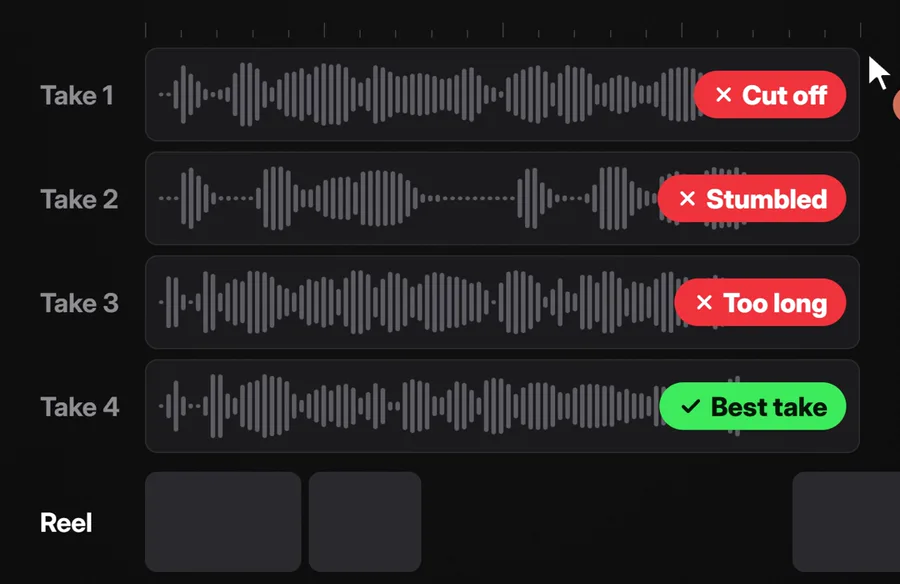
Ask for a take sheet before Claude cuts anything, so you stay in charge of what goes out in your name:
Before you build anything, make me a take sheet.
For every line I said more than once, list each take with its start time, what I said, and one short reason it is good or bad (cut off, stumbled, too long, looked away, best take).
Mark the take you want to keep. Wait for my OK before you cut.Check the words, not only the takes. In our edit, Claude also left out lines that were not quite true to how the video was made, and kept the honest version. You know what you meant to say better than any model, so read the kept lines once.
Step 5: Clean the voice
Most home recordings have two problems: background noise (fans, traffic, hum) and room echo, the hollow sound you get from bare walls.
- Isolate the voice. ElevenLabs Voice Isolator strips noise and echo and keeps the speech. It takes WAV, MP3, FLAC, OGG and AAC files up to 500 MB and one hour long. The free plan covers 10 minutes of audio a month for personal use; commercial use starts on the $6 Starter plan.
- Level it. Claude then uses FFmpeg to keep the voice at one steady volume, and to push down the quiet tail of echo after each word.
- Measure it. Ask Claude to measure the echo before and after. In our edit, the sound in the 50 to 150 milliseconds after each word dropped from -38.9 dB to -56.7 dB.
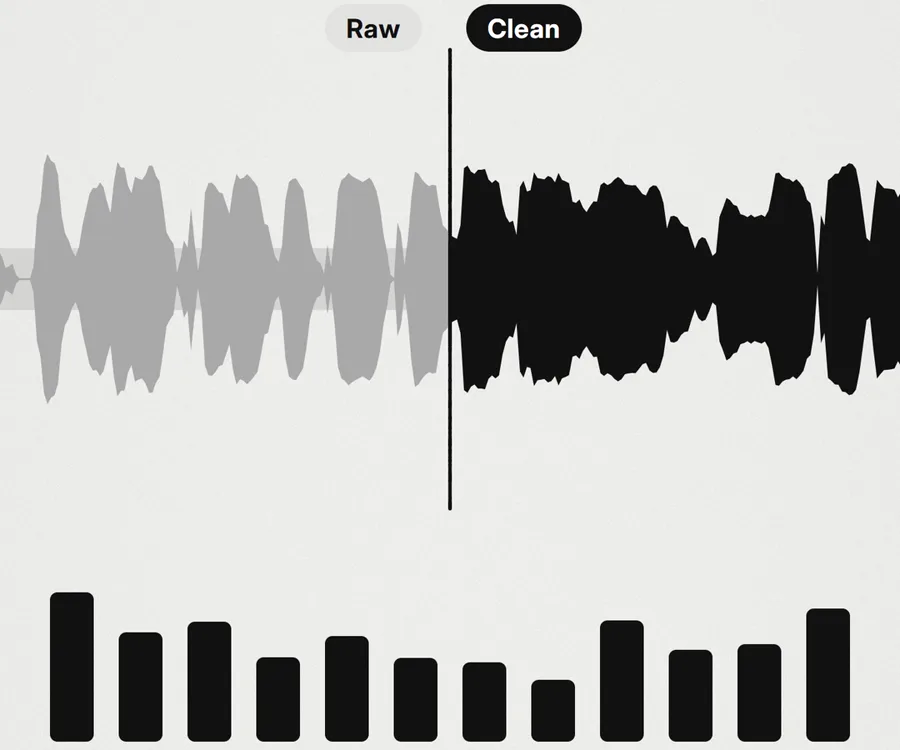
Free option: FFmpeg has its own noise filter (afftdn, which removes noise using a frequency analysis). Ask Claude to try it first and play you both versions, then decide if you need ElevenLabs.
Step 6: Captions that match every word and never cover your face
- Captions come straight from the word times, so each word appears as you say it. A few words at a time reads best on a phone.
- Tell Claude where your face is off limits. In our edit, Claude checked every frame and measured the gap between the bottom of each caption and the top of the speaker's head. The smallest gap in the final video was 83 pixels, with no overlaps.
- Read the captions once. Whisper can mishear a sound. In ours it heard "build" where the speaker meant "built", and the caption used the grammatical reading. These are quick to fix if you spot them.
Step 7: Animations, cut-outs and 3D
This is the part that used to need a motion designer.
- Animations and screens: HyperFrames lets Claude design each animation as a web page and render it to video. It needs Node.js 22 or newer and FFmpeg, and it installs into Claude Code as a plugin with two commands:
claude plugin marketplace add heygen-com/hyperframes, thenclaude plugin install hyperframes@hyperframes. - Text behind you: Robust Video Matting cuts you out of every frame without a green screen, so words and graphics can sit behind your head.
- 3D scenes: Blender builds and renders 3D shots, like your takes turning into blocks on a timeline.
- Sound effects: a swish on a scene change, a click on a cut. Ours had 74 small effects, the loudest still 16.8 dB under the voice, so they never compete with what you say.
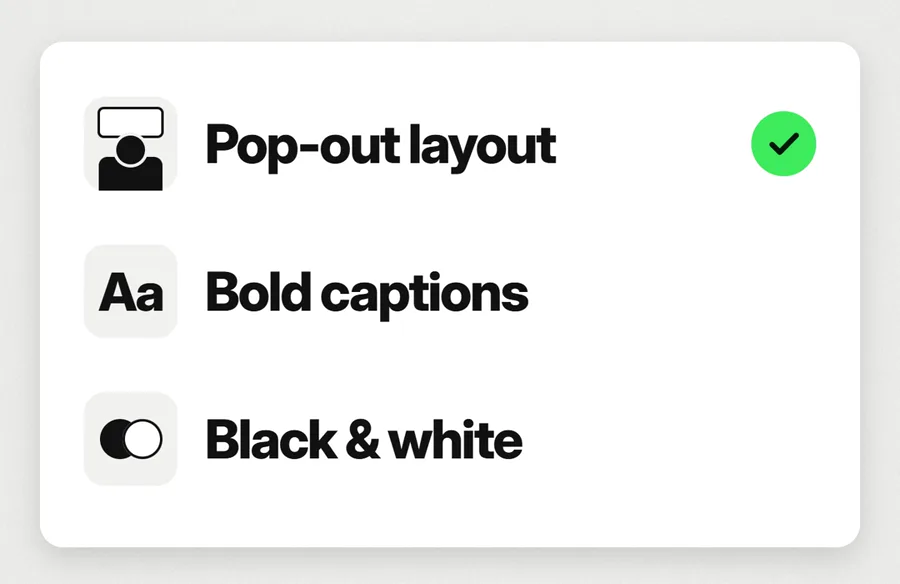
Ask for one animation per line that shows what you are saying. "It cleans my voice" can show a waveform going from rough to smooth. "It cuts my mistakes" can show the bad takes falling away. Literal pictures of each line are easier to follow on mute.
Step 8: Export and check before you post
- Export vertical: 1080 by 1920 pixels, 9:16, for Reels, Shorts and TikTok. Ours ran at 30 frames a second.
- Let Claude check its own work with the prompt below. Our final file was 45.5 seconds including a 4-second end card, and every one of its 1,365 frames was checked.
- Watch it yourself, with sound, start to finish, on your phone.
Check the final video before you show it to me:
1. Every frame plays, with no black or flashing frames.
2. Transcribe the final video again and compare it with the lines we kept. List anything that does not match.
3. Check that no caption ever covers my face.
4. Tell me the length, the size and the frame rate of the file.Change the style next time with a reference
Once the steps work, the look is the easy part to change. Give Claude a video whose style you like and ask it to edit your next one the same way. From the same raw recording, Claude has since made several more versions of our video in different styles, from a clean light design to a full 3D studio. The words and the takes stayed the same; only the look changed.
Here is a video whose style I like: [add the reference video or a screenshot of it]
Describe its style in a short list: layout, fonts, colours, how the captions look and how the scenes change.
Then edit my next video in that style, using the same steps as before. Keep my words and my best takes, and only change the look.An easier way to start: video-use
If the full toolkit feels like a lot, start with video-use, a free kit made by Browser Use (MIT license, about 30,000 stars on GitHub). You drop raw footage in a folder, chat with Claude Code, and get a finished file back.
- It removes filler words and dead space between takes, color grades each part, adds short audio fades at every cut and burns in subtitles.
- It can add animated overlays through HyperFrames and other tools.
- It needs Python, FFmpeg and an ElevenLabs API key, which it uses for transcription.
- Like the full workflow, it works from the transcript and still frames, so watch the result before you post.
To install it, open Claude Code and say: "Set up https://github.com/browser-use/video-use for me."
Costs, limits and mistakes to avoid
- What it costs: a Claude plan with Claude Code (Pro is $20 a month, or $17 a month billed yearly), plus ElevenLabs if you use it. Everything else here is free. Long edits use more of your plan's usage than a short chat.
- ElevenLabs' free plan is for personal use only. For a business account, use a paid plan, or try FFmpeg's free noise filter.
- Claude judges by measurements. It hears words through the transcript and sees through sampled frames. Always watch the final video before it goes out.
- Do not skip the take check. A wrong take is easy for viewers to spot.
- Run one heavy job at a time. Transcribing, cutting out the background and rendering 3D all load your computer. Let each finish before the next starts, especially on a laptop.
- When to skip it: for a quick trim of one clip, a normal editing app is still faster. This workflow pays off on talking head videos with many takes, captions and graphics, the kind you make every week.
If you would rather have a team set this up for your brand's videos, that is part of what we do in creative production.
Frequently asked questions
Can AI edit a talking head video by itself?
Yes, with a person checking the key decisions. Claude Code can transcribe the recording, pick the best take of each line, cut mistakes, clean the voice, add captions and animations and export the video. You approve the takes before the final render and watch the result before you post.
Do I need to know how to code to edit videos with Claude Code?
No. You describe what you want in plain English and Claude Code installs and runs the tools. You only need to approve its install commands and check its choices.
How much does it cost to edit videos with Claude?
Claude Code needs a paid Claude plan, from $20 a month or $17 a month billed yearly. Whisper, MediaPipe, FFmpeg, HyperFrames, Blender and Robust Video Matting are free. ElevenLabs Voice Isolator is free for 10 minutes of audio a month for personal use, with paid plans from $6 a month.
How does Claude know which take is best?
It transcribes every take with a time on each word, then scores them: sound first (no stumbles, nothing cut off, not too long), then eye contact checked with MediaPipe, then sharpness. Ask it for a take sheet so you can approve the picks.
How do I remove echo from a voice recording with AI?
ElevenLabs Voice Isolator removes noise and room echo from files up to 500 MB and one hour long. Claude can then level the voice with FFmpeg. For a free option, ask Claude to try FFmpeg's afftdn noise filter first and compare the two.
Is there an easier way to start?
Yes. video-use by Browser Use is a free Claude Code kit that cuts by what you said, removes fillers, color grades and adds subtitles. In Claude Code, say: Set up https://github.com/browser-use/video-use for me. It needs an ElevenLabs API key for transcription.