

A river valley at dusk where you steer a wooden boat upstream while a storm rolls in and the day turns to night. A V8 engine and a robotic jellyfish you can take apart, part by part. Twenty-five tiny illustrated rooms in one HTML file, without a single image.
Claude built all three websites, for three different people, and none of them looks like the usual AI site. Their makers shared how they asked. They gave Claude pictures to match, told it what finished looks like, and made it check its own work before calling the job done. This guide turns that into steps anyone can follow, with a prompt to copy and the free tools behind those sites.
Short answer: to get AI to build a website that looks premium, close the design choices it would otherwise fill with defaults. Give Claude 9 to 12 reference images, install a design skill, set a clear bar and a time budget, and have Claude compare screenshots of its page with your references. Then let a fresh reviewer that has not seen the build score it.
- Builders who share their prompts say the reference images carry most of the quality. The written prompt can stay short.
- Free skills such as taste-skill and Anthropic's frontend-design give Claude an art direction before it writes code.
- Claude can open the page it built, take screenshots and fix what does not match.
- Claude Code needs a paid Claude plan, from $20 a month ($17 a month billed yearly). The skills and most tools here are free.
Why most AI-built websites look the same
Anthropic publishes a design skill for Claude called frontend-design, and it is frank about the problem. It lists the looks AI-made pages drift into when nobody steers them:
- A warm cream background with a big serif headline and a terracotta accent.
- A near-black page with one acid-green or bright red accent.
- Content chopped into identical rounded cards, each with the same soft grey shadow.
- Template details on every subject: a small all-caps label above each heading, text joined with middle dots, an arrow on every button.
It also flags fade-and-slide-up entrances on every section as a sign of a generated page.
A prompt like "make it modern and premium" leaves every design choice open, and the model fills each one with its default. The fix is to close those choices yourself, with pictures, a design direction and a bar to hit, before Claude writes any code.
What the AI-built sites people share have in common
Sakura River Valley by Meng To
Sakura River Valley is a playable 3D scene: a boat moves through a Japanese river valley with changing weather and a full day-and-night cycle. Meng To posted it on X as made with Claude Opus 5.5 and shared the full prompt in the replies. It runs to about 1,500 words and reads like a film brief, ending with an order to test the page in a browser and fix what it finds.

Visual Learning by Elvar
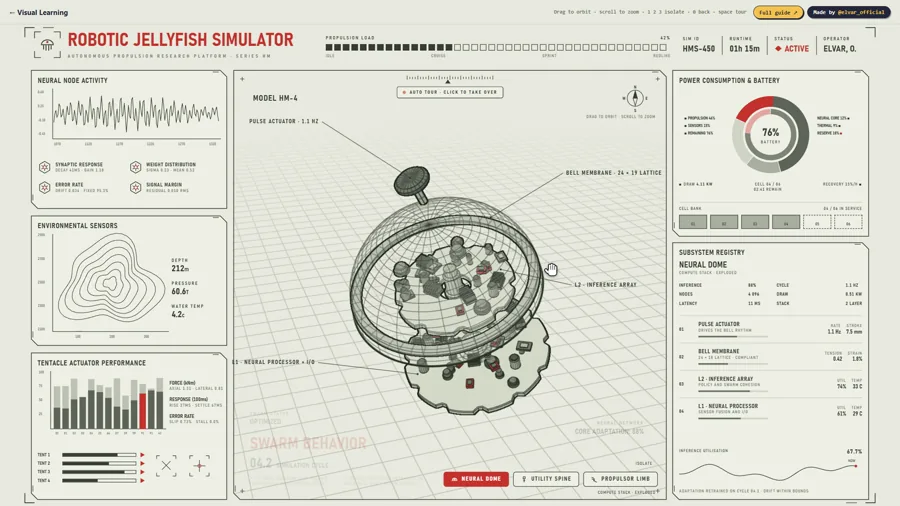
Visual Learning has 40 everyday machines drawn in code and opened up, from a drone to an espresso machine, plus seven simulators such as a V8 engine and a robotic jellyfish. Elvar built it with Claude and his own free skill, teardown. In his article on X he describes asking for a pangolin, an armadillo and a scorpion with nothing to work from. All three came back as generic toys. When he gave the same model one clip of a real V8 simulator, it rebuilt the engine panel by panel.
a small light by Kevin Ngo
a small light is 25 tiny illustrated rooms in a single HTML file, with no images at all. Kevin Ngo said on X that he made it with Claude Opus 5.
What they share is a very clear target (a reference, or a written picture as detailed as one), rules about what is not allowed, and a loop where Claude checks its own result. Leon Lin, who builds large 3D demos with Claude, puts it plainly in his article on prompting good looking demos: the references carry most of the quality, and the text barely matters.
Before you start
- A paid Claude plan. Claude Code comes with Pro ($20 a month, or $17 a month billed yearly at $200 up front) and Max (from $100 a month). The free plan does not include it (pricing).
- The Claude desktop app for macOS or Windows (Linux is in beta). Claude Code sits in its Code tab, so you do not need a terminal. Download links are in the desktop quickstart.
- Chrome or Edge, and Node.js 22 or newer, which taste-skill uses to check pages. Not sure you have Node.js? Ask Claude to check and walk you through installing it.
- Time. taste-skill's notes put one build at roughly 30 to 45 minutes. With your review rounds, plan on an afternoon for a first page.
Step 1: Collect reference images first
Words like "premium" or "cinematic" mean something different to every model and every person. A picture settles the light, the colors and the materials in one go. Leon Lin starts most of his big demos with 9 to 12 reference images and a short prompt.
- Make a project folder with a subfolder called references.
- Collect 9 to 12 images with the look you want: screenshots of sites you admire, film stills, product photos. Mobbin is a searchable library of more than 600,000 app and website screenshots, and design posts on X are a free source too.
- Cover the whole page: a few images for mood and light, a few for details like type and buttons.
- Write one line per image in a notes file saying what to take from it: "Light and fog from image 3. Headline size from image 7. Ignore the people in image 5." This stops Claude copying the wrong part.
- For a 3D scene, you can make the target first. Leon Lin generates his reference images with an image model, then asks Claude to build that scene in code.
What you should see: one folder of images and a notes file, after 20 to 40 minutes.
Common mistake: images that disagree with each other. If the moods fight, Claude blends them, and the blend is the generic look you wanted to avoid. Learn decisions like light and spacing from references, and never lift someone's logo, photos or copy.
Step 2: Give Claude a design direction with a skill
A skill is a folder of instructions Claude loads when a task needs it. Anthropic's documentation says only a skill's short description sits in Claude's context until it is used, so an installed skill costs almost nothing while it waits.
taste-skill by Leon Lin
taste-skill is MIT licensed and has more than 100,000 stars on GitHub. Its readme describes the run. A script deals three of 20 researched design directions and Claude picks one, then builds with credited pictures from open collections. At the end it opens the page in a real browser at three widths, studies its own screenshots and fixes the top three problems, for up to three rounds. It needs no API keys.
frontend-design by Anthropic
Anthropic's official skills include frontend-design, the skill quoted at the top of this guide. It has Claude write a short plan first (four to six named colors, the typefaces and a layout idea), check that plan for anything generic, and only then write code. It also tells Claude to critique its own screenshots as it builds.
Use one of the two per project, since both set the look and can pull against each other.
- Open the Claude desktop app, click Code, choose Local and pick your project folder.
- For taste-skill, type these two commands one at a time:
/plugin marketplace add Leonxlnx/taste-skill /plugin install taste-skill@taste-skill - For Anthropic's skill, type these two instead:
/plugin marketplace add anthropics/skills /plugin install example-skills@anthropic-agent-skills - Type
/and check that the skill shows up in the list.
If it fails: paste the error into Claude and ask it to fix the install, or just say "install taste-skill for me from https://github.com/Leonxlnx/taste-skill". If the skill still does not appear, start a new session.
Step 3: Write the prompt
A good prompt says what to build, points at your references and tells Claude how to check the result. This is the starter prompt from our free 3D website kit. Fill in the brackets.
Build me a one-page 3D website about [your topic] with three.js.
My reference images are in this folder: [add 9 to 12 images you like]. Match their look as closely as you can.
1. Make one big 3D scene that fills the whole screen. It should move slowly on its own, and react when I move my mouse or scroll.
2. Use soft light, shadows and a little fog, so it looks like a film.
3. Keep the text short and big, on top of the scene.
4. Make it load fast and work on phones.
Before you show me anything, open the page in a browser, take screenshots and compare them with my references. Fix what does not match. Do not stop until it matches.
Show me still screenshots of the main view first. Add the animation after I say yes.Prefer a one-click copy? The same prompt is on our free prompt page, with every tool link from this guide.
- "Match their look" turns the references into the bar instead of loose inspiration.
- One big scene gives the page one memorable thing. Anthropic's skill gives the same advice: be bold in one place and keep the rest quiet.
- Fast on phones is there because a scene that runs smoothly on a strong desktop can stutter on a phone.
- Stills first lets you fix the look while changes are still cheap.
three.js is the free 3D library behind most pages like these, and Claude writes that code for you. For a page without 3D, swap the first numbered line for a description of your hero section.
Learn from a 1,500-word prompt
For a showpiece, read Meng To's full prompt in his thread. Its shape works for any ambitious page:
- Two sentences on the subject and the visual style.
- A full inventory of what must be in the scene, down to small props.
- Hard rules, such as no text anywhere in the scene and one standalone file that opens straight in a browser.
- The hero element described in the most detail. For him that is the water, from reflections to the wake behind the boat.
- A test order at the end: open it in a browser, take screenshots at four times of day, read the console for errors and fix everything found.
Copy the shape and fill it with your own business. Your product becomes the hero element, and your brand rules become the hard rules.
Step 4: Set the bar and give it time
A number sets the bar. Leon Lin's point is that "make it look good" tells the model very little, while a target like matching the references 99% tells it the job is not done the moment the page first works. When the model rates itself 90% and he sees 60 to 70%, he tells it so.
Time changes the result. He gives big builds a minimum time and small jobs a hard cap. His ancient Greek world, Athenaion, took about 45 hours and 55 subagents, and he puts the API-equivalent cost at roughly $1,800 to $2,300, run on a Max plan. A landing page is a much smaller job, so start with a modest budget and raise it if the result falls short.
Add these lines to the end of your prompt:
Treat my reference images as the minimum bar. Aim to match them 95%.
When you rate your own work, show me your screenshots next to the references. I will give you my own number.
This is a big visual job. Plan for at least one hour of work. If you are done in ten minutes, something is missing.
If you have questions, ask them all now. After that, keep working without stopping to ask me.If Claude keeps stopping early, Leon Lin's free unlazy skill (MIT) makes it write down what "done" means first and check each item before it reports back. He notes it matters less with newer models like Opus 5.5. His newer skill, cook, packs the whole method into one loop: questions up front, references as the bar, rounds of stills scored by fresh reviewers, and nothing final before you approve.
Step 5: Let Claude check its own screenshots
In the desktop app, your running site opens in the Browser pane, where Claude can view it and keep fixing what it sees. In the terminal version, start Claude Code with claude --chrome and install the Claude in Chrome extension, version 1.0.36 or later. Anthropic lists checking a build against a design mockup as one of its uses.
- Compare side by side. Ask Claude to place each screenshot next to the reference it should match. Gaps are far easier to spot that way.
- Give feedback with targets. Say what and where: "the sky should be bluer and the hero text half the size." Leon Lin's most common note on 3D builds is that the colors come out too grey.
- Mark up screenshots. Drag one into the chat, or paste it (Ctrl+V, or Alt+V in the Windows terminal), and circle the problem.
- Check phone, tablet and desktop widths. taste-skill does this on its own. Without it, ask.
Step 6: Let a fresh reviewer judge
"The agent that built something is the worst judge of its own work." Leon Lin
The builder remembers every decision it made and tends to grade itself kindly. Anthropic's documentation says each Claude Code subagent starts with a fresh, isolated context window and does not see your conversation history, which makes it a cheap outside reviewer.
Review this page as a strict outside designer.
Use a subagent that has not seen our conversation. Give it only my reference images and screenshots of the page at phone, tablet and desktop width.
Ask it to score the page from 1 to 10 against the references for layout, type, color, light, detail and motion, and to list the five weakest spots.
Fix the weakest spots, then use a new subagent to score it again.
Stop when every score is 8 or higher, or after three rounds, and show me the scores and the final screenshots.The three-round cap keeps usage under control. Raise it for a showpiece.
Step 7: Make it fast for every visitor
A great screenshot is half the job. The other half is how the page behaves on an ordinary laptop or phone.
- Weak graphics. Elvar writes that his hexapod simulator ran at 15 frames per second on a laptop's built-in graphics and at 75 after quality fixes.
- The first view. Google's web.dev guidance counts a Largest Contentful Paint of 2.5 seconds or less as good. That is the time until the biggest image, text block or video on screen shows up.
- File size. Elvar says one page weighed 15.9 MB with its 3D models inside and X never showed its link preview. At 967 KB, with the models moved out, the preview appeared.
- Reduced motion. Devices have a setting to cut motion, which browsers pass to the page as
prefers-reduced-motion. MDN notes that scaling or panning large objects can cause discomfort for people with vestibular motion disorders.
Before we publish:
1. Lower the quality automatically if the page drops below 30 frames per second.
2. Show a still image of the scene right away and load the 3D after it.
3. Keep the page as light as you can, and tell me its final size.
4. Slow down or pause all motion when the visitor has reduced motion turned on.
5. Show me phone and desktop screenshots when it is done.Step 8: Put it online
- Ask Claude:
Put this site online on Vercel and give me the link.Then follow what it asks, such as signing in to Vercel. - Check the plan rules. Vercel says its free Hobby plan is for personal, non-commercial use. A business site belongs on Vercel Pro ($20 a month, with $20 of usage included) or another host whose terms allow commercial use.
- Open the live link on your own phone and a laptop before you share it.
The free tools that make 3D pages look expensive
| Tool | What it gives you | Cost and licence |
|---|---|---|
| three.js | Draws 3D scenes in the browser | Free, MIT |
| Motion Primitives | Animated parts such as text effects | Free, MIT |
| Canvas UI | WebGL effects over a real HTML page | Free on your own and client sites. You cannot sell the effects themselves. |
| Paper Shaders | Moving backgrounds, like soft gradients and flowing liquid | Free, Apache-2.0 |
| UI Layouts | Components, effects and ready-made blocks | Free, MIT |
| ThreeUI | Ready-made three.js scenes by Meng To | He says 150 of the 450+ are free and open source |
| 21st.dev | Website sections, each with a prompt for Claude | A free account copies 2 prompts a day |
| Poly Haven | 3D models, textures and skies | CC0: commercial use, no credit needed |
| Sketchfab | Downloadable 3D models | Licence differs per model. Editorial-only models cannot be used commercially. |
| Meshy | Turns a picture into a 3D model | Free plan: 10 downloads a month, CC BY 4.0, so credit Meshy |
| teardown | Turns a machine into a 3D simulator you can take apart | Free, MIT |
What it costs
Claude Pro at $20 a month is enough to start, and the tools above are free apart from paid tiers you may never need. Long visual builds eat plan usage, which is why Leon Lin ran his 45-hour build on Max. Hosting a business site on Vercel Pro is $20 a month.
Troubleshooting
- It still looks like every other AI site. Ban the traits from the top of this guide by name: "No cream background, no small all-caps labels above headings, no identical cards." Then check that your references agree with each other.
- The colors look flat or grey. Give a direction per element: "The sky bluer, the blossoms pinker, the grass greener."
- Claude says it is done too early. Add the bar and time lines from step 4, or install unlazy.
- It copied a reference too closely. Say which part to take from each image, and ask it not to copy any single element one to one.
Who this is not for
If you need an online store or a booking page live this week, start with a template site builder and add a 3D hero later. Checkout pages work better plain and fast.
This method also needs you in the loop. The quality comes from your references and your notes on each round of screenshots, so without an hour of your attention the result drifts back toward the defaults.
Frequently asked questions
How do I get AI to make a website that does not look AI-generated?
Close the choices AI fills with its defaults. Give Claude 9 to 12 reference images, install a design skill such as taste-skill or Anthropic's frontend-design, ban the generic traits by name (cream backgrounds, all-caps labels above headings, identical rounded cards) and have Claude compare screenshots of its page with your references before it calls the job done.
What should I put in a prompt to build a website with AI?
Say what to build, where your reference images are and what to take from each one, the hard rules (what is not allowed), a bar to hit such as matching the references 95%, a time budget, and how to check the result: screenshots at phone and desktop width compared with the references.
How many reference images should I give Claude?
Leon Lin, who builds large 3D demos with Claude, starts most big ones with 9 to 12 reference images and a short prompt. A simple page can use fewer, as long as the images agree with each other on mood, light and color.
Can Claude see the website it builds?
Yes. In the Claude desktop app your running site opens in the Browser pane, where Claude can view it and fix what it sees. In the terminal, start Claude Code with claude --chrome and install the Claude in Chrome extension (version 1.0.36 or later) on a Pro, Max or other direct Anthropic plan. You can also drag screenshots into the chat yourself.
Do I need to know how to code to build a website with Claude?
No. You describe what you want in plain English, and Claude writes the code, installs the skills and can put the site online. What you do need is time to look at each round of screenshots and say what to change.
Can I use Vercel's free plan for a business website?
Vercel says its free Hobby plan is for personal, non-commercial use. For a business site, use Vercel Pro at $20 a month or another host whose terms allow commercial use.
Sources
- Anthropic, frontend-design skill
- Leon Lin, How I prompt AI to build good looking demos
- taste-skill, unlazy and cook on GitHub
- Elvar, How I Turn Any Machine Into a 3D Simulator You Can Take Apart
- Claude pricing
- Claude Code desktop quickstart
- Use Claude Code with Chrome
- Claude Code subagents and skills
- web.dev, Largest Contentful Paint
- MDN, prefers-reduced-motion
- Vercel pricing
- Poly Haven licence and Sketchfab licences