
On October 26, 2026, Microsoft offered about 60,000 employees money to leave. That is roughly a quarter of its staff: people at vice president level and below, on select teams in the US, Canada, the UK and India. Two days later the company reported $36.6 billion of net income for July to September.
So this was not a company short of cash. The coverage tied the offer to cutting labor costs while Microsoft spends more on AI. The most useful detail sat further down the stories: some groups did not get the offer, including some people who work on data centers and some in sales and marketing.
Those groups have one thing in common. They either keep the AI machines running, or they bring in the money. That gives anyone with a job, or a small business, a simple way to look at their own week. This guide walks through it step by step, with a free prompt that does the sorting for you.
Short answer: write down every task you did last week and ask two questions about each one. Does it bring money into the business? Does it help run or set up AI? A task with two no's is the one AI is most likely to take first, so hand it to AI yourself and spend the time you get back closer to customers or to the tools.
- Microsoft's offer was a voluntary buyout, money to leave by choice, not a layoff. It was its second buyout offer of 2026.
- Some data center, sales and marketing staff were left out. It was decided team by team, so not all of them.
- Microsoft's own researchers found that gathering information and writing are the work people most often hand to AI.
- The check takes about half an hour and works on Claude's free plan. The prompt is below.
What Microsoft actually did
The headlines used the word "buyouts", and the difference from a layoff matters. A buyout is an offer: eligible employees can take a package and leave, or stay. Microsoft's chief people officer, Amy Coleman, told staff in a memo that it was "a new choice" for people already thinking about a future outside the company.
| What | Detail |
|---|---|
| The offer | Voluntary buyouts, announced to eligible staff by email on Monday, October 26, 2026, open for what Microsoft called a limited period |
| Who could take it | About 60,000 people, roughly 27% of the workforce, at vice president level and below, on select teams in the US, Canada, India and the UK |
| Total staff | About 223,000 at the end of June 2026, down from 228,000 at the end of 2025 |
| Who was left out | Some groups, including some people working on data centers, sales and marketing |
| Profit, July to September | $36.6 billion net income, up 32%, on revenue of $92.3 billion, up 19% |
| Spending, same three months | $45.2 billion on capital expenditures and finance leases, up about 30% |
| Earlier in 2026 | A smaller buyout offer to about 7% of its US workforce, and about 4,800 job cuts in July, many of them in the Xbox business |
The package terms were not published, so we do not know how much people were offered. What we do know is where the money is going. Microsoft's finance chief, Amy Hood, said on the earnings call that about 75% of its capital spending is now tied to short-lived assets such as Nvidia GPUs and Intel CPUs, the chips that run AI. On demand for Azure, its cloud business, she said: "We still have demand that exceeds supply."
Why the left-out teams matter
Microsoft did not explain why some groups were left out, so what follows is our reading, not the company's stated reason.
Look at the two groups side by side. Data center staff keep the hardware running that Microsoft is spending tens of billions a quarter on. Sales and marketing staff bring in the revenue that pays for it. A company cutting costs to fund AI kept, at least in part, the people next to the machines and the people next to the money.
That gives you two plain questions you can ask about any piece of work, in any company, of any size:
- Does this task bring money into the business?
- Does this task help run or set up the AI?
If the answer to both is no, that task is the easiest one to hand to a machine, and the first one a cost-cutting manager will look at.
What the research says about which work AI touches first
Microsoft's own researchers looked at this from the other side. In a study first published in July 2025 and last revised in October 2026, Kiran Tomlinson, Sonia Jaffe, Will Wang, Scott Counts and Siddharth Suri analyzed about 200,000 anonymized conversations with Bing Copilot and matched them to the work activities in the US government's O*NET job database.
- The work people most often ask AI to help with is gathering information and writing.
- The job groups where AI applies most are knowledge work: computer and mathematical jobs, office and administrative support, and sales.
- The study measures where AI can help, not who loses a job. It does not report layoffs or wages.
Sales on that list can look odd next to Microsoft keeping some sales teams. AI can research a lead and draft the follow-up email. The person who owns the relationship and closes the deal still brings in the revenue. Since AI can touch most information work, ask what a task does for the business, and skip asking whether AI could do it.
Before you start
- Last week's records. Your calendar, your sent email folder, your chat app (Slack, Teams or WhatsApp) and any task list or project board you use.
- A Claude account. The free plan is enough for this prompt. Any chat assistant can run it, but we wrote it for Claude.
- About 30 minutes. Most of it goes on the list. Claude does the sorting.
- A privacy check. Take client names, prices and anything confidential out of your list before you paste it. If you work for someone else, read your company's AI policy first.
Step 1: Write down everything you did last week
The list is the whole exercise. A vague list gives you a vague answer, so be specific and be honest.
- Go through last week's calendar. Write each meeting as one line that says what you actually did in it. "Weekly sync" becomes "Updated the team on last week's ad numbers".
- Go through your sent folder. Every kind of email you sent is a task: quotes, follow-ups, reports, answers to customer questions, invoices.
- Scan your chat app. Look for requests you handled: "can you pull the numbers", "can you fix the slide".
- Add the invisible work. Copying data from one tool to another, formatting reports, renaming files, chasing approvals, sorting the inbox. These rarely show up in a calendar and they are often the first to go.
- Write roughly how long each task took. It is optional, but it tells you where the biggest win is later.
What you should end up with: one task per line, in plain words. Expect it to be longer than you think.
If you cannot remember last week: track this week instead. At the end of each day, spend two minutes writing down what you did.
Step 2: Ask the two questions yourself first
Before you hand the list to Claude, mark it yourself. It only takes a few minutes, and it shows you how you see your own job.
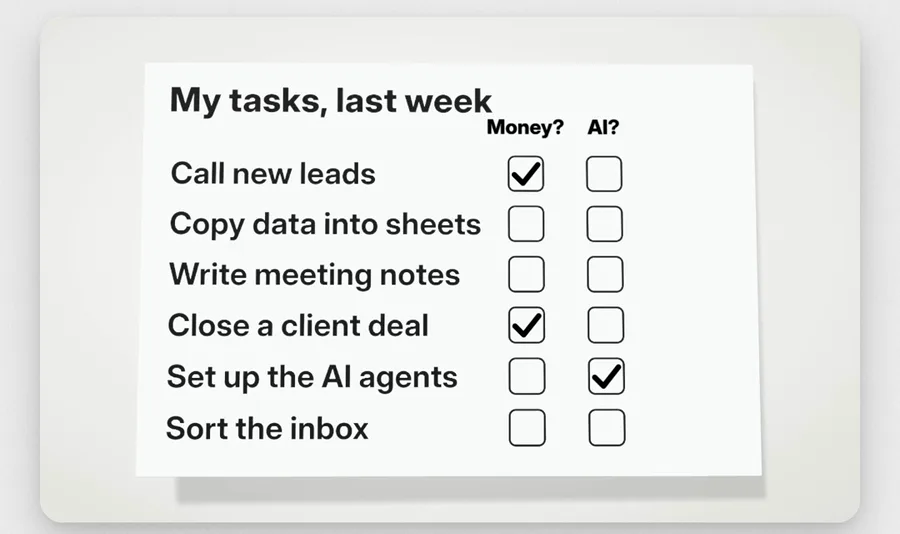
Question 1: does it bring in money?
Tick it when the task is directly connected to revenue: a call with a new lead, sending a quote, closing a deal, looking after a client who pays you, renewing a contract, pricing a new offer.
Be strict. If you need more than one sentence to explain how a task leads to money, do not tick it. "The weekly report helps the boss decide where to spend" is a stretch. "I called back the lead who asked for a price" is not.
Question 2: does it run the AI?
Tick it when the task sets up, runs, checks or fixes the AI tools your team uses: choosing a tool, writing the instructions it follows, checking its output before it goes out, keeping the data it needs clean, training a colleague to use it.
Neither? That is the one AI takes first
Copying data into sheets, writing up meeting notes, sorting the inbox, first drafts of routine reports, answering the same question for the tenth time. If a task gets no tick at all, mark it. That is the list you will work on.
Step 3: Let Claude sort the list and suggest a plan
- Open Claude at claude.ai or in the app, and start a new chat.
- Copy the prompt below and paste your list where it says.
- Send it. Claude returns a table with every task, a yes or no for each question with a short reason, and SAFE or AT RISK. Under the table you get a plain-English idea for handing each AT RISK task to AI, and a task closer to the money to spend that time on.
- Compare it with your own marks from Step 2. Where Claude disagrees, read its reason. Where it is wrong, tell it: "Task 4 does bring in money, because it is the quote the customer signs." Ask for an updated table.
- Save the final table. You will run this again next month.
I want to check which parts of my job AI is most likely to take first.
Here is every task I did last week:
[paste your list here, one task per line]
Make a table with one row for each task and these columns:
1. Task
2. Money? Does this task bring money into the business? Yes or no, with one short reason.
3. AI? Does this task help run or set up AI? Yes or no, with one short reason.
4. Verdict: SAFE if either answer is yes. AT RISK if both answers are no.
Then, for every AT RISK task:
- Tell me in plain English how I could hand it to AI myself this week.
- Suggest one task closer to the money or the customers that I could spend that time on.
Keep it simple and skip the jargon.Prefer a one-click copy? The same prompt is on our free prompt page.
If Claude's answer is too long or too technical: reply "shorter, and in plain words". If it marks almost everything SAFE, your list is probably too vague. Rewrite the lines as actions ("typed the sales numbers into the sheet") and run it again.
Step 4: Hand one AT RISK task to AI this week
Do not try to hand over everything at once. Pick one task and get it working.
- Pick the right first task. The best one repeats every week, takes real time and has an obvious "done". A weekly status report is a better first pick than a one-off project.
- Write down how you do it today, step by step, the way you would train a new hire. Add one example of a finished result you were happy with.
- Give Claude the instructions, the example and this week's raw input, using the prompt below. Compare its result with what you would have produced.
- Fix the instructions where it went wrong and run it again. Give it two or three rounds before you decide whether the task can move to AI.
- Keep yourself as the checker. Read the output before it goes to a client, a manager or the public. That checking is part of "running the AI", so it counts on the safe side of the sheet.
I want you to take over one task I do every week. Here is how I do it today, step by step:
[write the steps the way you would train a new hire]
Here is an example of a finished result I was happy with:
[paste one good example]
Here is this week's raw input:
[paste the notes, numbers or emails]
Do the task the same way. Then list anything you were unsure about, so I can check it before it goes out.If it does not work: split the task into smaller pieces and hand over one piece. If the task needs data from another tool, like a spreadsheet or your inbox, ask Claude what it would need to connect to it. Setting that up is exactly the kind of "runs the AI" work that moves you to the safe column.
Step 5: Move the time you get back closer to the money or the machines
Handing work to AI only protects you if the freed time goes somewhere that matters. Some ideas by role:
- Marketing: spend more time with customers and sales calls, test offers, and report your work in revenue terms, not only clicks and impressions.
- Operations and admin: become the person who sets up, checks and improves the AI tools for the team.
- Freelancers and agency staff: more client calls, faster proposals, more follow-ups with past clients.
- Business owners: run the sheet on each role, not only your own, and see where your team's hours go.
Then put a reminder in your calendar to run the check again in a month. Your list will change as the tools change.
Going further: three versions of the prompt
Find the biggest time saver
Add this to the end of the main prompt if you wrote down hours in Step 1:
Here is how many hours each task took last week:
[paste the hours next to each task]
Add an Hours column, sort the AT RISK tasks from most hours to fewest, and tell me which one to hand to AI first and why.Run it for a whole team
For managers and business owners. Keep it about tasks, not people, and say so when you share the result.
I lead a team. Below are the tasks each person did last week, grouped by role.
[paste each role's list under its role name]
Run the same two questions on every task (does it bring in money, does it run or set up AI).
Then give me:
1. One table per role, with SAFE or AT RISK for each task.
2. The three AT RISK tasks across the whole team that would free the most time if AI did them.
3. For each person, one task closer to the money or the customers they could take on instead.
Write it so I can share it with the team without anyone feeling singled out.Check a whole role before you hire
Before you post a job ad, paste the job description instead of last week's tasks and ask the same two questions. If most of the role comes out AT RISK, you may need a different role, or a smaller one plus AI.
Mistakes to avoid
- Calling everything "money". Almost any task can be linked to revenue with enough steps. The test only works if you are strict.
- Handing a task to AI and never checking it. Errors that reach a client cost more than the time you saved.
- Pasting confidential data. Strip names, prices and private details from the list and from any work you hand over.
- Doing it once. The check is most useful as a monthly habit, because both your work and the tools keep changing.
What this test can and cannot tell you
Treat it as a quick way to sort your own week, built on one company's choices and one large study. Nobody can forecast your job from it.
- Microsoft decided team by team and did not say why some groups were left out. Only some sales, marketing and data center staff were left out, not all of them.
- The Microsoft Research study shows where AI is being used, not which jobs disappear.
- Jobs that are mostly hands-on, physical work sit outside this test. The research found AI help is most common in information work.
- A task on the AT RISK list is the one you get to hand over on your own terms, before someone else decides for you.
If you want help putting AI to work on the AT RISK side of your business, that is what our AI automation team does.
Frequently asked questions
Did Microsoft lay off 60,000 people?
No. On October 26, 2026 it offered voluntary buyouts, which means money to leave if you choose to. About 60,000 staff at vice president level and below, on select teams in the US, Canada, the UK and India, could take it. It was Microsoft's second buyout offer of 2026.
Which Microsoft employees were left out of the buyout offer?
Coverage of the offer said some groups were excluded, including some people working on data centers and some in sales and marketing. It was decided team by team, and Microsoft did not explain the reasons.
Which jobs are most exposed to AI?
A Microsoft Research study of about 200,000 anonymized Bing Copilot conversations found AI applies most to knowledge work: computer and mathematical jobs, office and administrative support, and sales. Gathering information and writing were the work people most often asked AI to help with. The study measures where AI can help, not job losses.
How do I protect my job from AI?
List every task you did last week and ask two questions about each: does it bring money into the business, and does it help run or set up AI? Hand the tasks with two no's to AI yourself, keep checking the output, and spend the time you get back on work closer to customers or to the AI tools.
Can I use ChatGPT or Gemini instead of Claude for the task check?
Yes. The prompt is plain text and works in any chat assistant. We wrote it for Claude, and Claude's free plan is enough to run it.
Is it safe to paste my task list into an AI chat?
Take out client names, prices and anything confidential first. If you work for a company, check its AI policy before you paste work details into any AI tool.
Sources
- CBS News: Microsoft offers buyouts to 60,000 workers (October 26, 2026)
- BNN Bloomberg (AFP): Microsoft offers voluntary exit packages to 60,000 staff (October 26, 2026)
- Microsoft: first quarter fiscal year 2027 results (October 28, 2026)
- SiliconANGLE: Microsoft's earnings, capital spending and Azure growth (October 28, 2026)
- Microsoft Research: Working with AI, measuring the applicability of generative AI to occupations (paper on arXiv)
- Claude plans and pricing