Is your job safe from AI? Check it with two questions
Microsoft just offered about 60,000 people money to quit. That is roughly a quarter of its staff. But some people who work on its data centers, and some in sales and marketing, did not get the offer. They keep the AI machines running, or they bring in the money. So look at your own week and ask the same two questions about every task.
The task sheet prompt
Write down every task you did last week. Then copy this, paste your list where it says, and send it to Claude.
I want to check which parts of my job AI is most likely to take first.

Here is every task I did last week:
[paste your list here, one task per line]

Make a table with one row for each task and these columns:
1. Task
2. Money? Does this task bring money into the business? Yes or no, with one short reason.
3. AI? Does this task help run or set up AI? Yes or no, with one short reason.
4. Verdict: SAFE if either answer is yes. AT RISK if both answers are no.

Then, for every AT RISK task:
- Tell me in plain English how I could hand it to AI myself this week.
- Suggest one task closer to the money or the customers that I could spend that time on.

Keep it simple and skip the jargon.
The two questions
- 1
Question 1: does it bring in money?
Calls with new leads, closing a deal, looking after a client who pays you. If a task brings money into the business, tick it.
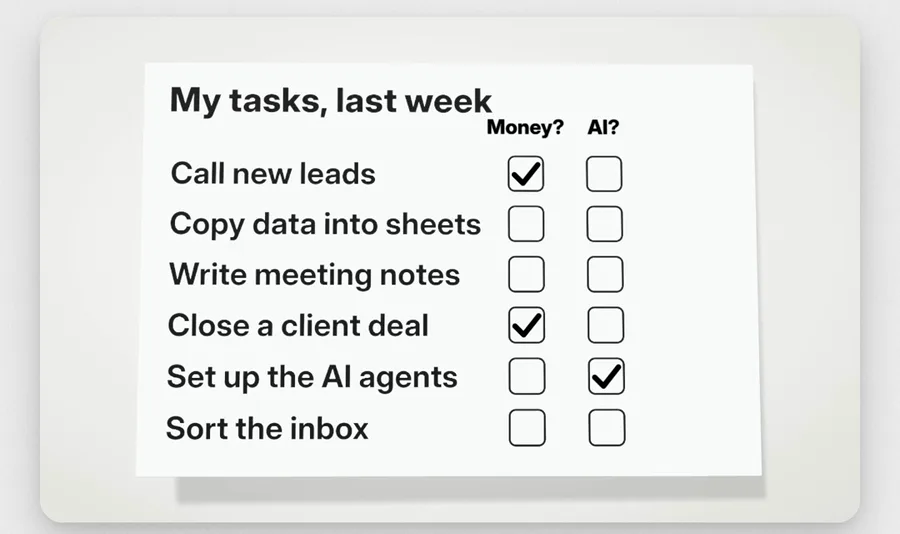
The task sheet from my reel. The tasks on it are examples, so put your own in. - 2
Question 2: does it run the AI?
Setting up the AI tools your team uses, or keeping them working. If a task does that, tick it too.
- 3
Neither? That is the one AI takes first
Copying data into sheets, writing meeting notes, sorting the inbox. If a task gets no tick at all, hand it to AI yourself, before someone else does.
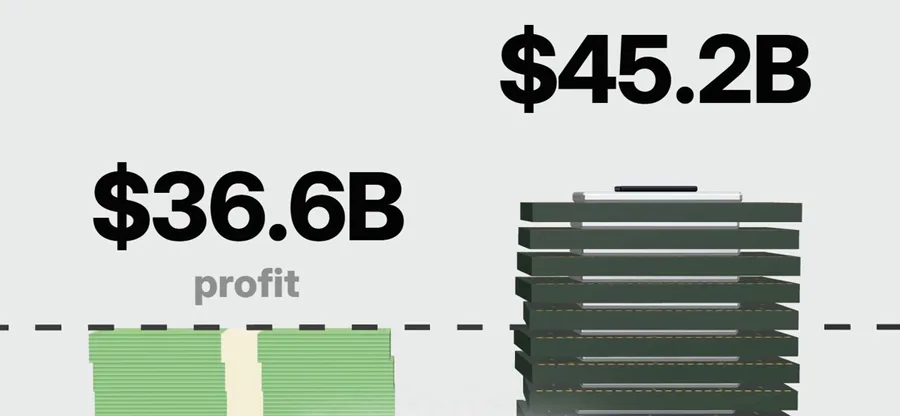
From my reel: Microsoft made $36.6 billion of profit in three months and spent $45.2 billion on chips and data centers in the same three months.
How to use it
- 1
Write down last week
List every task you did last week, big or small. One line each.
- 2
Paste it into Claude
Use the prompt above. Claude marks every task SAFE or AT RISK and tells you why.
- 3
Hand one AT RISK task to AI
Pick one task with no ticks and let AI do it this week. Claude tells you how in plain English.
- 4
Move that time closer to the money
Spend the hours you get back on work that brings in money, or on running the AI.
Questions people ask
Did Microsoft lay off 60,000 people?
No. It offered voluntary buyouts, which means money to leave if you choose to. About 60,000 staff in the US, Canada, the UK and India could take it. That is roughly a quarter of its workforce, and it is the second buyout offer Microsoft made this year. Read the CBS News story
Who did not get the offer?
Bloomberg reported that Microsoft left out people focused on its data centers, and people in sales and marketing. It was decided team by team, so it was some of them, not all. Read the Bloomberg story
Is Microsoft short of money?
No. Two days after the offer it reported $36.6 billion of profit for July to September. In the same three months it spent $45.2 billion on chips and data centers. Reports say it wants to cut costs and spend more on AI. Read Microsoft’s results
What if most of my tasks come out AT RISK?
Start with one. Hand that task to AI yourself this week, and spend the time on work that brings in money. Then do the next one.
Want AI set up like this for your business?We build AI setups and run ads for businesses.
Talk to usFacts from CBS News, BNN Bloomberg (AFP), Microsoft’s earnings release and SiliconANGLE.