

When you install Claude Code, you get the same Claude Code as everyone else. It knows nothing about your project until it reads the files. It does not check its plan before it writes code. And a screen with no design to follow can look plain.
Five free tools fix most of this. This guide is our Claude Code setup for people who do not write code. It starts with one prompt that installs all five tools. Then it gives the steps, the costs and the limits for each tool.
Short answer: A good Claude Code setup adds five free tools to the default install. They give Claude Code a memory, a project scan, a plan review, a UI library and free tokens for small jobs. Claude Code itself needs a paid Claude plan.
- Claude Mem, by thedotmack, records your sessions. The next session starts with notes from the last one.
- Claude Code Setup, by Anthropic, reads your project and recommends automations. It does not change your files.
- Elephant Goldfish, in Google's GitHub account, sends your plan to fresh reviewers that did not see your chat.
- 21st MCP lets Claude search more than 12,000 UI components. A free account can install 2 a day.
- FreeLLMAPI is a small server on your computer, not a plugin. Its models are not Claude models.
What a Claude Code setup is, and why the default is not enough
Claude Code is the AI agent from Anthropic that reads files, runs commands and writes files for you. Your Claude Code setup is the set of plugins, skills and rules that you add to it. The default install is general. Each tool below adds one thing that your project needs.
- Plugin: a package that adds features to Claude Code.
- Skill: a set of instructions that Claude loads when a task needs them.
- Hook: an action that runs on its own, for example after each file edit.
- MCP server: a connector that lets Claude use another tool. MCP means Model Context Protocol.
- Subagent: a second Claude that does one task in a separate context.
Before you start
- A paid Claude plan. Claude Code needs a Pro, Max, Ultra, Team, Enterprise or Console account. The free plan does not include it. Pro costs $20 a month, or $17 a month billed yearly. See Claude plans.
- Claude Code. It needs macOS 13, Windows 10 (version 1809), Ubuntu 20.04 or later, and 4 GB of memory. See the install guide. The Claude desktop app also has Claude Code in its Code tab.
- Node.js. The Claude Mem installer and the FreeLLMAPI launch command run with npx, which comes with Node.js. Claude Mem needs version 20.19 or later. Get the LTS version from nodejs.org.
- A project folder with real files in it, for example the code of your website.
- Free accounts, if you want them: a 21st account, and a free key from each AI provider that you want in FreeLLMAPI.
- Time. Each tool installs with one or two commands. The optional first project scan of Claude Mem takes about 5 minutes, its maker says.
Install Claude Code, if you do not have it
- On a Mac or on Linux, open Terminal. Paste
curl -fsSL https://claude.ai/install.sh | bashand press Enter. - On Windows, open PowerShell. Paste
irm https://claude.ai/install.ps1 | iexand press Enter. - Open a new terminal window. Type
claude --version. A version number tells you that the install worked. - Go to your project folder. Type
claude. Connect your Claude account in the browser.
If there is a problem: run claude doctor. It checks your install and suggests fixes.
Step 1: Install all five tools with one prompt
You can install each tool by hand with Steps 2 to 6. The faster way is one prompt. Claude reads the page of each tool, then does its install steps. It asks you before it changes an option or adds a key.
Install these 5 tools for me, one at a time. For each tool, read its page first. Then do its install steps. Ask me before you change a setting or add a key.
1. Claude Mem: https://github.com/thedotmack/claude-mem
If the installer asks for a memory provider, select my Anthropic plan. Do not select the paid claude-mem observer.
2. FreeLLMAPI: https://github.com/tashfeenahmed/freellmapi
This is a small server on my computer. Tell me where to add my own free keys.
3. Claude Code Setup: https://claude.com/marketplace/plugins/claude-code-setup
4. Elephant Goldfish: https://github.com/google/elephant-goldfish-model
5. 21st MCP: https://21st.dev/mcp
If it needs a login or a key, stop and tell me.
When you finish, tell me to restart Claude Code.- Claude Mem by thedotmack
- FreeLLMAPI by tashfeenahmed
- Claude Code Setup by Anthropic
- Elephant Goldfish by the Elephant-Goldfish Model team at Google
- 21st MCP by 21st.dev
Prefer a one-click copy? The same prompt is on our free prompt page.
- Open Claude Code in your project folder. Paste the prompt and send it.
- Read each request from Claude before you approve it. Plugins can run commands on your computer.
- When Claude Mem opens a page in your browser, choose the memory that uses your Anthropic plan.
- When a tool needs a key or a login, do that part yourself. Do not paste a password into the chat.
- When Claude finishes, close Claude Code and open it again. New plugins load when a session starts.
What you see: Claude installs the tools in order. For the plugins, it uses claude plugin commands, which install a plugin for you in every project.
If there is a problem: if Claude stops on one tool, ask it to continue with the next one. Then install the tool that failed with its step below.
Step 2: Give Claude Code a memory with Claude Mem
Claude Code already has two kinds of memory. CLAUDE.md is a file of rules that you write. Auto memory is a set of notes that Claude writes when you correct it, and it is on by default.
Claude Mem adds a full record of the work. A second agent takes notes while Claude works: what it read, changed and ran. The next session starts with a short index of those notes. The maker, Alex Newman (thedotmack), says: "Your coding agent forgets everything between sessions. Claude-Mem remembers for it." It is free under the Apache-2.0 license, with more than 118,000 stars on GitHub.
- Open a terminal. Type
npx claude-mem installand press Enter. - The installer asks for a work email. Press Enter to skip it.
- Keep the terminal open. A page opens in your browser. Select Claude Code in the list of agents.
- For the memory, choose local memory. It uses your Anthropic plan and needs no claude-mem account.
- Do not choose the claude-mem observer, unless you want to pay. Its 30-day free trial asks for a payment method.
- Finish on the page. Then restart Claude Code.
What you see: your first session in a project looks the same as before. The memory starts on your second session. To give Claude the whole project at once, type /learn-codebase.
The other way to install: in Claude Code, type /plugin marketplace add thedotmack/claude-mem, then /plugin install claude-mem.
- Local memory uses your Claude plan to write the notes, so it takes some of your usage.
- The memory stays on your computer, in a .claude-mem folder in your home folder. Cloud sync is off until you enable it.
- Anonymous usage analytics are on by default. To disable them, run
npx claude-mem telemetry disable. - To keep text out of the memory, put it between
<private>tags.
If there is a problem: run npx claude-mem doctor. It tells you what to fix. On Windows, if the terminal does not know npm, install Node.js and open a new terminal.
Step 3: Let Claude Code Setup scan your project
Claude Code Setup is an official plugin from Anthropic. Its page on claude.com has the "Anthropic verified" badge and shows 195,067 installs.
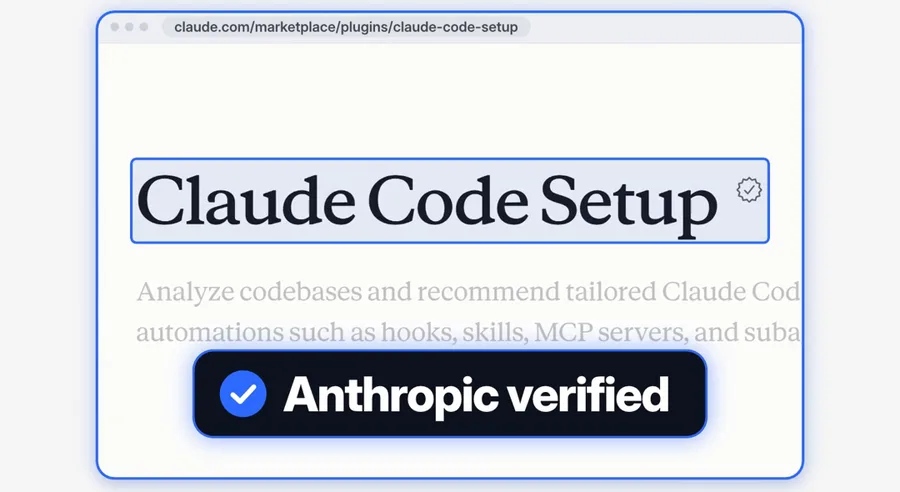
It reads your project and recommends five kinds of automation: MCP servers, skills, hooks, subagents and slash commands. A slash command is a short command that starts with "/". It gives the top 1 or 2 ideas in each kind. If you ask for one kind, it gives 3 to 5.
- Open Claude Code in your project folder.
- Type
/plugin install claude-code-setup@claude-plugins-official. Claude Code shows what the plugin will install. - Choose "Install for you" to get it in every project. "Plugin is now active." tells you that it is ready.
- Type
recommend automations for this projectand send it. - Read the ideas. Ask Claude to add the ones that you want, one at a time.
What you see: a short report with ideas in each kind and a reason for each one. The plugin only reads. Claude changes files only when you ask it to add an idea.
If there is a problem: if Claude Code does not know the marketplace, type /plugin marketplace add anthropics/claude-plugins-official. Then install again.
Step 4: Review the plan with Elephant Goldfish
An AI agent can start to write code before the plan is clear. Elephant Goldfish puts a review between the plan and the code.
The elephant is the agent that knows your project and your chat. It writes the plan. The goldfish are fresh reviewers. They read only the plan and the files that it names, without your earlier chat. So they find the assumptions that the plan does not say.
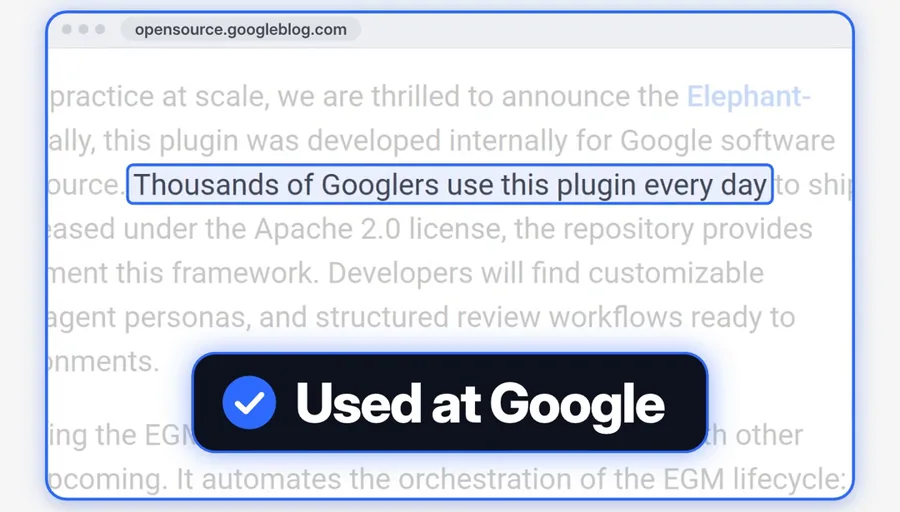
Google announced the plugin on the Google Open Source Blog on 22 October 2026. The post says: "Originally, this plugin was developed internally for Google software engineers, and is now open source." It adds: "Thousands of Googlers use this plugin every day to ship production Google code."
- In a terminal, type
claude plugin marketplace add google/elephant-goldfish-modeland press Enter. - Type
claude plugin install egm@egmand press Enter. Start a new Claude Code session. - To check a plan that you have, type
/egm:egm-reviewand the path of the file, for exampledocs/plan.md. - For a new feature, type
/egm:egm-brainstormand your idea in plain words. Then type/egm:egm-draft. The agent writes the plan one section at a time. - Run
/egm:egm-reviewon the draft. Choose which findings to fix. Approve the plan, then ask Claude to build it.
What you see: the plan is a Markdown file in your project. The reviewers report the gaps, the unclear parts and the risks. You decide what changes.
If there is a problem: the Errors tab in /plugin can say that the default agents folder is ignored. The makers say that this message is expected and harmless. If your session cannot make fresh subagents, the plugin stops the review.
The plugin is free under the Apache-2.0 license. Its README says: "This is not an officially supported Google product." It also says that a review does not replace tests or human judgment.
Step 5: Add UI components with 21st MCP
21st MCP lets Claude search a library of more than 12,000 UI components and add a real one to your project. A UI component is a ready part of a screen, for example a price table or a menu. 21st.dev makes it. Its old name is Magic MCP. The components are React code, so they fit websites made with React, for example Next.js websites.
- Make a free account on the 21st MCP page.
- In Claude Code, type
/plugin marketplace add 21st-dev/claude-code-plugin. - Type
/plugin install 21st@21st. The plugin includes the 21st server and the 21st skills. - If Claude asks for a key, copy your API key from the 21st MCP page. An API key is a password that lets a program use your account.
- Or install the 21st command-line tool with
npm i -g @21st-dev/cliand run21st login. It saves a token on your computer, so you do not paste a key. - Ask for what you need, for example: "add a pricing table with a monthly/yearly toggle from 21st".
What you see: Claude searches 21st, picks a real component and writes it into your project. Then it checks that the project still builds.
The limits: search is free on every plan. A free account can install 2 components a day, in total across the website, MCP and the command-line tool. Paid plans have no install limit. The Builder plan starts at $6 a month, billed yearly.
If there is a problem: if you hit the daily limit, wait until the next day. If a component does not match your brand, ask Claude to change its colors and fonts.
Step 6 (optional): Add FreeLLMAPI for small jobs
Read this step to the end before you install anything. FreeLLMAPI is a small server on your computer, not a plugin from the Claude Code plugin list. Its models are other AI models, not Claude models. The maker says: "Personal experimentation only."
Many AI companies give a free monthly limit on their models. FreeLLMAPI puts those limits behind one address. Its README gives these totals: about 10.1 billion tokens each month, from 87 free providers and 736 model families. A token is a small piece of text that an AI reads or writes. If one model hits its limit, the router sends the request to the next model.
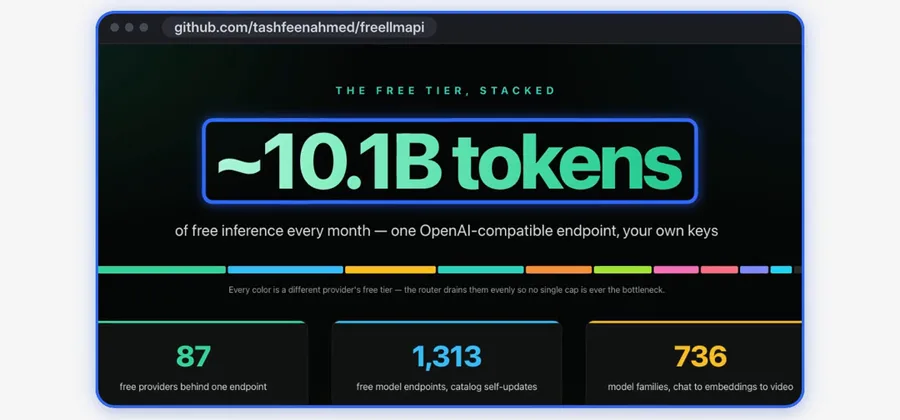
The 10.1 billion is the total of all the free limits. You get it only with your own free key from each provider.
- On a Mac, download the desktop app from the FreeLLMAPI releases page. It needs macOS 12 or later. On Windows, get it from the Microsoft Store, where the app is signed.
- Click the tray icon, then Open Dashboard. The desktop app needs no password.
- Make a free account with each AI provider that you want. Add each key on the Keys page.
- Click the tray icon, then Copy Key. This one key works for all of your providers.
- To start a separate Claude Code session on the free models, type:
npx freellmapi launch --url http://127.0.0.1:31415 --api-key YOUR-KEY - Give that session small jobs only, for example a summary or a first draft.
What you see: a normal Claude Code session, but the answers come from free models, not from Claude. The launch command gives the key to that one session only. Your normal Claude Code does not change. The setup-claude command writes FreeLLMAPI into your Claude Code configuration, so we prefer the launch command.
Read the limits before you use FreeLLMAPI
- The README lists no frontier models (the newest and strongest models), a speed that changes and no service promise. Quality drops late in the day when the top models hit their daily caps.
- The disclaimer says: "This project is for personal experimentation and learning, not production." Change to a paid API before you ship a real product.
- The terms of each provider still apply to your requests.
- The Claude Code docs say that Anthropic "doesn't support routing Claude Code to non-Claude models through any gateway."
- Your prompts go to the provider that the router picks. Keep client data out of these sessions.
- The router is free and MIT-licensed. A premium option costs $19 a year or $49 one time, and gives new models on the same day. Free installs get them 30 days later.
Go further: use the five tools on one job
An order for one real job, for example a new page on your website:
- Open Claude Code. Claude Mem gives Claude the notes from your last session.
- Run Claude Code Setup once for each project. Add the one or two ideas that matter most.
- Ask Elephant Goldfish for a plan and a review before any code.
- When you approve the plan, ask Claude to build it with 21st components.
- Send side jobs, for example a first draft of the page text, to a FreeLLMAPI session.
- Write a CLAUDE.md file. Type
/init, and Claude writes a first CLAUDE.md. Add the rules that Claude cannot find on its own, for example "Do not change the prices". - Check the context cost. Run
claude plugin details claude-memin your terminal. The Always-on line shows the tokens that the plugin adds to every session. - Remove what you do not use. In
/plugin, open the Installed tab and look under "Not used recently". Press Space on a plugin to disable it.
What this Claude Code setup costs
| Tool | Free | Paid option |
|---|---|---|
| Claude Code | Not on the free Claude plan | Pro: $20 a month, or $17 a month billed yearly. Max: $100 a month. Ultra: $200 a month. |
| Claude Mem | Free (Apache-2.0). Local memory uses your Claude plan. | The claude-mem observer, after a 30-day free trial. We found no price in its docs. |
| Claude Code Setup | Free | None |
| Elephant Goldfish | Free (Apache-2.0) | None |
| 21st MCP | Free search, 2 installs a day | Builder: from $6 a month, billed yearly |
| FreeLLMAPI | Free router (MIT), with your own provider keys | Premium: $19 a year, or $49 one time |
We checked these prices on 20 November 2026.
Limits and common problems
- A new plugin does not appear. Restart Claude Code, or type
/reload-plugins. Then type "/" and look for the commands of the plugin. - Trust a plugin before you install it. Anthropic's plugin repository says that Anthropic does not control what plugins include. It also cannot verify that a plugin works as intended or that it will not change.
- Two memories at once. Claude Mem does not disable the auto memory of Claude Code. You can keep both. To disable auto memory, type
/memoryand use its toggle.
Alternatives, and when to choose them
- The built-in memory only. For one small project, CLAUDE.md and auto memory can be enough. Choose Claude Mem when you want a searchable record of each session.
- Tests in place of a plan review. A plan review finds gaps before the code exists. Tests find errors after. A real product needs both.
- Your own design in place of 21st. If a designer gave you a design file, give Claude that design. 21st helps most when you have no design.
- A paid API in place of FreeLLMAPI. For client work, pay for an API. Keep FreeLLMAPI for tests and drafts.
Who this setup is not for
- People who want Claude Code at no cost. Claude Code needs a paid plan or a Console account.
- Teams with strict data rules. FreeLLMAPI sends prompts to outside providers, and Claude Mem keeps a record of each session.
- People who need an officially supported Google tool. Elephant Goldfish is not one, its README says.
Frequently asked questions
What should I add to Claude Code first?
Start with a memory and a project scan. Claude Mem records your sessions. Claude Code Setup tells you which hooks, skills, MCP servers and subagents fit your project. Before a large job, add a plan review with Elephant Goldfish.
Does Claude Code remember past sessions?
Yes, in part. At the start of each session, Claude Code reads your CLAUDE.md file and its own auto memory. Auto memory is on by default. Claude Mem adds a full, searchable record of what Claude read, changed and ran in each session.
Is Claude Code free?
No. Claude Code needs a Pro, Max, Ultra, Team, Enterprise or Console account. The free Claude plan does not include it. Pro costs $20 a month, or $17 a month billed yearly. The five tools in this guide are free to install.
Does FreeLLMAPI give you free Claude tokens?
No. The free tokens come from other AI providers, not from Anthropic. You add your own free key from each provider. The maker says "Personal experimentation only." Anthropic does not support Claude Code on non-Claude models.
Is Elephant Goldfish an official Google product?
No. It is in Google's GitHub account, and Google announced it on the Google Open Source Blog on 22 October 2026. But its README says: "This is not an officially supported Google product."
Do I need to know how to code to use these tools?
No. You paste one prompt into Claude Code and answer its questions in plain English. Claude runs the install commands. You approve each request and add your own keys.
Sources
- Claude Mem on GitHub and Claude Mem installation docs
- Claude Code Setup on claude.com and its README
- Elephant Goldfish on GitHub and the Google Open Source Blog post
- 21st MCP and Magic MCP on GitHub
- FreeLLMAPI on GitHub
- Claude pricing and Claude Code setup docs
- Install and manage Claude Code plugins and How Claude remembers your project
- Claude Code LLM gateway docs