
You open Claude or ChatGPT and type "make a website for my business". The AI then guesses your customers, your message, your colors and your layout. Then it writes all of those guesses in code.
If the layout is wrong, the AI must write the code again. Each new version uses more tokens, the units that measure your AI usage. A website brief stops this. It is a short document that you write before any code.
This guide shows you how to write a website brief with AI, with a template to copy. Then it gives you the two steps after the brief: the wireframe and the code. You do not write any code yourself.
Short answer: To write a website brief, ask Claude or ChatGPT to ask you one question at a time about your business. Save the answers in one document with these headings: Business, Customers, Mission, Vision, Problem, Solution, Colors, Brand, Pages and Main action. Make a wireframe from the brief. Ask for the code last.
- A brief gives the AI your real facts, so the AI does not guess them.
- For the brief, a free Claude or ChatGPT account is enough.
- For the wireframe, Paper and pen.dev (the new name of Pencil) both have a free plan.
- The free Vercel Hobby plan is for personal or non-commercial use only. A business website needs Vercel Pro or a different host.
What a website brief is, and why it comes first
A website brief is one document with every fact that your website needs. It says what you sell, who buys it, why your business exists and how your brand looks. It also lists your pages and the one action that a visitor must do.
A web designer asks you a question when a fact is not there. An AI often writes a guess in its place and continues. AI writes all of your website in code, so each wrong guess costs tokens when you ask for a new version.
The brief is the first of three steps:
- The brief. Claude or ChatGPT asks you questions and writes the document.
- The wireframe. A wireframe is a simple drawing of the page layout, with grey boxes and no colors. Paper or pen.dev draws it from the brief. It shows you the layout before the AI uses tokens on code.
- The code. Claude Code or Codex makes the website from the wireframe and puts it on the internet.
Before you start
| You need | Details |
|---|---|
| Claude or ChatGPT | For Step 1, the free plan of Claude or ChatGPT is enough. |
| A design app | Paper Desktop (macOS on Apple silicon, Windows x64, Linux) or pen.dev (Mac, Windows x64, Linux, or an extension for VS Code or Cursor). |
| An AI agent for code | Claude Code needs Claude Pro or higher, or a Console account. The Codex command-line app starts at ChatGPT Plus. An agent is an AI that reads files, runs commands and writes files for you. |
| A host account | A Vercel or Netlify account for Step 3. Read the plan rules below first. |
| Your brand files | Your logo, your brand colors and your fonts, if you have them. |
Step 1: Write your website brief
This is the most important step. A clear brief makes the next two steps shorter. You do it in a normal chat with Claude or ChatGPT. Do not start from a blank page: let the AI ask the questions.
What goes in a website brief
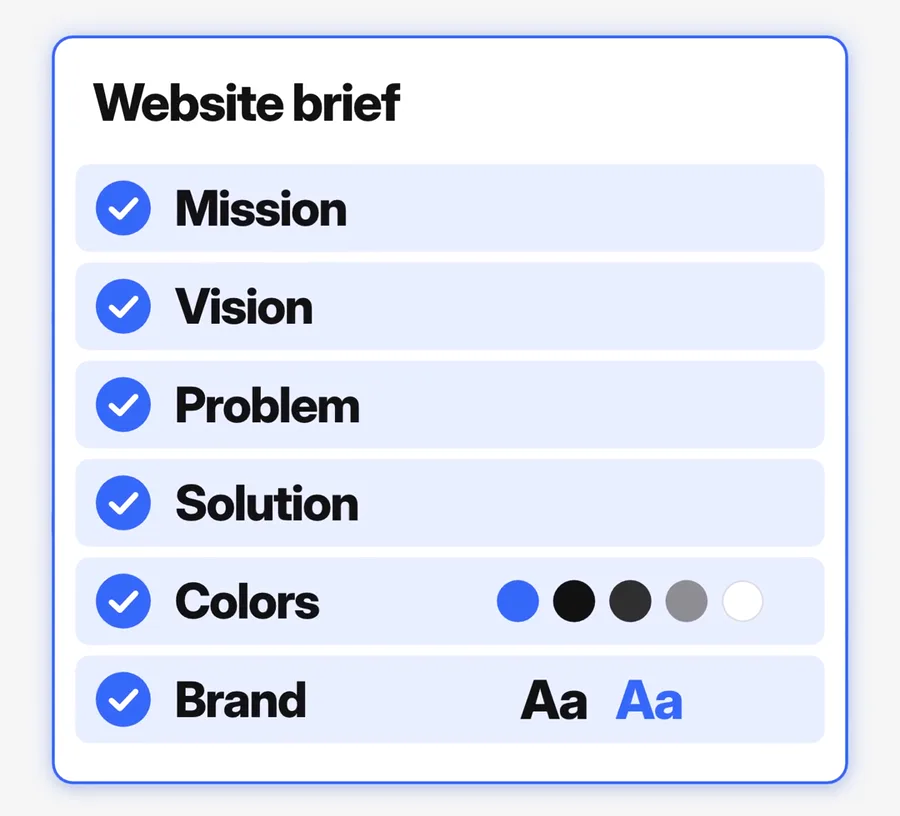
| Heading | What to write | Why the AI needs it |
|---|---|---|
| Business | What you sell, and where. | The headline and the page title |
| Customers | Who buys, and what they want to know before they buy. | The words and the order of the sections |
| Mission | Why the business exists, in one sentence. | The main message of the About section |
| Vision | Where the business will be in a few years. | The tone of the About page |
| Problem | The problem of your customers, in their words. | The first lines of the home page |
| Solution | How you solve it, and what you do that others do not. | The main promise of the page |
| Colors | Your brand colors as hex codes. A hex code is a six-character color code, for example #1A73E8. | "Blue" has many shades. A hex code gives one exact color. |
| Brand | Your logo, your fonts and the feel of the brand in three words. | The look of the wireframe and the code |
| Pages | The pages that you need, and the home page sections in order. | The start point of the wireframe |
| Main action | The one thing that a visitor must do: call, book, buy or send a form. | The main button on each page |
| Proof | Real reviews and real results that you have permission to show. | If this is empty, the AI must not invent proof. |
Keep each answer short and specific. "We repair phones on the same day" tells the AI more than "We give the best service".
The prompt for Step 1
I want a website for my business. Do not write any code. First, help me write a website brief.
Ask me one question at a time. Use plain words. Ask about:
1. My business: what it sells and who buys it.
2. The mission: why the business exists.
3. The vision: where the business will be in a few years.
4. The problem: the problem that my customers have.
5. The solution: how my business solves that problem.
6. The colors: the colors of my brand. Use hex codes if I have them.
7. The brand: my logo, my fonts and the feel of my brand.
8. The website: the pages that I need and the one thing that a visitor must do.
If I do not know an answer, give me 3 options to choose from.
When you have all the answers, write one document called "Website brief". Use these headings: Mission, Vision, Problem, Solution, Colors, Brand, Pages. Do not invent facts, prices or reviews. If you do not have a detail, write [NEED: ...] in its place.Prefer a one-click copy? The prompts for all three steps are on our free prompt page.
How to write the brief, step by step
- Open Claude or ChatGPT. Start a new chat.
- Paste the prompt above. Send it.
- Answer each question in your own words. The AI asks the next question after each answer.
- If you do not know an answer, ask for the 3 options. Choose one, or change one to fit your business.
- Read the final document. Find each [NEED: ...] mark. Give the AI the fact for each mark.
- Copy the final brief into a plain text file. You need it in Step 2 and in Step 3.
What you see: one question at a time, then one document with your answers under each heading. This is the longest of the three steps, because most of the time goes to your own answers.
If there is a problem: if the AI asks all of the questions at once, reply "Ask me one question at a time." If it adds a fact that you did not give, reply "Remove each fact that I did not give you. Write [NEED: ...] in its place."
A website brief template to copy
Do you prefer to write the brief yourself? Copy this template into a document. Write your answers after each line. Then paste it into Claude or ChatGPT and ask it to find the weak answers.
WEBSITE BRIEF
BUSINESS
Business name:
What we sell (one sentence):
Where we sell it (city, country or online):
CUSTOMERS
Who buys from us:
What they want to know before they buy:
MISSION
Why the business exists (one sentence):
VISION
Where the business will be in a few years:
PROBLEM
The problem that our customers have, in their words:
SOLUTION
How we solve that problem:
What we do that others do not:
COLORS (hex codes)
Main color:
Second color:
Background color:
Text color:
BRAND
Logo file:
Fonts:
The feel of the brand in 3 words:
Words that we never use:
PAGES
Pages that we need:
Sections of the home page, in order:
MAIN ACTION
The one thing that a visitor must do:
The words on the main button:
PROOF (real only, with permission)
Reviews that we can show:
Results that we can show:
WEBSITES WE LIKE
Link 1, and what we like about it:
Link 2, and what we like about it:Check your brief before Step 2
- Each heading has an answer, and no [NEED: ...] mark stays.
- Each fact is true today: prices, address, hours and offer.
- The main action is one action. "Book a call" is one action. "Book, call, buy or follow us" is four.
- Each color has a hex code, and each review is real.
- General words like "quality" and "trusted" are gone. In their place, the brief says what you do and for whom.
Step 2: Make the wireframe from the brief
Paper and pen.dev are design apps. Both connect to Claude or ChatGPT through MCP (Model Context Protocol), an open-source standard that connects AI apps to other systems. Then the AI draws the wireframe in the app for you. In this setup, the app must stay open while the agent works.
Option A: Connect Paper
- Download Paper Desktop and open it. It starts its MCP server.
- Open a file. Click an empty area of the canvas.
- Open the Connect your agent dialog in the top-right corner, or the MCP panel on the right.
- Click Add to Claude for Claude and Claude Code. Click Add to Codex for the ChatGPT app and the Codex command-line app.
- Restart Claude Code and type
/mcp. Paper is in the list. In ChatGPT, open a new chat in the Codex tab. - In a new Paper file, test it: "Create a basic Hello World frame in Paper." Allow the permission request. The frame shows in your file.
The Paper MCP guide has manual steps for each app.
Option B: Connect pen.dev
- Download the pen.dev app, or add its extension to VS Code or Cursor.
- Open a new .pen document, the pen.dev design file.
- Open Settings, then MCP. Enable your client, for example Claude Code or Codex.
- Restart the client. Make sure that
pencilis in its MCP server list. The server still has the old name.
The pen.dev MCP guide has the full steps.
The prompt for Step 2
Send this to the agent that you connected. Paste your brief at the end. For pen.dev, write pen.dev in place of Paper.
Read my website brief below. Then make a wireframe of my homepage in Paper. A wireframe is a simple drawing of the page layout. It has grey boxes for text and images. It has no colors and no photos.
Rules:
1. Make the desktop page 1440 px wide. Then make a phone version 390 px wide.
2. Use the pages and the sections from my brief. Put the most important section at the top.
3. Put a short label on each box, for example "Headline", "Photo" or "Button".
4. When you finish, look at the full page. Fix any problem in the layout.
5. Do not write any code.
Then list the sections in order and ask me what to change.
My website brief:
[paste your website brief here]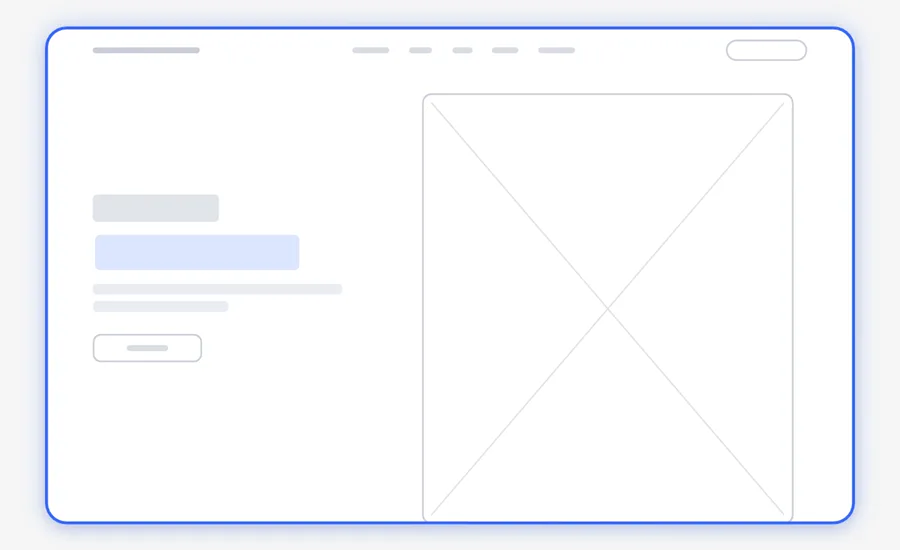
Change the wireframe until you like it
- Look at the desktop page. Then look at the phone version.
- Ask for one change in each message. For example: "Move the photo to the left."
- Check that each section from the brief is there, in your order.
- Check that a visitor can find the main action fast.
- When you like the layout, tell the agent that the wireframe is final.
If there is a problem: if the agent cannot see the design, make sure that the app is open with a file open. Then restart the agent. If the wireframe has colors or photos, say "Use grey boxes only."
Step 3: Make the code and put the website online
Our choice for this step is Next.js, a framework (a set of ready parts) for websites from Vercel. We add Three.js, a JavaScript 3D library by mrdoob and the three.js contributors, only when the brief asks for a 3D part. Both are free and open source.
Install Claude Code or Codex
- On a Mac or on Linux, open Terminal. Paste this line and press Enter:
curl -fsSL https://claude.ai/install.sh | bash - On Windows, open PowerShell. Paste this line and press Enter:
irm https://claude.ai/install.ps1 | iex - Open a new terminal window. Type
claude. Connect your Claude account in the browser. - For Codex, use the Codex tab in the ChatGPT app, or install the Codex command-line app.
Make the website from the wireframe
- Make a new, empty folder. Put your brief in it as a plain text file.
- Open a terminal in that folder. Type
claudeorcodex. - Make sure that this agent can read Paper or pen.dev. If it cannot, connect it as in Step 2.
- Paste the prompt below. Read each request from the agent before you approve it.
Turn my wireframe into a real website.
1. Read the wireframe in Paper. Read the website brief in this folder.
2. Make the website with Next.js. Use Three.js for a 3D part only if my brief asks for one.
3. Keep the same layout as the wireframe. Use the colors and the brand from my brief.
4. Use the real words from my brief. Do not invent facts, prices or reviews.
5. Make each page work on a phone and on a computer.
6. Start the website on my computer and tell me how to open it.
Do not deploy the website yet. I will check it first.What you see: the agent reads the wireframe and the brief, writes the files and starts the website on your computer. A Next.js website on your computer usually opens at http://localhost:3000. Next.js needs Node.js 20.9 or later. If the agent cannot find it, install it.
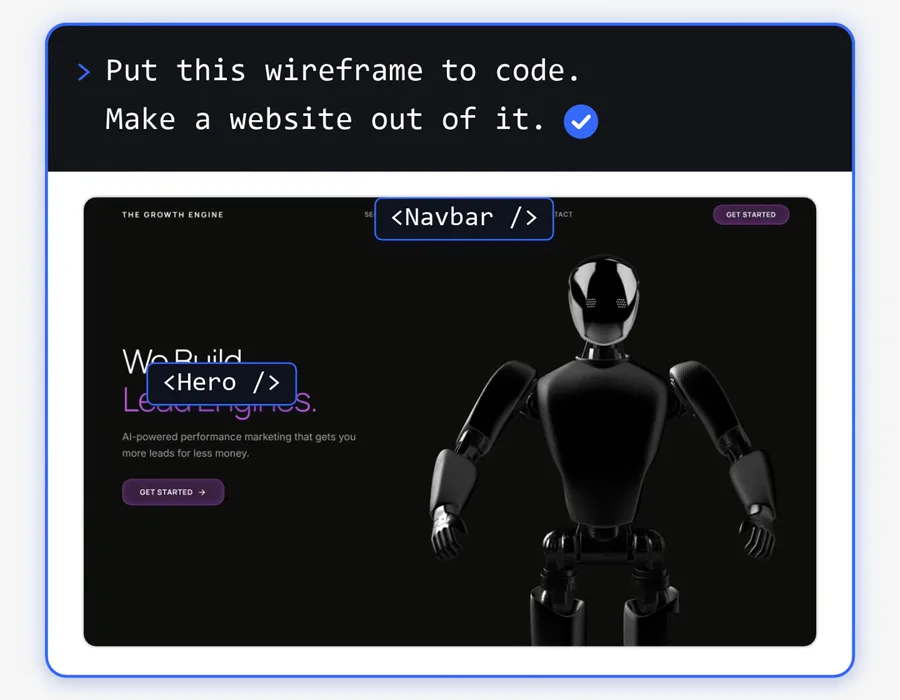
Open the local link. Compare each section with the wireframe and each fact with the brief. Make the browser window narrow to check the phone layout. Ask for one fix in each message.
Deploy the website
Deploy means to put the website on the internet. When the website works on your computer, paste this into the same chat:
Deploy this website on Vercel. If I do not have a Vercel account, tell me what to do first. When the website is live, give me the link.- The agent uses the Vercel command-line tool. If Vercel asks for your login, enter it yourself in the browser.
- When the deploy is complete, open the link on your phone and on your computer.
- For Netlify, write Netlify in place of Vercel.
netlify loginopens a browser window.netlify deploy --prodputs the website on its main link.
Netlify runs Next.js websites with no extra configuration, through its open-source OpenNext adapter.
Go further
- Paste the brief before each new request. For a new page, ask for its wireframe first, with the same rules.
- Change the brief first. If your offer changes, edit the brief. Then ask the agent to update the website from it.
- Use the brief outside the website. The same facts help the AI write your ads and your emails.
What it costs
| Tool | Free plan | Paid plan |
|---|---|---|
| Claude | Free, with usage limits. No Claude Code. | Pro: $20 a month, or $17 a month billed yearly. Includes Claude Code. |
| ChatGPT and Codex | Free and Go ($8 a month) list Codex in the desktop app only. | Plus: $20 a month. Codex on the web, in the command-line app and in code editors. |
| Paper | 100 MCP tool calls each week, unlimited editors. | Pro: $16 per editor a month, billed yearly. |
| pen.dev | Unlimited MCP tool calls while you design. 1 agent at a time. | Pro: $16 per user a month. Ultra: $48. |
| Vercel | Hobby: personal or non-commercial use only. | Pro: $20 a month, with $20 of usage credit. |
| Netlify | 300 credits each month, with a hard limit. | Personal: $9 a month. Pro: $20 a month. |
| Next.js, Three.js | Free, MIT license. | None |
We checked these prices on 19 November 2026. A domain name is a separate cost.
Limits and common problems
- Vercel Hobby is not for a business. The Vercel Terms of Service say that you can use the Hobby plan only for personal or non-commercial use.
- Netlify Free can pause your website. A production deploy uses 15 credits, so 300 credits pay for 20 deploys and nothing else. At zero credits, Netlify pauses your projects, and visitors see "Site not available".
- Free plans have no guarantee. Vercel and Netlify both say that they can remove a free project at any time, without notice.
- The Paper limit. If you use the 100 MCP tool calls of the week, use pen.dev or upgrade to Paper Pro.
- The pen.dev limit. The free plan lists "5 days / month designing with an agent for free".
- AI can invent facts. The prompts tell it not to. Still, read every word before you deploy.
Alternatives, and when to choose them
- No wireframe. For one simple page, you can ask for the code right after the brief. You lose the cheap layout check.
- Paper or pen.dev. Choose Paper if a team must edit the design at no cost. Choose pen.dev if 100 MCP tool calls a week is not enough.
- Vercel or Netlify. We found no non-commercial rule for the Netlify free plan in its Self-Serve Subscription Agreement. Vercel makes Next.js, but a business needs Vercel Pro.
- A website builder. If you want to edit the text yourself each day without AI, a builder with a visual editor can suit you better.
Who this guide is not for
- Businesses that need a shop, payments or user accounts from the first day. A developer must check that code before launch.
- Businesses that want a website with no plan limits at no cost.
Frequently asked questions
How long should a website brief be?
There is no fixed length. Each heading needs a clear and specific answer. Short, exact answers help the AI more than long, general text. If you do not have an answer yet, write [NEED: ...] under the heading and add the fact later.
Can ChatGPT or Claude write my website brief for me?
Yes. The free plan of either app can ask you the questions and write the document. But the facts must come from you. If the AI adds a fact that you did not give, remove it before you use the brief.
What is the difference between a website brief and a wireframe?
A website brief is text. It holds the facts about your business, your customers, your colors, your brand and your pages. A wireframe is a simple drawing of the page layout, with grey boxes and no colors. The AI makes the wireframe from the brief.
Is Pencil the same app as pen.dev?
Yes. The pen.dev website says "pencil.dev is now pen.dev". In your AI client, the MCP server of the app still shows the old name, pencil.
Do I need to know how to code to build a website with AI?
No. Claude Code or Codex writes the code. You write the brief, approve the wireframe, check the website and ask for changes in plain words.
Can I give the same brief to a human web designer?
Yes. A website brief holds the facts that a designer asks for at the start of a project. You can give the same document to a designer, to Claude or to ChatGPT.
Sources
- Paper pricing, Paper MCP guide and Paper downloads
- pen.dev pricing, pen.dev MCP guide and pen.dev downloads
- What is the Model Context Protocol (MCP)?
- Claude pricing and Claude Code setup
- ChatGPT plans, Codex pricing and Codex on GitHub
- Next.js installation guide and three.js on GitHub
- Vercel Terms of Service, Vercel pricing and Vercel CLI
- Netlify pricing, Netlify credits, how Netlify credits work and Netlify Self-Serve Subscription Agreement
- Netlify CLI and Next.js on Netlify