

Installing a Claude Code plugin takes two short commands. Those same two commands can put code on your computer that runs with your permissions. Anthropic's documentation says so directly, and it adds that Anthropic cannot verify what third-party plugins contain.
So we install every plugin in the same order: find the real source, scan it, read what it will add, pick a scope, confirm it loaded. This guide walks through that routine, then applies it to five free projects. Together they cut the code your agent writes, let it read more of the web, pool free AI models and give it 66 film styles.
Short answer: in Claude Code, type /plugin marketplace add owner/repo, then /plugin install name@marketplace. Read the panel that opens, choose a scope, and check that the plugin's commands appear when you type /.
- A plugin can run code with your permissions, so scan anything from a publisher you do not know.
- NVIDIA's free SkillSpector can scan a GitHub repository before you install it.
- Local scope keeps a new plugin inside one project, which is the careful way to try it.
- Plugins add to what Claude Code loads each session, so remove the ones you stop using.
What a Claude Code plugin is
A plugin is a package that adds abilities to Claude Code. One plugin can hold any mix of these parts:
- Skills and commands: written instructions that enter Claude's context and shape what it does.
- Agents: specialist helpers Claude can hand work to.
- Hooks: shell commands that run on their own at set moments, such as before Claude uses a tool.
- MCP servers: connectors that give Claude new tools to call.
A marketplace is a catalog of plugins, usually stored in a GitHub repository. Anthropic runs an official one called claude-plugins-official, and Claude Code adds it for you. Any other marketplace you add yourself, once.
People online use the word plugin loosely. Of the five tools in this guide, Ponytail and Lemo-Opuscar install through a marketplace. SkillSpector and Agent Reach are command-line programs, and FreeLLMAPI is a small server that runs on your own computer. All five add something to Claude Code, and each one installs a little differently, so each gets its own steps below.
Before you start
- A paid Claude account. Claude Code needs a Pro, Max, Ultra, Team, Enterprise or Console account. The free claude.ai plan does not include it. Prices are on Claude's pricing page.
- Claude Code itself. On a Mac, run
curl -fsSL https://claude.ai/install.sh | bashin Terminal. On Windows, runirm https://claude.ai/install.ps1 | iexin PowerShell. Open a new terminal window and runclaude --version. You should see a version number. If you prefer no terminal at all, the desktop app has a plugin browser too. - A test folder. Make an empty folder, open Claude Code inside it, and try new plugins there first.
- uv, a small program that installs command-line tools. SkillSpector uses it. Install uv with
curl -LsSf https://astral.sh/uv/install.sh | shon a Mac, orpowershell -ExecutionPolicy ByPass -c "irm https://astral.sh/uv/install.ps1 | iex"on Windows.
Each marketplace plugin installs in one short step. FreeLLMAPI takes longest, because you sign up with each free AI provider you want to use.
The routine for any Claude Code plugin
- Find the real source. Open the project on GitHub and check who publishes it. Look-alikes exist. Agent Reach warns that a package using its name on PyPI is a different project, and Ponytail's author says genuine copies come only from their GitHub repository or npm package.
- Scan it. The next section shows how. Skip this only for a publisher you already trust.
- Add the marketplace. In Claude Code, type
/plugin marketplace add owner/repo. You should see a message that starts with "Successfully added marketplace". Plugins in Anthropic's official marketplace skip this step. - Open the plugin's details. Type
/plugin install name@marketplace. Inside a session this does not install anything yet. It opens a panel so you can review the plugin first. - Read the Will install list. It names the commands, agents, skills, hooks and servers the plugin adds. Look hardest at hooks and servers, because they run by themselves and sit outside Claude Code's permission rules and sandbox. Some third-party plugins show "Components will be discovered at installation" instead. In that case, open the repository and read
hooks/hooks.json,.mcp.jsonand thebinfolder. - Choose a scope. The table below explains the three choices.
- Read the last line of the install summary. "Plugin is now active" means you are done. "Run /reload-plugins to apply" means one more command. "The plugin couldn't be loaded" means you should open the Errors tab in
/plugin. - Confirm it works. Type
/and look for the plugin's name, or runclaude plugin listin your terminal.
| Scope | Who gets the plugin | Use it for |
|---|---|---|
| User | You, in every project on this computer | Tools you have tried and trust |
| Project | Everyone who works in this repository | A plugin your whole team agrees on |
| Local | You, in this repository only | Trying something new |
In the desktop app, click the + next to the prompt box and choose Add plugins. In VS Code, type /plugins. Cloud sessions, including claude.ai/code in a browser, do not load the plugins you installed on your own computer.
You can also run the same steps from a normal terminal with claude plugin marketplace add owner/repo and claude plugin install name@marketplace. Those install at user scope unless you add --scope local, and the terminal version does not stop to show you the review panel.
Step 1: Install SkillSpector and scan first
SkillSpector is NVIDIA's free scanner for AI agent skills, released under the Apache-2.0 license. Its README lists 71 vulnerability patterns across 17 categories, including prompt injection and data theft. The same README cites a research dataset of 31,132 skills, where 26.1% contained vulnerabilities and 5.2% showed likely malicious intent.
- Install it from your terminal. It needs Python 3.12 or newer.
uv tool install git+https://github.com/NVIDIA/skillspector.git - Scan a repository before you install it. The
--no-llmflag runs the fast pattern check and sends nothing to an AI model.skillspector scan https://github.com/DietrichGebert/ponytail --no-llm - Read the result. You get a risk score from 0 to 100, a recommendation and a list of findings. A score of 50 or under comes back as SAFE or CAUTION. A CAUTION still has findings worth reading.
- For anything rated critical or high, stop. NVIDIA's guidance is to block these until they are fixed or formally accepted. Paste the finding into Claude and ask what it means in plain English before you decide.
- For a deeper pass, let an AI model review the skill too. SkillSpector can use your existing Claude Code login. Set
SKILLSPECTOR_PROVIDERtoclaude_cli, then run the scan without--no-llm. This pass uses tokens from your plan.
A low score cannot prove a plugin is safe. A pattern-only scan can miss what an AI review would catch, and SkillSpector's documentation says binary or unreadable files do not count as successfully analyzed. Third-party marketplaces also have auto-update turned off by default, so the files you scanned stay the same until you choose to update. Scan again when you do.
Step 2: Add Ponytail so your agent writes less code
Ponytail, by DietrichGebert (MIT license), tells your agent to write only what a task needs. Before writing anything, the agent checks whether the feature needs to exist at all, whether your project already has it, and whether a standard tool covers it. It writes new code only after those checks.
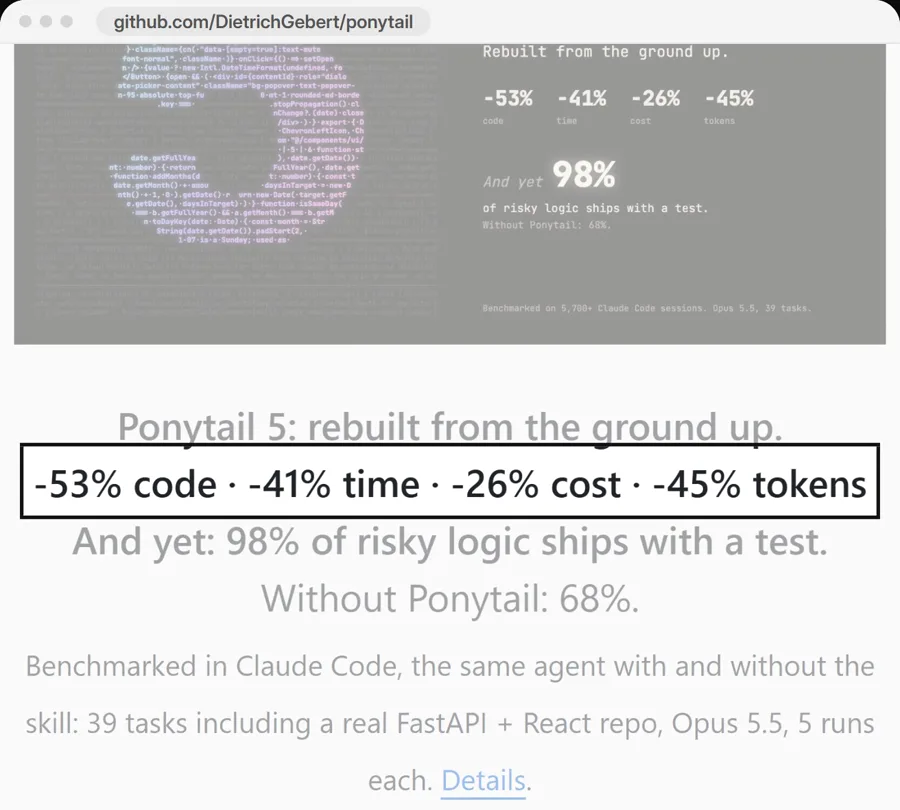
The project tested itself on 39 tasks in Claude Code, using Opus 5.5, five runs per task, with and without the skill. It reports 53% less code, 41% less time, 26% lower cost and 45% fewer tokens. It also reports that 98% of risky logic shipped with a test, against 68% without Ponytail. These numbers come from the project, so compare them against your own usage.
- Scan it, as shown above.
- In Claude Code, send these as two separate messages:
/plugin marketplace add DietrichGebert/ponytail/plugin install ponytail@ponytail - Choose local scope for your test folder.
- Start a task. Ponytail runs in every session, and a band above the prompt shows what the current task used.
Type /ponytail lite, /ponytail full or /ponytail off to change how strict it is. /ponytail-review checks your latest change for bugs and risks, and /ponytail-help lists the rest.
Step 3: Add Lemo-Opuscar for animated films
Lemo-Opuscar by LemoLab gives Claude Code 66 film styles. Each style is a written style prompt plus a demo film that Claude Opus 5.5 made entirely in code, with no video model. You can browse them in the gallery.
- Scan
https://github.com/lemomo-ai/lemo-opuscarwith SkillSpector. - Run these in your terminal:
claude plugin marketplace add lemomo-ai/lemo-opuscar claude plugin install lemo-opuscar@lemolab - Open Claude Code in an empty folder and name a style:
Make a 30-second film in the watercolor style that explains what my bakery does. - Not sure which style fits? Type
/lemo-opuscar:lemo-opuscarby itself and it asks you what you want to make.
You need Node 20 or newer, ffmpeg 7 or newer, and Python 3.11 or newer (or uv). The project says the agent installs whatever else is missing. Plan for 30 to 60 minutes per film and a fair amount of tokens. The code is MIT. The demo films are CC BY 4.0, so if you reuse one, credit LemoLab with a link to the repository.
Step 4: Add Agent Reach so your agent can read more of the web
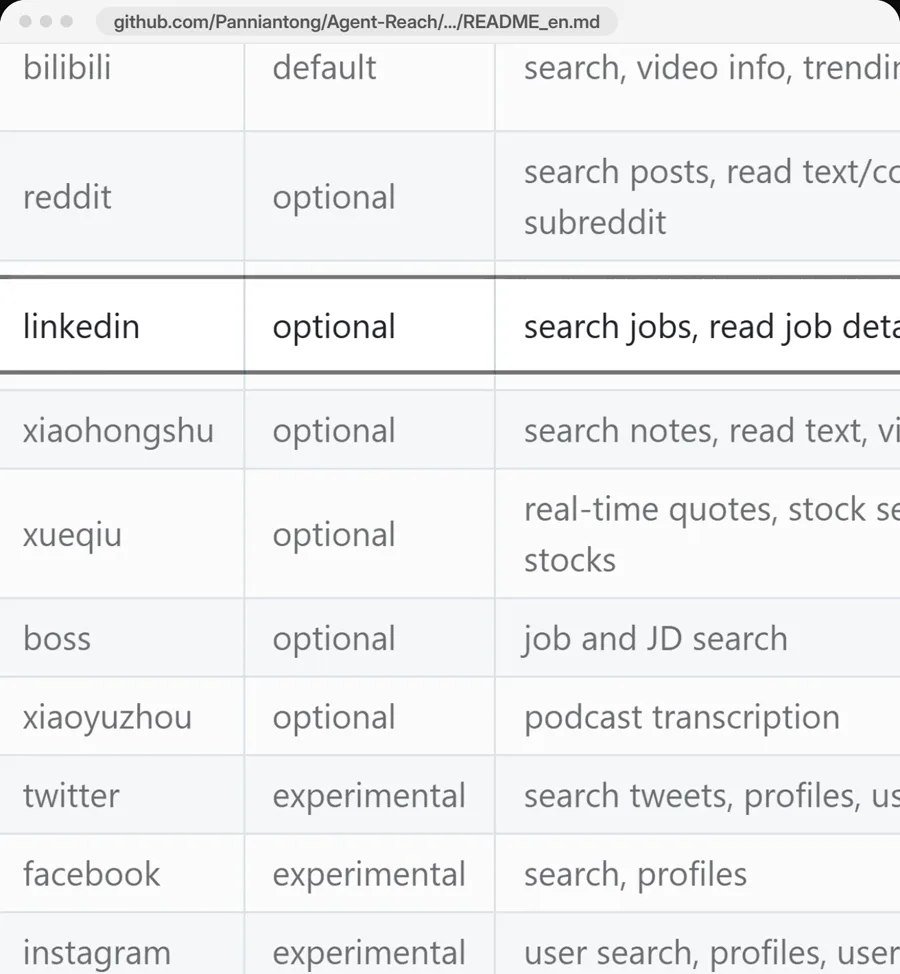
Agent Reach by Panniantong (MIT license) is one command-line tool that lets your agent search and read sites it struggles with alone. It charges no API fees. It only reads. It never posts, comments, likes or sends messages.
| Site | Status | What it needs |
|---|---|---|
| Web pages, GitHub, YouTube | On after install | Nothing. YouTube speech-to-text needs a Groq or OpenAI key |
| Add it when you want it | A login | |
| Add it when you want it | Job search and job details only. Public jobs need nothing | |
| X, Instagram, Facebook | Experimental, can break at any time | A login |
- Scan
https://github.com/Panniantong/Agent-Reachwith SkillSpector. - Paste this into Claude Code:
Install Agent Reach: https://raw.githubusercontent.com/Panniantong/Agent-Reach/main/docs/install.md - Allow it to run commands when asked. It may install uv.
- Pick the extra sites you want, or say "add Reddit" later.
Sites that need a login reuse the login in your Chrome for that one site. Your passwords are never read. That login is usually your main account, and platforms may restrict accounts used for automation, so the project recommends a secondary account. Tell your agent which one to use. If you need to enter an API key, run agent-reach configure groq-key in your own terminal. Never paste keys into a chat.
Step 5: Add FreeLLMAPI only if the trade suits you
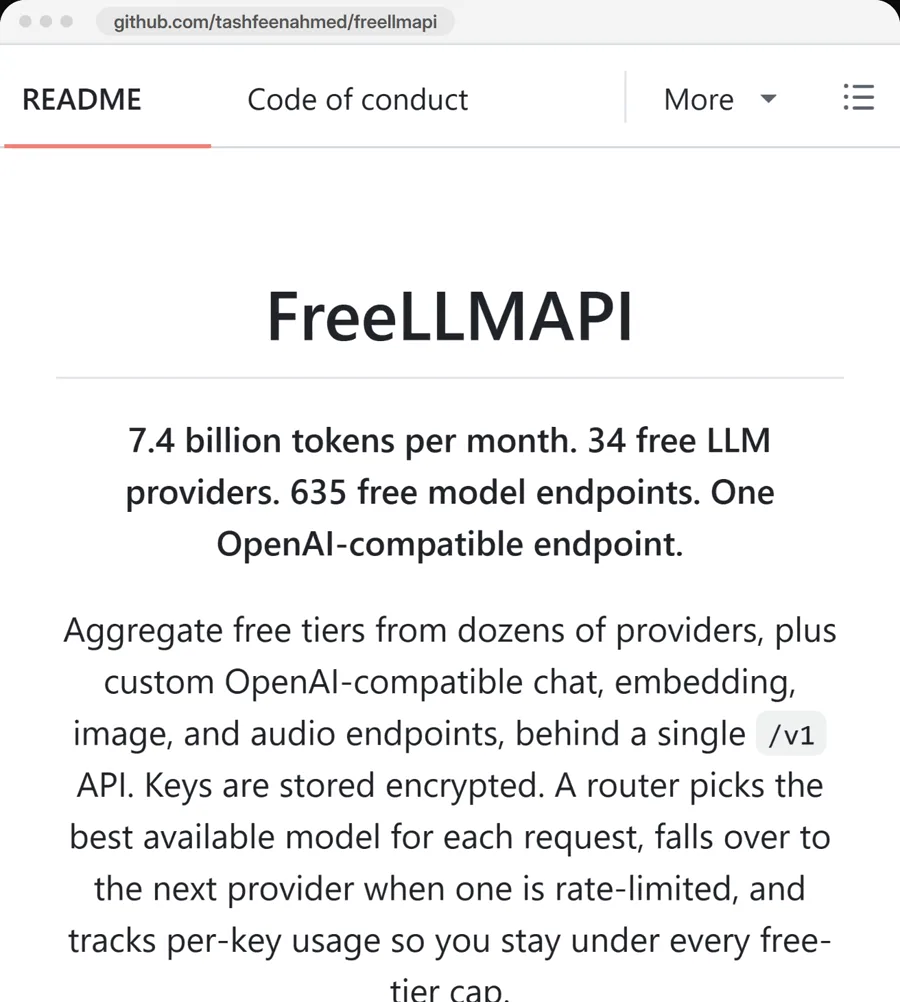
FreeLLMAPI by tashfeenahmed (MIT license) stacks the free tiers of 34 AI providers behind one local address. Its own count is about 7.4 billion tokens a month across 635 model endpoints. You add your own free key for each provider, and when one provider hits its rate limit, the router moves to the next one.
Read these limits before you set it up:
- The project lists no frontier models, variable speed and no uptime promise. Quality drops late in the day as the top models hit their daily caps, then resets at midnight UTC.
- Its README says it is for personal experimentation and learning, and tells you to switch to a paid API before you ship anything real.
- Each provider's terms still apply. The project's own review flags several providers for caution and says to avoid one.
- Anthropic does not endorse or audit third-party gateways, and does not support routing Claude Code to non-Claude models through any gateway. If something breaks here, Anthropic support will not help.
- Your requests go to whichever provider the router picks. Keep client data and anything confidential out of the pool.
- Install it. On Mac or Windows, download the desktop app from the Releases page. On a Mac or Linux machine with Docker, the project also offers
curl -fsSL https://freellmapi.co/install.sh | bash. - Open the dashboard from the tray icon, or at
http://localhost:3001for a Docker install. - Sign up for the free tiers you want. Add each key on the Keys page, then copy the single key shown in that page's header.
- Start Claude Code on the pool. This command needs Node 20 or newer and keeps your key out of config files:
npx freellmapi launch --api-key YOUR-KEY - To make it permanent, use the setup command. Add
--dry-runfirst to preview the change. It backs up your existing config before it writes.npx freellmapi setup-claude --url http://localhost:3001 --api-key YOUR-KEY --dry-run
The router is free. An optional paid live catalog ($19 a year, or $49 once) gets new models sooner.
The one-prompt version
If you would rather have Claude do the work, paste this into Claude Code. It installs the scanner first, then checks each of the others before installing it.
Set up these 5 tools in Claude Code for me, one by one. Start with NVIDIA SkillSpector, and use it to scan each of the others before you install it. Read each README and follow its install steps. Ask me before you change any settings, and tell me when you need a key or a login from me.
1. https://github.com/NVIDIA/skillspector
2. https://github.com/tashfeenahmed/freellmapi
3. https://github.com/lemomo-ai/lemo-opuscar
4. https://github.com/DietrichGebert/ponytail
5. https://github.com/Panniantong/Agent-ReachPrefer a one-click copy? The same prompt is on our free prompt page.
Stay at the keyboard while it runs, because it will stop to ask for permissions and keys. Delete the FreeLLMAPI line if you do not want that one.
Keep your plugin list short
Each plugin can add tokens to every message you send, even a free one. Four checks keep that under control:
- Run
claude plugin details namein your terminal. The Always-on line shows how many tokens that plugin adds to every session. - Run
/usageon a paid plan. It breaks recent usage down by skills, plugins and MCP servers, and suggests what to change. - Open
/plugin, press Tab to reach the Installed tab, and look under Not used recently. - Press Space on a plugin to switch it off, or run
claude plugin disable name@marketplace.
To remove a plugin completely, run claude plugin uninstall name@marketplace. Its files stay in Claude Code's cache folder for 14 days, then a background sweep clears them.
To update a third-party plugin, run claude plugin update name@marketplace. Scan the repository again first, since the code may have changed since your last check.
What it costs
| Piece | Price | Watch for |
|---|---|---|
| Claude Code | Pro is $20 a month, or $17 a month billed yearly. Max starts at $100 a month | Usage limits vary by plan |
| SkillSpector | Free (Apache-2.0) | The optional AI review uses tokens |
| Ponytail | Free (MIT) | Nothing to pay |
| Lemo-Opuscar | Free (MIT, films CC BY 4.0) | A film takes 30 to 60 minutes and a fair amount of tokens |
| Agent Reach | Free (MIT), no API fees | YouTube speech-to-text needs your own Groq or OpenAI key |
| FreeLLMAPI | Free (MIT) | Optional live catalog at $19 a year or $49 once |
When something goes wrong
- "claude" is not found. Open a new terminal window. If it still fails, run
claude doctor, which lists install problems with suggested fixes. - The marketplace will not add. Check the spelling of
owner/repo. Any address that is not on GitHub needs the fullhttps://in front. - The plugin installed but its commands are missing. Run
/reload-plugins, then open the Errors tab in/plugin. - "/plugin isn't available in this environment." You are in a non-interactive run. Use the
claude plugincommands in your terminal. - SkillSpector exits with code 2. That means bad input or an unreadable source. Check the address you gave it.
- FreeLLMAPI answers get worse in the evening. The best free models have hit their daily caps. They reset at midnight UTC.
Who this is for, and who should skip parts of it
This setup suits founders, marketers and solo operators who already use Claude Code and want more from it without new subscriptions. Use the routine for every plugin you find, including ones from people you know.
Skip FreeLLMAPI if you handle client data, health records or anything under contract. Skip Lemo-Opuscar if your plan's usage limits are tight, since one film can take up a long working session. If your company manages your laptop, ask before installing anything: administrators can restrict which marketplaces are allowed.
Frequently asked questions
How do I install a plugin in Claude Code?
Type /plugin marketplace add owner/repo to add the plugin's marketplace, unless it is in Anthropic's official marketplace. Then type /plugin install name@marketplace, review the panel that opens, and choose a scope. In the desktop app, click the + next to the prompt box and choose Add plugins.
Are Claude Code plugins safe?
Not automatically. A plugin can run code on your computer with your permissions, and Anthropic cannot verify what third-party plugins contain. Check who publishes it, scan it with a tool such as NVIDIA SkillSpector, and read the Will install list before you accept.
What is the difference between a Claude Code plugin and a skill?
A skill is one set of instructions that Claude loads when it needs them. A plugin is a package that can hold skills along with agents, hooks and MCP servers, and it installs through a marketplace.
Which install scope should I choose?
Use local scope to try something new, because it applies only to you in that one repository. Use user scope for tools you trust in every project, and project scope when your whole team should have the plugin.
How do I remove a Claude Code plugin?
Run claude plugin uninstall name@marketplace in your terminal, or open the Installed tab in /plugin and choose Uninstall. Its cached files stay on disk for 14 days before a background sweep removes them.
Can Claude Code run for free with FreeLLMAPI?
Claude Code can run against a FreeLLMAPI pool, which stacks the free tiers of AI providers you add keys for. You still need Claude Code installed, and the pool has no frontier models. FreeLLMAPI says it is for personal experiments, and Anthropic does not support routing Claude Code to non-Claude models through a gateway.
Sources
- Anthropic: install and manage plugins
- Anthropic: plugin security and trust
- Anthropic: LLM gateways
- Anthropic: manage costs
- Anthropic: Claude Code setup
- NVIDIA SkillSpector on GitHub
- NVIDIA: scan agent skills before installation
- Ponytail on GitHub
- Lemo-Opuscar on GitHub
- Agent Reach English README
- FreeLLMAPI on GitHub