
An SEO audit is a full check of your website. It shows why Google does not show your pages, and which fix to do first. A person who does an audit by hand needs 4 to 8 hours.
Claude SEO is a free plugin for Claude Code. You type one command and your website link. Up to 17 AI agents check your website at the same time. After 10 to 15 minutes, you get a score out of 100 and a fix list, with the most important fix first.
We ran it on our own website. This guide gives you each step: the install, the audit, the report and what to do with the fix list. You do not need to write code.
Short answer: to do an SEO audit with AI, install Claude Code and the free Claude SEO plugin. Type /seo audit and your website link. Read the score and the action plan. Do the most important fix first, then run the audit again.
- The plugin is free and open source (MIT license). Claude Code needs a paid Claude plan or an Anthropic API account.
- A full audit takes 10 to 15 minutes and reads up to 500 pages.
- It checks technical SEO, content, on-page SEO, structured data, speed, images and AI search.
- The results are files on your computer: a full report and an action plan, sorted from Critical to Low.
- To check one page only, type
/seo pageand the page link. It uses less of your Claude plan.
What an SEO audit is, and what AI changes
An SEO audit checks everything that controls how search engines see your website. It has three main parts:
- Technical SEO. Can Google find, read and index your pages? This part checks your sitemap, your robots.txt file, your redirects and your page speed.
- Content. Do your pages answer the questions that people search for? Is the content helpful, deep enough and clear about who wrote it?
- On-page SEO. Do your page titles, descriptions, headings and links tell search engines what each page is about?
AI changes the speed. Claude SEO gives each part of the check to a separate AI agent. An agent is a separate Claude worker with one job, for example the technical check or the content check. The agents work at the same time, so a full audit takes 10 to 15 minutes.
AI also adds a new part to the audit: AI search. Many people now ask ChatGPT, Perplexity or Google AI Overviews for answers. The plugin checks how likely these tools are to use your pages as a source.
What Claude SEO checks
Claude SEO is an open-source plugin by Agrici Daniel. On 17 November 2026, it had more than 29,900 stars on GitHub, and the latest version was 2.6.2.
The plugin has 29 sub-skills and 20 specialist agents. A sub-skill is a set of instructions for one task. In a full audit, up to 17 agents work on your website at the same time.
The full audit gives one SEO Health Score from 0 to 100. The score is a weighted total of seven categories:
| Category | Weight | What it checks |
|---|---|---|
| Content quality | 23% | Experience, expertise, authority and trust (E-E-A-T), thin pages, readability |
| Technical SEO | 22% | robots.txt, sitemaps, canonical tags, security headers |
| On-page SEO | 20% | Page titles, descriptions, headings and links |
| Schema (structured data) | 10% | Schema.org markup, the code that tells search engines what a page is about |
| Performance | 10% | Speed, measured with the Core Web Vitals (LCP, INP and CLS) |
| AI search readiness | 10% | Access for AI crawlers, the llms.txt file, how easy your pages are to quote |
| Images | 5% | Image size and format, alt text |
The plugin also detects the type of your business: SaaS, local business, e-commerce, publisher or agency. Then it changes its checks to match. For a local business, it also checks your Google Business Profile and your reviews.
When the audit is done, Claude saves the results in a folder with your domain name, for example example.com-audit. The two main files are:
- FULL-AUDIT-REPORT.md: all the findings, category by category.
- ACTION-PLAN.md: the fixes, sorted into Critical, High, Medium and Low.
The folder also holds a file of findings for each category and, if possible, desktop and mobile screenshots. The plugin can also make a PDF version of the report.
What you need before you start
- A paid Claude plan or an Anthropic API account. The free Claude plan does not include Claude Code. The Pro plan costs $20 a month, or $17 a month if you pay $200 for a year.
- Claude Code 1.0.33 or newer. If you do not have Claude Code, follow the Claude Code install guide.
- Python 3.11 to 3.14. Python is a free program that the plugin needs for its checks. You can get it from python.org.
- A website link. Use your own website. If you do not have one, use a public website that you know.
- About 20 minutes. The install is quick, and the audit takes 10 to 15 minutes.
You do not need API keys. The plugin works without them. Later, you can connect free Google tools for real speed data. Stage 6 shows how.
Stage 1: Open Claude Code in a new folder
- Make a new, empty folder on your computer, for example
seo-audits. Claude saves the audit files in this folder. - Open a terminal in that folder. On Windows, open the folder, type
cmdin the address bar and press Enter. On a Mac, open Terminal, typecdand a space, drag the folder into the window and press Enter. - Type
claude --versionand press Enter. The version must be 1.0.33 or newer. - Type
claudeand press Enter. Claude Code starts. - If Claude Code asks if you trust the folder, select yes.
This stage takes about 2 minutes. A separate folder keeps the audit files in one place, away from your other work.
Stage 2: Install the Claude SEO plugin
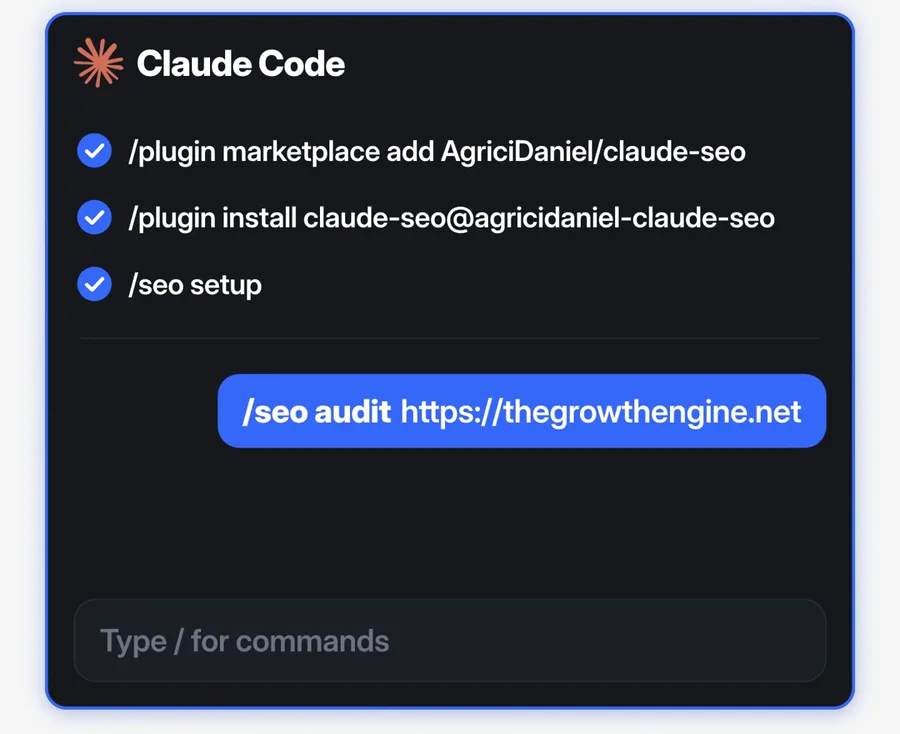
- In Claude Code, type this line and press Enter. It adds the plugin's marketplace, which is a list of plugins on GitHub.
/plugin marketplace add AgriciDaniel/claude-seo - Wait for the message "Successfully added marketplace".
- Type this line and press Enter:
/plugin install claude-seo@agricidaniel-claude-seo - Claude Code shows the details of the plugin. Read what the plugin adds.
- Select "Install for you". With this option, every project on your computer can use the plugin.
- If Claude Code shows "Run /reload-plugins to apply", type
/reload-pluginsand press Enter. - Type this line and press Enter:
/seo setup - Type
/seo doctorand press Enter. It checks that the plugin is ready.
The setup command makes a separate Python environment and a headless browser for the checks. A headless browser is a browser with no window. The setup does not change the rest of your computer.
A plugin can run commands on your computer. The Claude Code plugin documentation tells you to read the details of each plugin before you install it. Claude SEO is open source, so you can read all of its files on GitHub.
Stage 3: Run your first full audit
- Type
/seo audit, a space and your website link. Then press Enter./seo audit https://your-website.com - Use the full link with https. Use your home page, not a deep page.
- Wait 10 to 15 minutes. Claude starts several agents, and they work at the same time.
- If Claude asks for permission to run a command or to read a page, read the request and allow it.
- Keep the terminal open until Claude shows the summary.
The audit reads up to 500 pages of your website. It obeys your robots.txt file and follows up to 3 redirects for each link. It sends 5 requests at the same time at most, with 1 second between requests, so it does not overload your server.
Some websites need JavaScript to show their content, for example Next.js, React or Vue websites. The plugin opens these pages in its headless browser. Then it sees each page as a visitor sees it.
Stage 4: Read your score and your fix list
- Open the audit folder on your computer.
- Open FULL-AUDIT-REPORT.md in any text editor. The summary at the top gives the score, the type of business, the top 5 critical issues and the top 5 quick wins.
- Read the score for each category. The lowest category shows where your biggest problem is.
- Open ACTION-PLAN.md. Read the Critical fixes first.
- For each fix, read the reason. A good fix tells you what it is based on and how you will know that it worked.
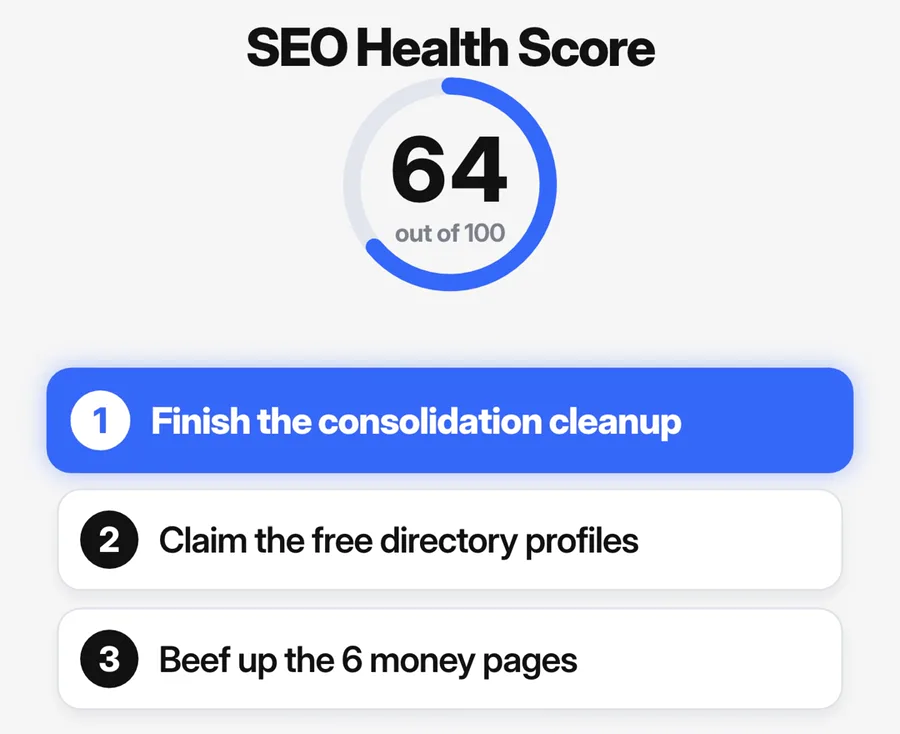
Here is our own result. On 10 June 2026, Claude SEO gave our website a health score of 64 out of 100. Content quality had the lowest category score. The top 3 fixes were:
- Finish the cleanup after we merged many old blog posts. Our sitemap and some links still pointed to the old pages.
- Claim free profiles on business directories, so that other websites link to ours.
- Add more content to our 6 main service pages, so that Google has a reason to index them.
Each fix came with the reason, the steps and the effort. The report also told us which fixes we could do in code and which fixes needed a person.
Stage 5: Turn the fix list into simple steps
An action plan can be long. Paste this prompt in the same chat. Claude reads the plan and gives you the most important work in plain words:
Read the file ACTION-PLAN.md in the audit folder. Show the 3 most important fixes. For each fix, write the steps in plain words.Prefer a one-click copy? The same prompt and the install lines are on our free prompt page.
Then ask Claude about each step that you do not understand. For example: "What is a canonical tag, and how do I add one in WordPress?"
Claude can also write some fixes for you. For example, it can write the Schema.org code for a page. If your website files are on your computer, Claude can change them. Check each change before you publish it.
Stage 6: Do one fix, then run the audit again
- Do the first Critical fix.
- Publish the change on your live website.
- Type
/seo auditand your website link again. - Compare the new score with the old score.
We did this on our own website. Our first audit, on 5 June 2026, gave 58 out of 100. Then we merged old blog posts, added security headers and added an llms.txt file. The next audit, on 10 June, gave 64.
To track changes over time, use the drift commands. /seo drift baseline saves a snapshot of a page. Later, /seo drift compare shows what changed.
For real data, connect Google. Type /seo google setup. It connects free Google APIs: PageSpeed Insights, Chrome UX Report, Search Console and Google Analytics 4. Your keys stay on your computer.
Other commands for smaller jobs
A full audit is not always necessary. These commands check one part of your website. They use less of your Claude plan.
| Command | What it does | When to use it |
|---|---|---|
/seo page <url> | A deep check of one page | Before you publish an important page |
/seo technical <url> | A technical audit in 9 categories | After a website move or a redesign |
/seo content <url> | A check of content quality and E-E-A-T | When a page gets visits but no leads |
/seo schema <url> | Finds, checks and writes Schema.org markup | When you want rich results in Google |
/seo geo <url> | A check for AI search | When you want AI tools to use your pages as a source |
/seo local <url> | Google Business Profile, citations and reviews | For a business with a shop or an office |
/seo plan <type> | An SEO plan for saas, local, ecommerce, publisher or agency | When you start a new website |
/seo content-brief <topic> | Target keywords, an outline and internal links | Before you write a new article |
Type /seo in Claude Code to see every command.
How the audit checks AI search
The /seo geo part of the audit scores how easy your pages are to quote. It checks that AI crawlers can reach your pages. It also looks for your brand on Wikipedia, Reddit, YouTube and LinkedIn.
Google gives a clear rule about AI search. Its guide to generative AI features in Search says that AI Overviews and AI Mode use the same core systems as normal Google Search. In Google's words, optimization for generative AI search "is still SEO".
The same guide says that Google Search does not use llms.txt files. An llms.txt file is a text file that describes a website for AI tools. Other AI tools can read it, so it does no harm. But it does not help you in Google.
So fix the basics first: pages that Google can index, fast pages and clear content. Then use the AI search part of the report.
Costs, limits and common mistakes
- Cost. The plugin is free under the MIT license, with no price for each website and no usage limit. You pay only for your Claude plan or your API use.
- Plan use. Five agents that need more judgment run on Claude Opus, and the other agents run on Claude Sonnet. So a full audit uses more of your plan than a check of one page.
- Usage check. Type
/usagein Claude Code to see your usage. On a paid plan, it also shows the share that plugins and subagents used. - Model choice. Each agent has its own file in the plugin's agents folder. You can change the model of any agent in that file.
- Speed data. Without Google keys, the Core Web Vitals are lab estimates, and the index status is a guess from the page. Our own report marked the speed score as an estimate for this reason.
- Hidden content. If a page shows its main content only after a scroll or a click, the results can be wrong.
- Large websites. The audit reads up to 500 pages. For a quick check, use
/seo pageon your most important pages. - Your data. The pages that the plugin reads go to Claude, the same as any other work in Claude Code. The reports stay on your computer. No other company sees your data unless you connect an extension or an API yourself.
- Two versions. The public version is free for everyone. Members of the AI Marketing Hub Pro community get a private version with early access to new features. You do not need it for this guide.
- The score alone. A common mistake is to watch only the score. The fix list is the useful part. Read the reason for each fix before you change a live website.
Common problems and fixes
- Claude Code does not know the /seo command. Type
/plugin list. If Claude SEO is not in the list, type the marketplace line and the install line again. - "No module named requests" or another Python error. Type
/seo doctor, then/seo setup. Do not install Python packages yourself. - "python is not recognized" on Windows. Install Python from python.org and tick "Add to PATH". If your Python is 3.15 or newer, also install Python 3.14.
- A browser error from Playwright (the browser tool of the plugin). Type
/seo setupagain, then/seo doctor. - "Request timed out after 30 seconds". The website is slow, or it blocks automated requests. Try again later.
- The audit takes too long. Your website has many pages, or slow pages. Use
/seo pageon your most important pages.
For more problems and fixes, read the Claude SEO guide to common problems.
Alternatives, and when to pick them
- Google Search Console. It shows your real search traffic and the pages that Google does not index. Every website owner needs it. Claude SEO can read its data after
/seo google setup. - PageSpeed Insights. This Google tool checks the speed of one page. Use it for a quick speed check with no install.
- Desktop crawlers and large SEO suites. The Claude SEO README says that crawlers such as Screaming Frog crawl faster and deeper. It also says that large SEO suites have their own backlink databases, and that many people use both. Claude SEO explains what it finds, sorts it by impact and answers your questions in plain English.
- An SEO agency or a consultant. The README compares prices: an agency audit at $2,000 to $15,000 or more for each project, as an example price. A person also does the fixes and knows your market. If you have no time for the fixes, a person is still the better choice.
Who this guide is not for
- People who do not want to use a terminal. The install needs a few typed commands.
- People with no paid Claude plan and no API account.
- Owners of very large websites. The audit reads up to 500 pages, so a desktop crawler is better for a website with thousands of pages.
- People who want someone else to do the fixes. The audit gives you a plan. Someone must still do the work.
Frequently asked questions
Can AI do a full SEO audit?
Yes. The free Claude SEO plugin for Claude Code checks technical SEO, content, on-page SEO, structured data, speed, images and AI search. It gives a score out of 100 and a fix list. A person must still decide on the fixes and do them.
Is Claude SEO free?
Yes. Claude SEO is free and open source under the MIT license. It runs inside Claude Code, and Claude Code needs a paid Claude plan or an Anthropic API account. The Claude Pro plan costs $20 a month.
How long does an SEO audit with AI take?
A full audit with Claude SEO takes 10 to 15 minutes and reads up to 500 pages. To check one page only, type /seo page and the page link. It is faster and uses less of your Claude plan.
Do I need API keys for Claude SEO?
No. The plugin works without keys. For real speed and traffic data, type /seo google setup to connect free Google APIs: PageSpeed Insights, Chrome UX Report, Search Console and Google Analytics 4.
Does Claude SEO work on Next.js, React or Vue websites?
Yes. If a page needs JavaScript to show its content, the plugin opens it in a headless browser, a browser with no window. Then it checks the page as a visitor sees it.
Does my website data leave my computer?
The pages that the plugin reads go to Claude, the same as any other work in Claude Code. The reports stay on your computer as files. No other company sees your data unless you connect an extension or an API yourself.
Sources
- Claude SEO on GitHub: README, install, commands, license and stars
- Claude SEO full audit skill: crawl settings, output files and score weights
- Claude SEO guide to common problems
- Claude Code documentation: install and manage plugins
- Claude Code documentation: manage costs and the /usage command
- Claude plans and prices
- Google Search Central: optimize your website for generative AI features
- Python downloads