

A design skill for Claude Code has more than 55,000 stars on GitHub. It says that it makes websites that do not look AI-made. We wanted to know if that is true for a normal business job.
So we made two empty folders and gave Claude Code the same prompt in each. One folder had the skill, Hallmark. The other folder had no skill. Claude with no skill finished in 21 minutes. Claude with Hallmark was not done after 294,000 tokens, and its page looked weaker to us.
This guide gives you the same test, step by step. Use it on Hallmark or on any other skill before you let a skill change how Claude works for you.
Short answer: to test a Claude Code skill, make two empty folders. Install the skill in one folder only. Give both chats the same prompt. Then compare the result, the time and the tokens.
- Install the skill for one project only. A global install puts the skill in every folder and spoils the test.
- Start a new chat after the install, so you know that the skill is loaded.
- Write down the time, the tokens and the questions that each chat asks.
- Judge the two pages at desktop width and at phone width, from the top to the end.
- In our test, Claude Code with no skill made the better page and finished first. Hallmark used more tokens because it checks its own work many times.
What a Claude Code skill is
A skill is a folder with a file called SKILL.md. The file gives Claude instructions for one type of job. The Claude Code skills documentation says that Claude uses a skill when it is relevant. You can also run a skill yourself: type a slash and the skill name.
Skills live in one of two places:
- Personal skills go in
~/.claude/skills/. Every project on your computer can use them. - Project skills go in
.claude/skills/inside one project folder. Only that project can use them.
This difference is important for a fair test. If the skill is a personal skill, both of your test folders can use it.
A skill also has a small cost when you do not use it. The documentation says that the description of each skill loads into every chat, so Claude knows what is available. The full skill loads only when Claude uses it. So each skill that you install adds a little text to every turn.
Why a popular skill still needs a test
GitHub stars show that many people saved a project. They do not show that the project works for your job.
Design skills are very popular now. On 16 November 2026, Hallmark had 55,749 stars, Impeccable had 111,009 stars and taste-skill had 116,471 stars. Each one says that it helps Claude make better pages.
A skill changes how Claude works on every job where Claude uses it. It can add steps, checks and questions. These can make the result better. They can also make the job slower and use more of your plan.
A test of about one hour tells you which is true for your type of work. You do it one time, and then you know.
What you need before you start
- Claude Code. Get it from the Claude Code page. The Free plan does not include Claude Code. The Pro plan costs $20 a month, or $17 a month when you pay $200 for one year.
- Node.js 18 or later. Hallmark installs with an
npxcommand, and Node.js includesnpx. Download Node.js from nodejs.org. - Google Chrome. Hallmark checks the page in a real browser. For these checks, it needs Chrome and a small tool called puppeteer-core. Without them, it runs only its simple checks on the code.
- One real prompt. Use a job that you will really give Claude. A test with a pretend job tells you little.
- About one hour. In our test, the chat with no skill took 21 minutes. The chat with Hallmark took longer.
You do not need to write code for this test. You type plain English, and Claude Code does the work.
Stage 1: Make two fair test folders
- Make a new folder with the name WITH SKILL. For our test, we used the name WITH HALLMARK.
- Make a second folder with the name WITHOUT SKILL.
- Keep both folders empty. An old file in one folder can change the result.
- Use the same Claude model in both chats. Type
/modelin each chat and select the same model. - Use the same effort level in both chats. Type
/effortin each chat and make sure that the level is the same.
This stage takes about 2 minutes. The aim is simple: the skill must be the only difference between the two chats.
Stage 2: Install the skill in one folder only
- Open a terminal in the WITH SKILL folder.
- Type this command and press Enter. It installs Hallmark for this folder only.
npx skills add nutlope/hallmark - Do not add
-gto the command. The Hallmark README says that-ginstalls the skill for every project. Then your WITHOUT SKILL folder can also use it. - If you do not want to type commands, open Claude Code in the WITH SKILL folder and send this message:
https://github.com/Nutlope/hallmark install this skill only in this project folder - If Claude asks to install a browser tool, say yes. Hallmark uses it to check the page in Chrome. The command is
npm i -g puppeteer-core. - Close the chat. Start a new chat in the same folder.
The last step is a safety step. Claude Code usually finds a new skill in an open chat. But the documentation says that a skills folder that did not exist at the start of the chat needs the /reload-skills command. A new chat removes that doubt.
Make sure that the test is fair. Open Claude Code in the WITHOUT SKILL folder and type a slash (/). Claude Code shows a list of commands, and each skill name becomes a command. If hallmark is in the list, the skill is installed for every project. Delete the folder ~/.claude/skills/hallmark, then install the skill again without -g.
Stage 3: Send the same prompt to both chats
- In the WITH SKILL chat, type
/hallmark, a space, and then paste your prompt. The slash name runs the skill directly. - In the WITHOUT SKILL chat, paste the same prompt with no slash command.
- Send both prompts at about the same time. Write down the start time.
- If a chat asks questions, give the same answers in both chats. Hallmark first asks one time for your material, such as photos, screenshots and real numbers.
- If one chat asks a question that the other chat did not ask, write it down. The questions are part of the result.
This is the prompt that we used for our test. It asks for the home page of a new coffee shop.
I need you to make a really impressive website home page which will also be the landing page for our customers. It is going to be super realistic and impressive in design. It is for our new coffee shop that we are opening soon, and the theme of our shop will be spiritual.Prefer a one-click copy? The same prompt is on our free prompt page.
For your own test, change the business and the theme. Use the same words in both chats. Do not improve the prompt in one chat only.
Stage 4: Measure the time and the tokens
A token is a small piece of text that Claude reads or writes. More tokens means that the job used more of your plan.
- While Claude works, read the line next to the spinner. It shows the time and a token count for the current turn.
- When a chat finishes, write down the time.
- Type
/usagein each chat. It shows the tokens that the session used. On a Pro or Max plan, it also shows your plan usage bars. The dollar figure is only for API accounts, which pay for each token. - Write the numbers in a table like this one.
| What to record | WITH SKILL | WITHOUT SKILL |
|---|---|---|
| Time to finish | ||
| Tokens used | ||
| Questions that it asked | ||
| Times that it checked its own work | ||
| Problems that you found |
If one chat runs for a long time, you do not have to wait for it. Write down its tokens when the other chat finishes. In our test, the Hallmark chat had used 294,000 tokens when we checked it, and it was still at work.
Stage 5: Judge the two pages
- Ask each chat to open its page in Chrome.
- Put the two windows side by side.
- Look at the top of each page for 5 seconds. Visitors see this part first, so it is the most important part.
- Scroll each page to the end. Find any empty spaces, broken photos or text that is not true.
- Make the browser window narrow, like a phone. Then make it very wide. Find any parts that move to the side or leave an empty space.
- Click every button and link. A form must send something. It must not only say thank you.
- If you can, show both pages to a colleague. Do not tell them which page used the skill. Ask which page they prefer.
Then decide. The better page is the page that does the job for your visitors. A page with more effects is not always the better page.
Our result: Hallmark against Claude Code with no skill
Our founder, Allen, did this test with the coffee shop prompt above. Both chats used the same Claude model. This table shows what each chat did.
| Claude Code with Hallmark | Claude Code with no skill | |
|---|---|---|
| Time | Not done when we checked | 21 minutes |
| Tokens | 294,000, and still at work | 271,000 at the end |
| Review | It checked its work many times. A fresh reviewer asked for 5 fixes, Hallmark made all 5, and a second reviewer checked the page again. | No skill steps |
| Top of the page | Calm and minimal, but weaker to us | Big, real photos of a mountain |
| Special effect | None that we noted | A scroll effect that shows the altitude go down |
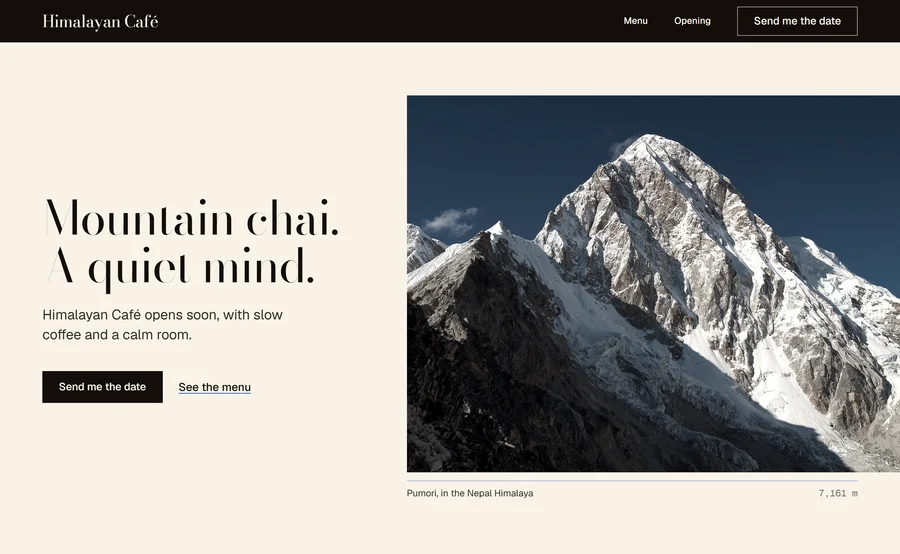

The Hallmark page also had a fault. It has a row of five photos. In a browser that is 1,920 pixels wide, all five photos fit, but the row still scrolls 176 pixels to the side. So the visitor scrolls to an empty space.
For this job, the skill did not win. Our verdict on the claim is hype. But this is the result of one test with one prompt. It is not a verdict on Hallmark for every job. Claude makes a different page each time, and Hallmark offers different themes each time.
What Hallmark does, and why it uses more tokens
Hallmark is free and open source under the MIT license. Its README says that Together AI made it. It works with Claude Code, Codex, Cursor and OpenCode.
The README gives the steps of a build:
- It reads the project and asks one time for your material: photos, screenshots and real numbers. It does not invent facts.
- It offers three themes that fit the prompt, from a catalog of fifty. Each theme sets the paper, the type, the colour and the surfaces.
- It builds the top part of the page alone, and it reviews that part before it builds the rest.
- It checks the page in a browser at eight widths. Then a reviewer with a fresh context checks the page again.
A reviewer with a fresh context is a new Claude helper that did not see the first build. It examines the page with no memory of the work. This is good for quality. It also explains the tokens, because each review reads the page again.
Hallmark also lists the signs that make a page look machine-made. These are some examples from its README:
- A small label above every heading.
- Labels in spaced capital letters.
- One word in a different colour in a headline.
- An email sign-up form at the end of every page.
- A form that says thank you but sends nothing.
For photos, Hallmark uses a list of 755 openly licensed photos on Wikimedia Commons, and it credits each photo on the page. It does not use stock photo sites such as Unsplash or Pexels.
If you already have a page, Hallmark has two more commands. /hallmark redesign ./src/app rebuilds a page and keeps its content and links. /hallmark audit ./index.html only writes a report. If you install Hallmark as a Claude Code plugin, the command is /hallmark:hallmark. You can see the themes at usehallmark.com.
Use the same test for any skill
The method works for every type of skill. Change the prompt and the checks to fit the job.
| Type of skill | Test prompt | What to compare |
|---|---|---|
| Design | A home page for your business | The top of the page, phone width, broken parts, time and tokens |
| Copy | A blog post or an email from your notes | Facts, tone, length, and how much you must change |
| Code review | A review of one small project | Real problems found, false alarms and time |
| Data | A report from one spreadsheet | Correct numbers, clear charts and time |
These rules make the test better:
- Use two or three prompts. One prompt can give a lucky result.
- If your plan allows it, run each prompt two times. Claude gives a different result each time.
- Use a job that you do every week. A skill that saves time on a weekly job is worth more than a skill that wins one demo.
Costs, limits and common mistakes
- The plan. Claude Code needs a paid plan, and Pro costs $20 a month. A long skill run uses more of your plan limits.
- A global install. With
-g, the skill is in both test folders, and your test shows nothing. - An open chat. If the install makes a new skills folder during a chat, Claude Code needs
/reload-skills. A new chat is simpler. - No browser tool. Without Chrome and puppeteer-core, Hallmark runs only its static checks. Then it cannot see the page in a real browser.
- Too many skills. Each installed skill adds its description to every turn. Remove the skills that did not win your test.
- One run only. Results change from run to run. If the two pages are close, do the test again before you decide.
Alternatives
| Option | What it is | When to select it |
|---|---|---|
| Claude Code with no skill | Claude's own design sense and your prompt | When it wins your test, as it did in ours. It needs no extra install. |
| Hallmark | A design skill by Together AI with fifty themes, browser checks and a fresh reviewer | When strict checks against machine-made signs are more important to you than time and tokens |
| Impeccable | A design vocabulary for AI agents that write code, with commands such as polish, bolder, critique and audit | When you want to improve a page one step at a time |
| taste-skill | Skills for art direction, reference images and a browser check | When you have reference images for the look that you want |
Use the same two-folder test for each option. Then you compare them on your own job, with your own numbers.
Who this test is not for
If you need one page today and you have no time, do not do the test. Use Claude Code with no skill and a clear prompt. Then tell Claude what to change.
If you do not want to use Claude Code at all, this test is not for you. A website builder with templates is a simpler start.
If you make pages for clients every week, do the test. One hour now can save you many tokens and many fixes later.
Frequently asked questions
How do I test if a Claude Code skill works?
Make two empty folders. Install the skill in one folder only, without the global option. Give both chats the same prompt. Then compare the result, the time and the tokens.
Do Claude Code skills use more tokens?
The description of each installed skill adds a little text to every turn. A skill that adds checks and reviews can use many more tokens. In our test, Claude with Hallmark used more than 294,000 tokens, and Claude with no skill used 271,000.
Is the Hallmark skill free?
Yes. Hallmark is free and open source under the MIT license. You need Claude Code, and Claude Code needs a paid Claude plan. The Pro plan costs $20 a month.
Does Hallmark make websites look less AI-made?
Hallmark checks the page against a list of signs that look machine-made, and a fresh reviewer checks the page again. In our coffee shop test, the page with no skill still looked better to us. Test it with your own prompt.
Do I need to restart Claude Code after I install a skill?
Usually no. Claude Code finds a new skill in an open chat. If the install made a new skills folder, type /reload-skills. A new chat is the simplest way to be sure.
Why should I not install a test skill with -g?
The -g option installs the skill for every project. Then the folder with no skill can also use it, and the test is not fair.