
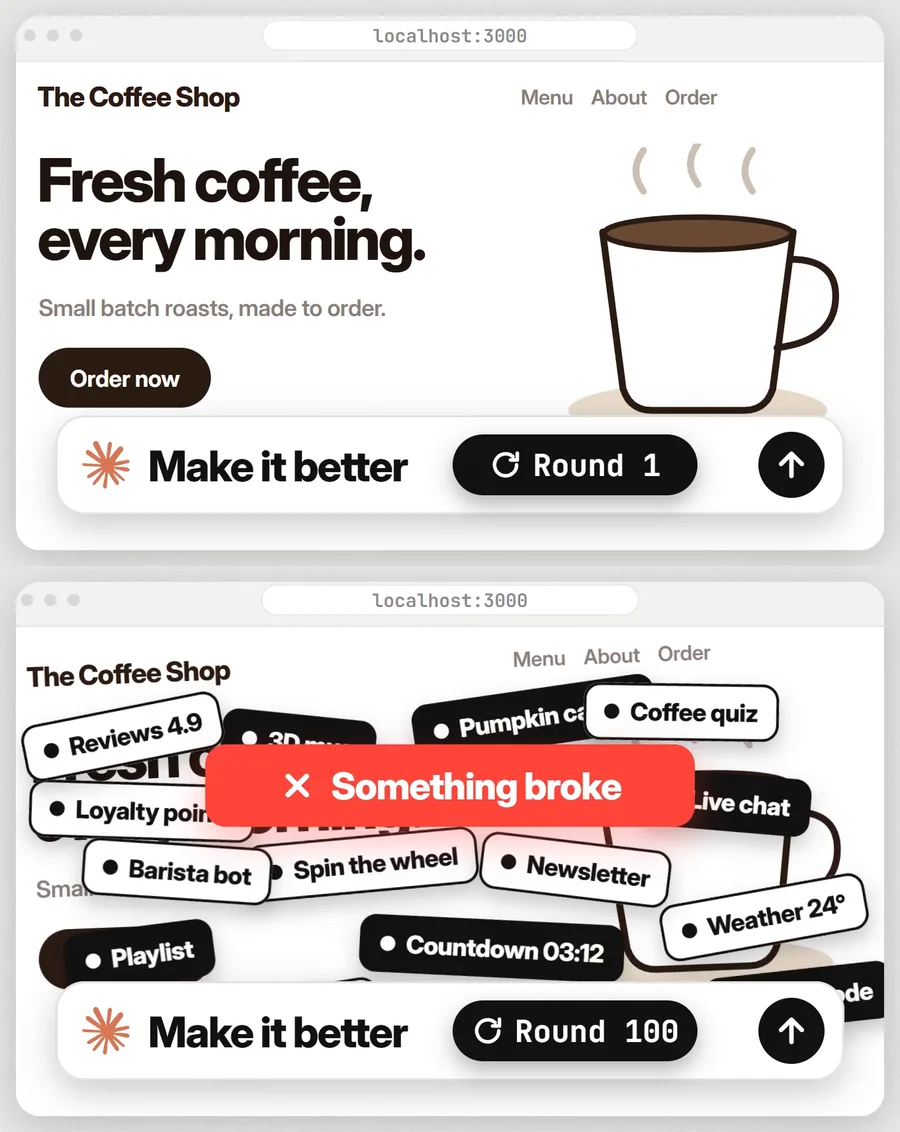
In late October 2026, Nate Herk, who runs a YouTube channel about AI automation, gave Claude Code an ugly coffee shop website and sent it the same instruction 100 times in a row: look at the site, then make one bold change that improves conversions or the look and feel, and ship a change every round. He ran the test twice, once with Claude Sonnet 5.5 and once with Claude Opus 5.5.
The Opus run went on for eight and a half hours and grew the site to about 21,000 lines of code. By round 100 the homepage had a pumpkin you could carve with a small or a big knife, a Spanish toggle that did not translate the page, and sections that had stopped working. Neither model searched the web for ideas once, even though both could.
Most people run a smaller version of this test every day. You paste a draft into ChatGPT or Claude, type "make it better", and get back something longer and busier that may or may not be an improvement. This guide shows what to type instead: what to put in the prompt, the full prompt to copy, ready versions for common jobs, and how to fix the answers when they still miss.
Short answer: to get better results from AI, tell it who the work is for, what "better" means as one result you can count, and show it one example you love. Then ask for only the 3 changes that matter most, plus what to remove. The first round takes about ten minutes and works on the free plans of ChatGPT and Claude.
- A vague request like "make it better" makes the model guess, and its most common guess is to add more.
- Anthropic and OpenAI both tell users to give context, be specific and include examples.
- In the Self-Refine study, specific feedback beat generic feedback on all three tasks where the researchers compared them.
- Asking for 3 changes and what to cut keeps the job small enough to finish.
Why "make it better" makes AI work worse
"Better" means nothing on its own. Better for whom, and better at what? When the prompt does not say, the model fills the gap with its own defaults. For a website, the default is more sections, more animation and more ways to buy. For an email, it is more words and more enthusiasm.
The coffee shop test shows how far that goes when nobody steps in. Herk had to force a change every round, because in earlier tries the model stopped around round 20 or 25 and said nothing else could be done. With the order to ship something every time, the two models went in different directions:
| After 100 rounds | Claude Sonnet 5.5 | Claude Opus 5.5 |
|---|---|---|
| Time taken | Almost 2 hours | 8.5 hours |
| Size of the site | Under 3,000 lines of code | About 21,000 lines of code |
| AI images and videos it made | 11 images, 2 videos | 54 images, 3 videos |
| How it used the freedom | Small, careful changes | Kept adding features until parts broke |
| Web searches for ideas | 0 | 0 |
The Opus run would have cost about $137 at API prices (Herk ran it on his subscription). Its final page also pushed upsells and ordering everywhere, which Herk described as a hard sell where a soft close would have worked better. His own summary: "The model sets the ceiling, and the prompt sets the direction." And: "Innovate without a vision turns into adding."
The AI companies say much the same in their own guides. Anthropic's prompting guide tells users to think of Claude "as a brilliant but new employee who lacks context on your norms and workflows," and suggests a test: show your prompt to a colleague who has no context on the task, and if they would be confused, Claude will be too. The same guide warns that some Opus models tend to overengineer and build in flexibility nobody asked for, and that the fix is specific guidance on what is in scope. OpenAI's guide says its models perform best with explicit instructions and a handful of examples of the output you want.
Research on AI improving its own drafts points the same way. In the Self-Refine study (Madaan and colleagues, 2023), a model revised its work after feedback. When the researchers swapped the specific feedback for a generic note such as "Improve the efficiency of the code," results dropped on every task they compared. On one writing task the score fell from 43.2 to 31.2. A separate paper presented at ICLR 2024 found that when models tried to correct their own reasoning with no outside feedback, their answers sometimes got worse.
So the fix is to supply what the model cannot know: the reader, the goal and your taste. The rest of this guide turns that into five steps.
What you need before you start
- An AI chat: ChatGPT or Claude. The free plan of either one is enough for this method, and both free plans include web search and Projects, which come up later.
- The work you want improved. You can paste the text, share a link, upload a file or drop in a screenshot. A web page, an email, a post, an ad, a proposal, a deck and a product description all work.
- One sentence about the person who will read or use the work, as specific as you can make it.
- One result you could count, such as booked calls, replies, sales or saves.
- One example you love, made for a similar reader. For ads, the free Meta Ad Library lets you search the live ads of any brand on Facebook and Instagram. For emails, your own inbox is the best collection you have.
- About ten minutes for the first round. Later rounds take two or three.
Step 1: Say who the work is for
This is the line most prompts leave out. A landing page for office workers who want coffee fast should get shorter and quicker to scan. The same page for people planning a weekend visit to a specialty cafe should get warmer and more detailed. With no reader named, the AI writes for a generic visitor.
- Open a new chat in ChatGPT or Claude. A fresh chat keeps instructions from an older job out of this one.
- Write a line that starts with "Who it is for:" and name the person: their job or situation, where they are, and what they want. "Small gym owners in the US who want more members" works. "Everyone" or "my customers" gives the AI nothing to aim at.
- If you have them, add one or two facts about that reader in their own words, such as a question they always ask or a worry they raise on calls. The AI cannot invent these, and they are what make its advice specific to you.
- Check the line: could a stranger picture one real person from it? If not, narrow it down until they could.
Step 2: Say what "better" means
Pick one result you could count if you had the numbers. It gives the AI a test for every idea it has: will this change get more of that result? Without that test, every addition looks like progress, which is how a coffee shop site ends up with a pumpkin carving tool on its homepage.
- Write a second line that starts with "What better means:" and name one result. "More people booking a call." "More replies asking for a quote." "More people adding it to the cart."
- Keep it to one goal. Two goals that pull apart, such as "more sign-ups" and "more premium sales," make the AI split the difference.
- If the goal is about look and feel, say what the feeling is for. "Looks trustworthy enough that a first-time visitor books a call" gives the AI far more to work with than "make it look premium."
- If you know a real number, include it: "About 1 in 50 visitors book a call now." Never ask the AI to guess your numbers for you.
Step 3: Give it one example you love
An example shows taste faster than any description. Anthropic's guide calls examples "one of the most reliable ways to steer Claude's output format, tone, and structure." One example is enough for a single piece of work. When you need many pieces in the same format, such as a month of posts, the same guide suggests three to five that differ from each other.
- Find one example made for a similar reader: a competitor's page, an email that made you reply, an ad that stopped your scroll, a proposal that won.
- Paste it in, link to it or upload a screenshot, on a line that starts with "An example I love:".
- Add one line on what you love about it, such as "The headline is six words and says the price." Without this line, the AI has to guess what you liked, and it may copy the wrong part or copy the whole thing.
- If it matters, say what not to take from it: "Same short headline, but keep our own brand colors and offer."
Step 4: Ask for only the 3 changes that matter most
End the prompt with this line:
Suggest only the 3 changes that matter most, and tell me what to remove.The cap of three makes the AI rank its ideas against your goal, so you get the changes most likely to move your number and a list short enough to act on today. Asking what to remove gives it a way to improve the work by cutting, which a plain "make it better" almost never invites.
- Paste your work under a line that says "Here is my work:".
- Put the final line last, so it is the last thing the AI reads before it answers.
- Send it. You should get three numbered changes, each with a reason tied to your reader and goal, and a short list of things to cut. For a one-page draft the answer usually comes back in under a minute.
- If you get more than three, or no reasons, reply: "Only the 3 that matter most for [your goal], ranked, with one line on why each one helps."
The full prompt to copy
Here is the whole method in one prompt. Fill in the brackets and send it to ChatGPT or Claude.
Make this better.
Who it is for: [who will read or use it]
What better means: [the one result you want, for example more booked calls or more sales]
An example I love: [paste it, or a link to it]
Here is my work:
[paste it here]
Suggest only the 3 changes that matter most, and tell me what to remove.If you have a minute more, add a line under the example that starts with "What I love about it:" and fill it in, as in Step 3.
Prefer a one-click copy? The same prompt is on our free prompt page, with a copy button on every version.
Step 5: Make the changes, then decide whether to go again
- Read the three changes. Keep the ones that fit your reader and goal and drop the rest. You know your customer better than the AI does.
- Ask it to do the work: "Make changes 1 and 3 and show me the new version. Keep everything else as it is." Anthropic's guide notes that if you ask Claude to suggest changes, it will sometimes suggest rather than make them, so say which one you want.
- Judge the new version against your goal. Is it more likely to get the result you named in Step 2?
- For a second round, open a new chat with the new version and the same lines for the reader, goal and example. Herk also ran each round in a fresh session; the difference is that you make the call between rounds.
- Stop when the three changes it suggests are small. In the Self-Refine study, most of the gain came in the first few rounds, and the authors note that each extra round adds less. For a page or an email, two or three rounds is usually enough.
Ready prompts for common jobs
The method stays the same for any kind of work. Only the reader, the goal and the example change. Here are three versions in full.
A website or landing page
Make my landing page better.
Who it is for: [who lands on it, for example small gym owners in the US]
What better means: [for example more people booking a call]
A page I love: [paste a link or a screenshot]
What I love about it: [one line, for example the headline is short and clear]
Here is my page: [paste the link or the text]
Look at it like someone who is seeing it for the first time, on their phone. Suggest only the 3 changes that matter most, and tell me what to remove.A sales email
Make this sales email better.
Who it is for: [who gets it, for example owners of dental clinics]
What better means: [for example more replies asking for a call]
An email I love: [paste one you liked getting]
Here is my email:
[paste it here]
Keep it short enough to read on a phone. Suggest only the 3 changes that matter most, and tell me what to remove.A social media post
Make this post better.
Where it is going: [Instagram, LinkedIn or X]
Who it is for: [for example first-time founders]
What better means: [for example more saves and comments]
A post I love: [paste it here]
Here is my post:
[paste it here]
Start with the first line, because that is the one people see. Suggest only the 3 changes that matter most, and tell me what to remove.Versions for an ad, a proposal, a pitch deck and a product description are on the same prompt page.
Going further
Save your reader and goal once
If you improve the same kind of work every week, put Steps 1 and 2 into a Project. ChatGPT and Claude both let you create a Project with its own instructions, and every chat inside it starts with them. Both free plans include Projects (Claude's free plan allows up to five). Write your reader, your goal and a link to your favorite example in the instructions, and each new chat only needs the work and the final line.
Tell it to look things up
Neither model in the coffee shop test searched the web once, even though the prompt said to think outside the box. Herk said he expected them to look at award-winning sites for inspiration, and they did not. If you want outside ideas, ask for research by name. Claude's help center says that to make sure Claude searches, you should put "Search the web" or "Use web search" in your prompt, and ChatGPT's free plan includes search too.
Search the web for 5 [landing pages / emails / ads] made for [who it is for] that are built to get [what better means]. For each one, tell me the one idea I could borrow. Then look at my work below. Suggest only the 3 changes that matter most, and tell me what to remove.
Here is my work:
[paste it here]Use it for ideas, before there is a draft
The same lines work when you have nothing written yet. Ask for ten ideas, then narrow them: "Pick the 3 most likely to get [what better means] from [who it is for], and say why. Tell me which of the 10 to drop." A ranked short list with reasons is much easier to choose from than ten loose ideas.
Give it the facts only you have
The AI does not know a customer's exact words, your real price, a result you can prove or the objection you hear on every sales call. Paste them under a line that says "Facts you can use:" and add "Do not add numbers or claims I did not give you." That second line stops the AI from inventing reviews or statistics to make the copy sound stronger.
Common mistakes and how to fix them
| What you see | Why it happens | What to do |
|---|---|---|
| It rewrote everything and it no longer sounds like you | You asked for a better version, so it wrote a new one | Reply: "Keep my wording wherever it works. Change only the 3 things you suggested." |
| The advice is generic, like "add social proof" or "make the button clearer" | It has no facts about your business to work with | Paste a customer quote, your offer and your price, then ask again. |
| It copied your example too closely | You did not say what you liked about it | Reply: "Take only the short headline idea from the example. Keep our own words and offer." |
| Every round adds more | Nothing in the prompt rewards cutting | Keep the final line and add a cap: "The new version must be shorter than the old one." |
| It invents numbers, names or reviews | It is trying to make the copy persuasive | Add: "Do not add numbers, names or claims I did not give you." |
| Round 3 undoes what round 1 fixed | The chat has drifted, or your goal changed | Start a new chat with the latest version and the same reader, goal and example. |
What it costs and who it is not for
The method costs nothing. It is plain English, there is nothing to install, and the free plans of ChatGPT and Claude both handle it. If you use it all day and run into the free limits, Claude Pro is $20 a month, or $17 a month billed yearly. ChatGPT has paid plans as well.
It is the wrong tool in a few cases:
- You do not know yet who the work is for. Settle that first. The AI can list options, but it cannot choose your customer for you.
- The work makes legal, medical or financial claims. Use the method to tighten the writing, then have a qualified person check every claim.
- The problem is the offer itself. Three changes to a page will not save an offer nobody wants. Ask a different question first: "What would make [who it is for] want this?"
Frequently asked questions
Why does ChatGPT make my writing worse when I ask it to improve it?
Because "improve" does not tell it who the writing is for or what better means, so it falls back on its defaults: more words, more enthusiasm, more sections. Name the reader, name one result you want, show one example you like, and ask for only the 3 changes that matter most.
What should I include in a prompt to get better results from AI?
Who the work is for, one result you can count (such as more booked calls), one example you love with a line on what you love about it, any facts only you know, and the shape of the answer you want, for example "3 changes, ranked, with a reason for each, and what to remove".
How many examples should I give AI?
One is enough to show your taste for a single piece of work, as long as you say what you like about it. When you need many pieces in the same format, Anthropic's prompting guide suggests 3 to 5 examples that differ from each other, so the model does not pick up patterns you did not intend.
How many times should I ask AI to improve the same thing?
Two or three rounds is usually enough. In the Self-Refine research, most of the gain came in the first few rounds and each extra round added less. In Nate Herk's 100-round test, the extra rounds made the site worse: features broke and the page filled up with things visitors did not need.
Should I let AI rewrite my work or just suggest changes?
Ask for suggestions first, then tell it which ones to make. You stay in charge of what changes, and your own voice survives. If you want it to make the changes, say so plainly: "Make changes 1 and 3 and keep everything else as it is."
Why did Claude never search the web in the make it better test?
The prompt never asked it to, and both Claude models stuck to what they already knew. Nate Herk said he expected them to look at award-winning sites for ideas, and neither did. If you want research, ask for it by name. Claude's help center suggests putting "Search the web" in the prompt.
Sources
- Nate Herk, "I Told Claude to "Make it better" 100 Times (It Went Too Far)", YouTube, 30 October 2026
- Anthropic, Prompting best practices
- OpenAI, Prompt engineering guide
- Madaan et al., Self-Refine: Iterative Refinement with Self-Feedback (2023)
- Huang et al., Large Language Models Cannot Self-Correct Reasoning Yet (ICLR 2024)
- Claude Help Center, Enable and use web search
- Claude plans and pricing
- ChatGPT plans and pricing
- Engadget, OpenAI rolls out ChatGPT Projects to free users (September 2025)