Skip cold emails. Show them a better website first
Find a local business with an old website or no website at all. Paste their website link (or their Google Maps link) on line 1 of this prompt inside Claude Code. Claude installs four free open-source tools, copies the real business details, builds a modern preview site with a before-and-after compare slider, and checks it for phones and speed. Send the private preview link with your quote directly to the owner.
Copy the full 10-step prompt
Open Claude Code in a new, empty folder. Paste the business website link (or Google Maps link) on the first line, then paste this prompt.
WEBSITE: [paste the website link here]

You are a senior web designer and a senior Next.js engineer.
Rebuild the website above as a brand new website. Make it look like a top design studio made it.
Keep every word, every photo and the message of every section. Change the design, the code, the motion and the speed.

Do the steps below in order. Do not skip a step. After each step, tell me in one line what you did.

RULES
- Use this prompt only on a website that I own, or to make a private preview for the real owner.
- Do not publish the new site as my work. Do not use it to trick people.
- Do not change a fact. Keep every name, price, phone number, address, review and the business hours exactly the same.
- Do not invent claims, reviews, numbers, people or photos of the business.
- Do not generate images. Use only the photos, the logo and the files of the current website.
- If something is not clear, make the safe choice. Write it in REPORT.md.

STEP 1. GET THE TOOLS
1. Check that Node.js is version 24 or higher. If it is not, stop and tell me how to update it.
2. Make sure that this folder is empty. If it is not empty, stop and tell me.
3. Clone the template into this folder: git clone https://github.com/JCodesMore/ai-website-cloner-template .
4. Remove the origin remote.
5. Install the dependencies.
6. Install Impeccable for this project: npx impeccable install --providers=claude --scope=project
7. Install the design skills of Emil Kowalski: npx skills@latest add emilkowalski/skills -a claude-code
8. Install Huashu Design: npx skills@latest add alchaincyf/huashu-design -a claude-code
9. If an install asks a question, choose this project. Say yes to the Impeccable design hook.
10. If Impeccable warns about an older copy for all projects, use the copy in .claude/skills/impeccable.
11. Add ".claude/**" and ".agents/**" to the ignore list in eslint.config.mjs. The skill files are not app code.
12. Run npm run check. Fix any error before you continue.
13. Read the SKILL.md file of each new skill. If a skill does not load, follow its SKILL.md by hand.
14. Make sure that you can open pages in a headless browser (a browser with no window), such as Playwright or Chrome.
15. If you cannot, stop and tell me what to do.

STEP 2. COPY THE CURRENT WEBSITE
1. Open .agents/skills/clone-website/SKILL.md. Follow it for the website link above.
2. Include every page in the main menu and in the footer.
3. Take full-page screenshots of every old page at 1440 px and 390 px wide. Save them in docs/before/.
4. If a page is very tall, take the screenshot in parts and join them. One screenshot stops at about 16,000 pixels.
5. Save every image, logo, icon, video and font in public/. Keep the original file names.
6. If a font license does not allow this, use the closest free Google Font. Write it in REPORT.md.
7. Run Lighthouse on the old home page in mobile mode: npx lighthouse [link] --only-categories=performance,accessibility,best-practices,seo
8. Save the four scores.
9. Commit the work with the message "Exact copy of the current website".

STEP 3. LEARN THE BRAND
1. Follow the brand asset protocol in Huashu Design. Use only the files of the current website.
2. Do not download images from other websites. Do not generate images.
3. Write brand-spec.md with the logo, the brand colors as hex codes, the fonts and the photo style.
4. Take the colors from the CSS and the logo. Do not guess them.
5. Describe the tone of voice in 3 lines. Add 3 real sentences from the site as examples.

STEP 4. SAVE THE COPY, SECTION BY SECTION
1. Write content.md. For each page, list each section in the order that it shows.
2. In each section, copy every title, sentence, button, menu item, form label and footer text word for word.
3. Under each section, write its job in one line. Example: "Job: make the visitor trust the clinic before they call."
4. Also copy the page titles, the meta descriptions and the image alt text.
5. Fix only clear typos (words with wrong letters). List each fix in REPORT.md.
6. Find the web leftovers (old web parts with no use today): a hit counter, "best viewed in" text, an "under construction" note.
7. Do not copy the web leftovers to the new site. List them in REPORT.md for the owner.

STEP 5. PICK A DESIGN DIRECTION
1. Follow the three-direction process in Huashu Design (references/directions.md).
2. Make 3 very different directions for the home page. Use the real brand, the real copy and the real photos.
3. For each direction, make the hero and one more section as an HTML file in docs/directions/.
4. Show me the 3 directions. Wait for my choice. If I write "you pick", choose the strongest one. Tell me why in 2 lines.
5. Run /impeccable init. Write the chosen direction in the Impeccable surface brief.
6. Do not start a second direction round in Impeccable. The direction from Huashu Design is the direction.

STEP 6. BUILD THE NEW WEBSITE
Stack: Next.js 16 (App Router), TypeScript in strict mode, Tailwind CSS v4, shadcn/ui, Motion, and Three.js with React Three Fiber.
1. Build every page again in the chosen direction.
2. Keep the same pages, the same section order and the same copy from content.md.
3. Make sure that each new section does the same job as the old section.
4. Use the real photos. Crop them well. Use next/image for every image.
5. Add one 3D scene with Three.js in the hero. Make it about the business, not a random shape.
6. On a phone, the 3D scene must not cover the text or the call button.
7. Load the 3D scene only after the first scroll, tap or mouse move, and only when it is on the screen.
8. Before that, and on slow phones and for reduced motion, show a still image of the same scene.
9. Add smooth motion. Follow the rules in emil-design-eng and animate.
10. Keep every form. In the preview, a form shows a thank-you message and sends no data.
11. Make every phone number, email address and map link work.
12. On a phone, keep the phone number one tap away on every screen.
13. Build for phones first. Follow the mobile-native skill.

DESIGN RULES
- Use the brand colors. Do not add a purple or blue gradient that the brand does not use.
- Do not use Inter for everything. Use the brand font, or a strong font pair that fits the brand.
- No cards inside cards. No gray text on a color background. No icon box above every title.
- Give each page one big idea. Use large type, strong contrast and a lot of white space.
- All text must pass WCAG AA contrast (the standard for text that is easy to read).
- Animate only transform and opacity. Use ease-out for things that enter. Keep UI motion between 150 and 300 ms.
- Do not animate every section. Animate only what helps the visitor.

STEP 7. PROTECT THE SEO (HOW GOOGLE FINDS THE SITE)
1. Keep the same page URLs. If a URL must change, add a 301 redirect (a permanent forward).
2. In Next.js, write statusCode: 301 in the redirect. "permanent: true" sends a 308, not a 301.
3. Keep the page titles, the meta descriptions and the H1 titles.
4. If a page has no meta description, write one from the text of that page. List it in REPORT.md.
5. Add LocalBusiness schema (code that tells Google the business facts). Use only facts from the old site.
6. Add sitemap.xml and robots.txt. Do not block the pages in robots.txt, because Google must read the noindex tag.
7. Add noindex to every page of the preview, so that Google does not show it before the owner says yes.

STEP 8. CHECK AND FIX
1. Run /impeccable critique one time for the whole site. Fix each problem that it finds.
2. Run /impeccable audit. Fix every P0 and P1 problem.
3. Start the site. Run npx impeccable detect on the local link of each page. Fix every problem that it finds.
4. Use review-animations from the skills of Emil Kowalski on all motion. Fix what it finds.
5. Use break-ui on the forms, at 320 px wide and at a large text size. Fix what it finds.
6. Get all text from the old pages and the new pages. List each old sentence that is not on the new site.
7. Add each sentence from that list to the new site again. The web leftovers from Step 4 are the only exception.
8. Run Lighthouse on the new home page in mobile mode. Get 90 or more in Performance, Accessibility and Best Practices.
9. The noindex tag makes the SEO score low. Run Lighthouse again with --skip-audits=is-crawlable. Get 90 or more in SEO.
10. Write both SEO scores in REPORT.md.
11. Run npm run check. Fix every error.
12. Run /impeccable document. It writes DESIGN.md from the new website.
13. Run /impeccable polish as the last pass.

STEP 9. MAKE THE BEFORE AND AFTER
1. Take full-page screenshots of every new page at 1440 px and 390 px wide. Save them in docs/after/.
2. Copy the before and after screenshots to public/compare/. The site cannot show files from docs/.
3. Make a /compare page. Show the old and the new version of each page side by side.
4. On the home page compare, add a slider that moves between the old and the new version.
5. Make the slider work with a mouse, a finger and the keyboard.

STEP 10. GIVE ME THE RESULT
1. Start the site. Give me the local link and the /compare link.
2. Write REPORT.md with what changed, the Lighthouse scores before and after, the typo fixes, the forms and the fonts.
3. List the web leftovers and anything else that I must do before the owner sees the site.
4. If I ask, deploy a private preview to Vercel with noindex. Send the link only to the owner.
What the prompt installs and what it makes
All four tools inside the prompt are free and open source. The before-and-after sample below is a made-up bakery site tested end to end with this exact prompt.
- 1
Before: old local business site (sample)
Made-up 2010 test site (Maple Street Bakery)
The prompt first clones the current website, saves every real photo and sentence, and takes desktop and phone screenshots before changing anything. If the business has no website, paste its Google Maps link instead so Claude uses its real hours, address and details.
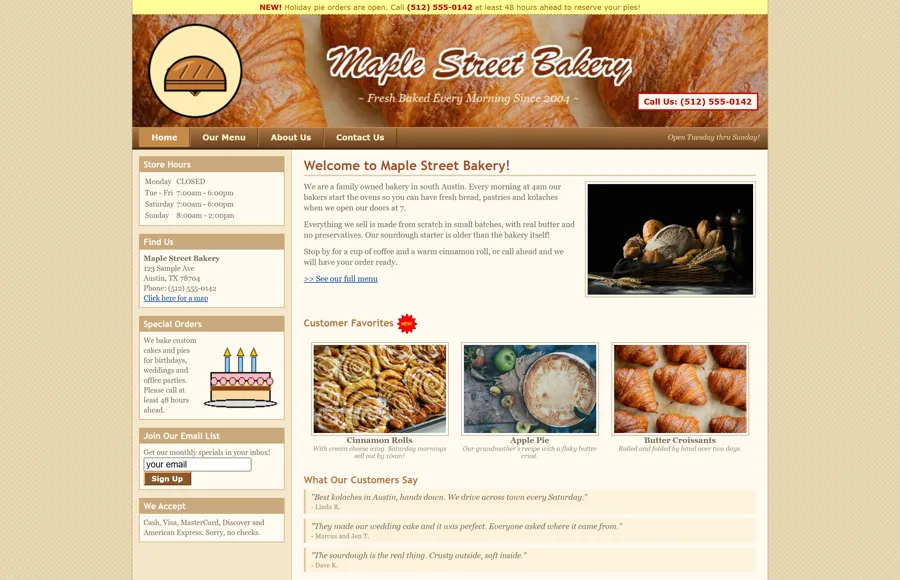
Sample test site: a made-up 2010 bakery website created to test this prompt end to end. Not a real client. - 2
After: rebuilt preview site and compare slider (sample)
Output of running this prompt end to end in Claude Code
Claude generates three design directions, builds the site in Next.js 16 with Tailwind CSS v4, runs design and mobile checks, adds noindex so Google will not index the preview, and builds a /compare slider page to send privately to the owner.
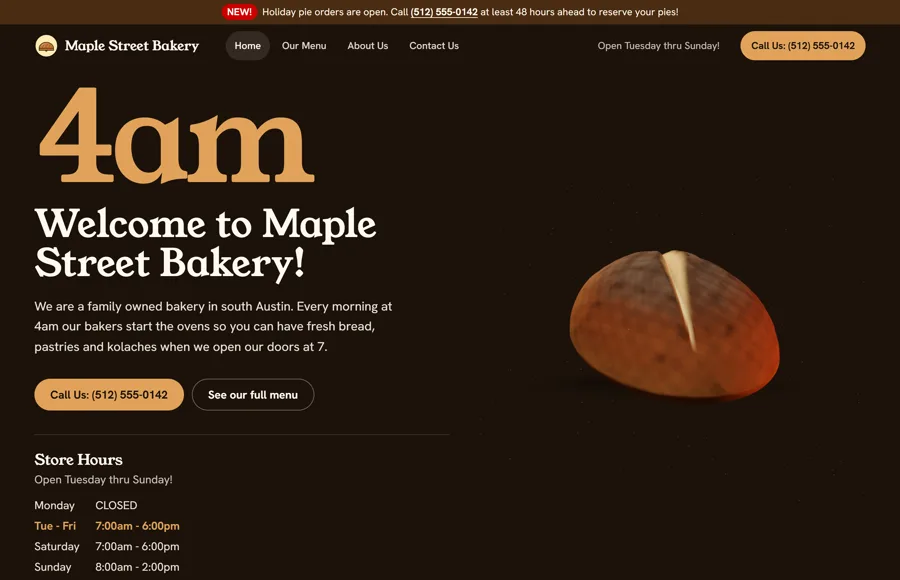
Sample test output: the rebuilt version of the same made-up bakery site produced by this 10-step prompt. - 3
AI Website Cloner Template
Made by JCodesMore · free and open source (MIT) · more than 39,000 stars on GitHub
The starter project that copies an existing site into Next.js 16, TypeScript, Tailwind CSS v4 and shadcn/ui. Needs Node.js 24 or higher.
Open on GitHub - 4
Impeccable, Emil Kowalski skills and Huashu Design
Paul Bakaus (Apache-2.0) · Emil Kowalski (MIT) · Huashu Design (MIT)
Huashu Design reads the brand and proposes three design directions. Impeccable checks 62 rules to catch generic AI design mistakes. The Emil Kowalski skills handle smooth motion and phone layouts.
Open Impeccable on GitHub
How to run it
- 1
Check what you need
You need Claude Code (paid Claude plan or Anthropic API account), Git, Node.js 24 or higher, and Playwright or Chrome for headless browser checks.
- 2
Find a local business
Ask Claude to find local businesses in one area that have no website or an outdated website. Copy the website URL or Google Maps link.
- 3
Open an empty folder in Claude Code
Create a brand new empty folder on your computer and open Claude Code inside it.
- 4
Paste the link and the prompt
Replace the first line with the business link, paste the full 10-step prompt above, and let Claude run. A full run takes about 1 to 2 hours.
- 5
Send the private preview with your quote
Send the preview link privately to the real business owner with your price quote, one personal message at a time. Never publish another business brand as your own work, and delete the preview if the owner says no.
Questions people ask
What if the business has no website yet?
Paste their Google Maps link on line 1 instead of a website link, and tell Claude to build the preview from their real business listing details without inventing reviews or fake photos.
Are the tools in this prompt free?
Yes. AI Website Cloner Template (MIT), Impeccable (Apache-2.0), Emil Kowalski skills (MIT) and Huashu Design (MIT) are all free and open source. You only need Claude Code (a paid Claude plan or API account) and Node.js 24 or higher.
Is it safe to deploy a preview for a business?
Step 7 adds a noindex tag to every page so Google will not show the preview in search. Send the link only in a private message to the real owner, never present their brand as your client portfolio, and take it down if they say no.
Do I need to know how to code?
No. You prompt Claude Code in plain English, pick your favorite of the three design directions in Step 5, and review the preview site before sending it.
Want AI set up like this for your business?We build AI setups and run ads for businesses.
Talk to usAI Website Cloner Template by JCodesMore (github.com/JCodesMore/ai-website-cloner-template). Impeccable by Paul Bakaus (github.com/pbakaus/impeccable). Design skills by Emil Kowalski (github.com/emilkowalski/skills). Huashu Design by alchaincyf (github.com/alchaincyf/huashu-design). All credit to the makers.